

My advice to people who need to analyse or unpack a unit of competency is to highlight text and write text. But if you don’t know why you are highlighting, then you don’t know what to highlight. And if you don’t know why you are writing text, then you don’t know what text to write.
This article aims to demonstrate how to analyse or unpack a unit of competency and explain why we highlight and write text when we analyse or unpack a unit.
Introduction
I deliver the TAE40122 Certificate IV in Training and Assessment qualification. And frequently I find some people have difficulty understanding what they need to do to analyse or unpack units of competency.
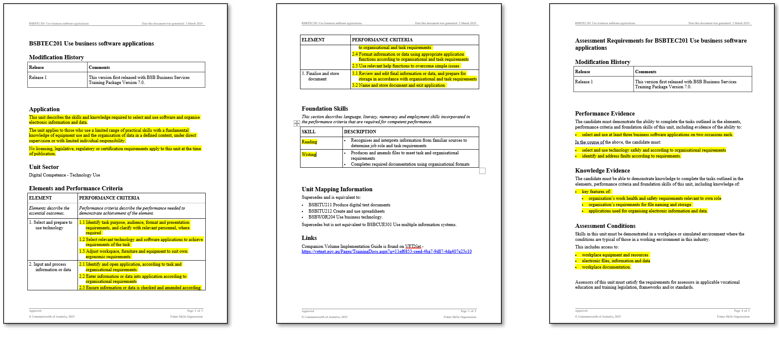
The following shows the original BSBTEC201 Use business software applications unit of competency download from the training.gov.au website.

The next three examples show how some people have unpacked this unit.
Example 1
This example shows parts of the content being highlighted. However, this highlighting has no or limited value in analysing the unit.
Example 2
This example shows different colour highlighting has been used. However, this highlighting has limited value.
In this example, it also shows that the analysis is incomplete. There is no evidence (no highlighting) to show that the Foundation Skills, Knowledge Evidence or Performance Evidence have been analysed.

Example 3
This example shows general comments about the unit rather than an analysis of the unit’s content. In the black text boxes, I’ve tried to make it a bit easier to read the green highlighted text. These comments do not help analyse or unpack the contents of the unit.

The above examples are indicators that someone doesn’t yet understand why they are highlighting or writing text.
Why do we highlight or write text?
Units of competency are designed to be ambiguous. This ambiguity allows us to interpret and contextualise the unit to meet different situations and environments that occur in different workplaces.
What does ‘interpret’ mean?
To ‘interpret’ means to explain the meaning of something, to understand it in a particular way, or to translate it from one language to another. Units of competency have often been written in VET language, and we need to be translated into plain English or into words that are clear and unambiguous for ourselves and others to understand.
For example, let’s interpret ‘software applications’.
The first thing to notice is that it is plural rather than singular. In other words, more than one software application. Therefore, we can interpret ‘software applications’ to mean word processing application, spreadsheet application, presentation application, email application, etc.
What does ‘contextualise’ mean?
The verb ‘contextualise’ means to place something (like a word or piece of information) within a context. The main purpose is to make something clearer, easier to understand, or more relevant.
The BSBTEC201 Use business software applications unit of competency can be contextualised for workplaces that use different software applications.
For example, let’s contextualise ‘software applications’ for three different contexts.

Techniques used to analyse or unpack a unit
Start with a Microsoft Word version of the unit of competency downloaded from the training.gov.au website. Then use the following four techniques when analysing or unpacking the unit:
1. Highlighting
Use different coloured highlights to visually connect similar or related information. Conversely, use distinct coloured highlights to visually separate unrelated information. Essentially, you are using colours to highlight which pieces of information belong together and which do not.
2. Use shapes and lines
Shapes and lines can be used as an alternative or complement highlighting to visually connect related information or visually separate information that is not related. For example, you could draw a box around all related items or use a connecting line (like an arrow) to show the flow between them.
3. Numbering
Sequencing information
Use numbers to establish the logical sequence of information. For instance, even if the Performance Criteria aren’t listed in the order they’re executed, assigning numbers will clearly identify the correct, step-by-step progression (step 1, step 2, etc.).
Cross-referencing information
Also, to simplify cross-referencing information, we can assign a number to Foundation Skills, Knowledge Evidence, and Performance Evidence, as they are not currently numbered. For example:
- FS plus a sequential number to be allocated to each Foundation Skill (FS1, FS2, etc.)
- KE plus a sequential number to be allocated to each Knowledge Evidence (KE1, KE2, etc.
- PE plus a sequential number to be allocated to each Performance Evidence (PE1, PE2, etc.)
We do not need to number the Performance Criteria since they are already numbered (PC1.1, PC1.2, PC2.1, etc.)
This numbering system makes it easier to refer from one section to another without needing connecting lines.
4. Writing text
Add text in the downloaded Microsoft Word version of the unit of competency. The purpose of this text is to record your interpretations and contextualisation. Use red or blue coloured text so that your notes are easily visible and cannot be confused with the original black text of the download unit.
An example of an analysed or unpack unit
Here is an example showing how highlighting and text has been used to analyse a unit of competency. Visually, it obviously shows that the entire unit of competency and assessment requirements (from start to end) has been analysed.
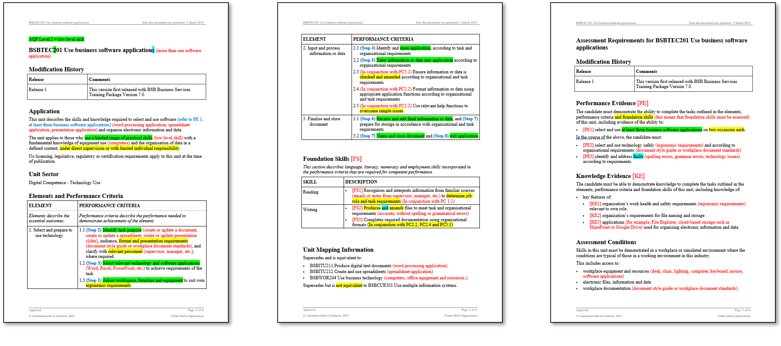
The above example is a bit hard to see the details.
Here is the first page…

Here is the second page…

And here is the third page.

From the analysed or unpacked unit, we can begin to clarify the work task or tasks to be performed. The following is a task breakdown (step-by-step procedure) for the BSBTEC201 Use business software applications unit of competency.
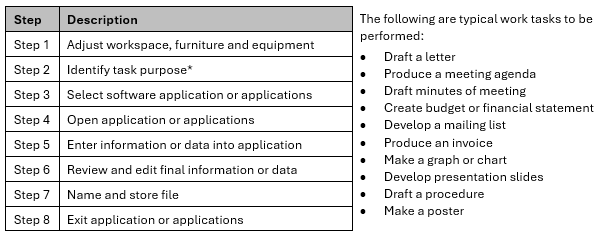
Also, it is important to note that this unit requires a person to be competent at using at least three different software applications.
In conclusion
This article started with an explanation about why we highlight and write text when we analyse or unpack a unit. Then an example has been used to demonstrate how to analyse or unpack a unit of competency.
Units of competency are download from the training.gov.au website as a Microsoft Word file. The following Microsoft Word skills are required to analyse or unpack the unit:
- Enter text
- Change text colour
- Bold and un-bold text
- Use highlighter tool
- Change colour of highlighter
- Insert shapes (select text box, shape or line to be inserted)
- Change size, location, and colour of a text box, shapes and lines.
Units of competency vary. Each will need to be analysed or unpacked before we can determine the appropriate assessment methods and tasks, and then we can identify the training content and sequence to be delivered. The Australian VET system is competency-based and the ability to unpack a unit of competency is essential for all TAFE teachers, trainers and assessors working for RTOs.
Do you need help with your TAE studies?
Are you a doing the TAE40122 Certificate IV in Training and Assessment, and are you struggling with your studies? Do you need help with your TAE studies?

Ring Alan Maguire on 0493 065 396 to discuss.

Training trainers since 1986

 On Target Work Skills