Technology and training: a case study in how to use training packages to meet learning needs of trainers

technology and trainers

The world of work has an ever-increasing reliance on technology. And registered training organisations (RTOs) operating within Australia’s training system are not exempt from the impact of the digitised workplace.

The TAE40116 Certificate IV in Training and Assessment qualification covers the roles of individuals delivering training and assessment services in the vocational education and training (VET) sector. It is the entry-level and mandatory requirement for people seeking to work for an RTO.

From my experience, some people who aspire to become a trainer do not have the digital literacy skill to perform effectively at an RTO. This article is a case study in how a training package qualification can be used to deliver a structured approach for technology training for trainers.

What technology skills do trainers need?

The following table gives some examples of technology skills required for each of the core units of the TAE40116 Certificate IV in Training and Assessment qualification. [1]

Cluster Core units of competency Examples of technology skills required
Code Title

Language, literacy and numeracy (LLN)

TAELLN411

Address adult language, literacy and numeracy skills

Use the Foundation Skills Assessment Tool (FSAT)* to diagnose LLN skill level
Send an email communicating results of diagnosis assessments and giving information about the availability of support services
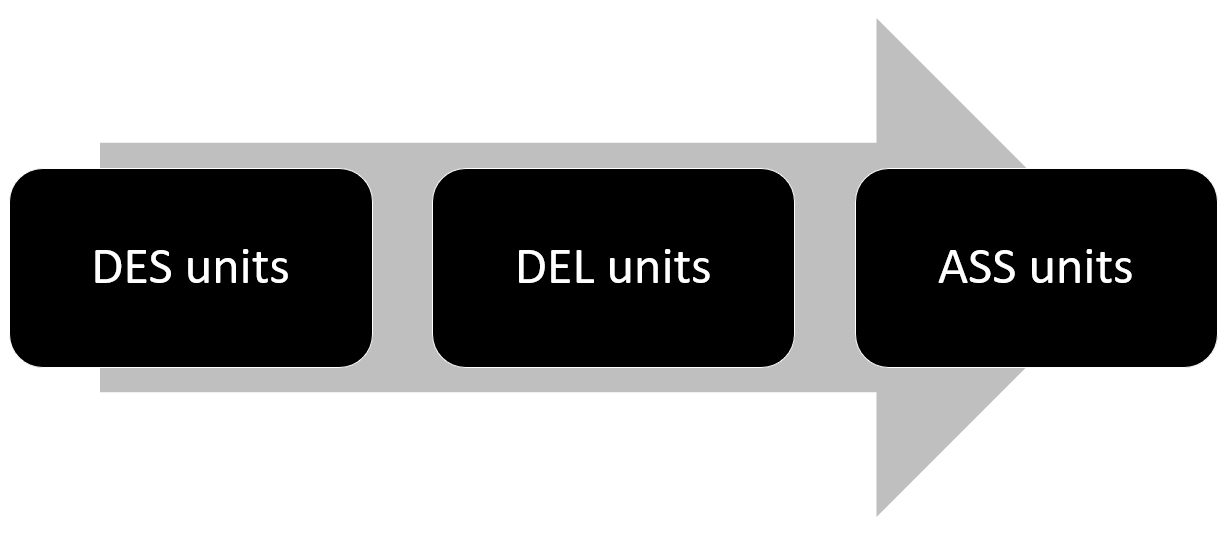
Design training
(DES)
TAEDES402 Use training packages and accredited courses to meet client needs Search the training.gov.au website and download documents
Use information from training packages during the development training and assessment resources (cut and paste, use Microsoft Word table function)
TAEDES401 Design and develop learning programs Use Microsoft Word templates to produce learning program plans and associated documents
Deliver training
(DEL)
TAEDEL401 Plan, organise and deliver group-based learning Use Microsoft Word to develop session plans and training resources
Create and display Microsoft PowerPoint slides
TAEDEL402 Plan, organise and facilitate learning in the workplace Use office equipment to print and bind workplace log books
Access RTO systems from remote location
Assessment (ASS) TAEASS401 Plan assessment activities and processes Use Microsoft Word templates to produce assessment plans and associated documents
Use calendar and other online tools to schedule tasks and meetings
TAEASS502 Design and develop assessment tools Use Microsoft Word templates to produce assessment tools
Use File Explorer for version control and file management
TAEASS402 Assess competence Access Moodle and assess portfolio of evidence
Use RTO systems to record student progress and results
TAEASS403 Participate in assessment validation Search RTO systems to access compliance documents such as training and assessment strategies (TAS), competency matrices and assessment records
Use Microsoft Word to record observations and outcomes from the assessment validation process

* FSAT is an interactive online tool designed to identify and measure an individual’s foundation skill

The amount of technology skills covered during the delivery of most TAE40116 Certificate IV in Training and Assessment qualifications would be limited. Most newly qualified trainers would not have had the exposure to the full range of technology applications expected by a typical RTO. And the technology skills of some newly qualified trainers would be far below what to needed to perform effectively and efficiently.

How to develop the technology skills for an RTO trainer?

The BSB30115 Certificate III in Business qualification can be used to provide a structured approach to developing the technology skills for an RTO trainer.

The packaging rules for the BSB30115 Certificate III in Business qualification requires the achievement of twelve units of competency; one core unit and eleven elective units. Seven of the elective units must be selected from the elective units listed for this qualification. The other four elective units may be selected from the elective units listed for this qualification or from any endorsed training package at the same qualification level. The rules do allow one elective to be selected from a Certificate II qualification and 2 elective units may be taken from a Certificate IV qualification. Elective units must be relevant to the work environment and the qualification, maintain the integrity of the AQF alignment and contribute to a valid, industry-supported vocational outcome. [2]

The following table gives a sample selection of units that would cover the application of technology skills for an effective and efficient RTO trainer.

Cluster Unit of competency Type of unit
Code Title
Work safely and effectively BSBWHS302 Apply knowledge of WHS legislation in the workplace Core
BSBWOR301 Organise personal work priorities and development Elective
BSBFLM312 Contribute to team effectiveness Elective
Technology skills BSBWRT301 Write simple documents Elective
BSBITU303 Design and produce text documents Elective
BSBITU302 Create electronic presentations Elective
BSBITU304 Produce spreadsheets Elective
BSBITU306 Design and produce business documents Elective
BSBINM301 Organise workplace information Elective
BSBIPR301 Comply with organisational requirements for protection and use of intellectual property Elective
BSBWOR204 Use business technology Imported
TAEDEL501 Facilitate e-learning Imported*

* Imported from the TAE40116 Certificate IV in Training and Assessment

Technology training for trainers may be delivered independent of the TAE40116 Certificate IV in Training and Assessment qualification. However, it may be delivered concurrently. The following matrix shows the connection between technology training for trainer and the compulsory TAE40116 Certificate IV in Training and Assessment qualification for new RTO trainers.

Units covered by the BSB30115 Certificate III in Business to delivery technology training for trainers TAE40116 Certificate IV in Training and Assessment
Code Title LLN cluster DES cluster DEL cluster ASS cluster
BSBWHS302 Apply knowledge of WHS legislation in the workplace

x

x

x

x

BSBWOR301 Organise personal work priorities and development

x

x x

x

BSBFLM312 Contribute to team effectiveness  x  x  x
BSBWRT301 Write simple documents

x

x

x

BSBITU303 Design and produce text documents

x

x

x

BSBITU302 Create electronic presentations

x

BSBITU304 Produce spreadsheets

x

x

BSBITU306 Design and produce business documents

x

x x

x

BSBINM301 Organise workplace information

x

x x

x

BSBIPR301 Comply with organisational requirements for protection and use of intellectual property

x

x x

x

BSBWOR204 Use business technology

x

x x

x

TAEDEL501 Facilitate e-learning

x

x

x

It is common for RTOs to use Microsoft Office. The following are some examples of technology applications and a brief description of their use within an RTO context.

Example of technology application Icon Description
Computer skills tech training icon 1 Computer skills include:

  • File management
  • Use office equipment such as printers, copiers and scanners
  • Use RTO systems such as Australian Vocational Education and Training Management Information Statistical Standard (AVETMISS), student management system (SMS), learning management system (LMS), financial management system, etc.
Internet skills tech training icon 2 Generally, a trainer needs the skills to search internet, and it is essential for a trainer to have the capability to efficiently search the training.gov.au website and download documents.
Microsoft Word skills tech training icon 3 Microsoft Word skills to produce training and assessment resources
Microsoft PowerPoint skills tech training icon 4 Microsoft PowerPoint skills to create and display presentation slides
Microsoft Excel skills tech training icon 5 Microsoft Excel skills to track and record student progress and results
Microsoft Outlook skills tech training icon 6 Microsoft Outlook skills that include using email and calendar functions to organise personal work priorities and contribute to team effectiveness
Moodle skills tech training icon 7 Moodle is a widely used learning management system that includes tools to facilitate individual and collaborative learning, and keep an accurate record of online training and assessment

The following matrix shows how various technology applications may be integrated for each core unit of the TAE40116 Certificate IV in Training and Assessment qualification and the sample BSB30115 Certificate III in Business qualification .

Unit of competency Examples of technology application
Code Title tech training icon 1 tech training icon 2 tech training icon 3 tech training icon 4 tech training icon 5 tech training icon 6 tech training icon 7
TAE40116 Certificate IV in Training and Assessment qualification provides context for learning technology skills
TAELLN411 Address adult language, literacy and numeracy skills x x x x x
TAEDES402 Use training packages and accredited courses to meet client needs x x x
TAEDES401 Design and develop learning programs x x x x
TAEDEL401 Plan, organise and deliver group-based learning x x x x x x x
TAEDEL402 Plan, organise and facilitate learning in the workplace x x x x x
TAEASS401 Plan assessment activities and processes x x x x x
TAEASS502 Design and develop assessment tools x x x x
TAEASS402 Assess competence x x x x
TAEASS403 Participate in assessment validation x x x x
BSB30115 Certificate III in Business qualification provides content for learning technology skills
BSBWHS302 Apply knowledge of WHS legislation in the workplace x
BSBWOR301 Organise personal work priorities and development x x
BSBFLM312 Contribute to team effectiveness x x
BSBWRT301 Write simple documents x x x x x
BSBITU303 Design and produce text documents x x x x
BSBITU302 Create electronic presentations x x
BSBITU304 Produce spreadsheets x
BSBITU306 Design and produce business documents x x x x x x x
BSBINM301 Organise workplace information x x
BSBIPR301 Comply with organisational requirements for protection and use of intellectual property x x x x
BSBWOR204 Use business technology x
TAEDEL501 Facilitate e-learning x

In conclusion

Australia’s VET system has been designed to be flexible and responsive to the needs of industry and individual learners. This article has demonstrated how to use a training package qualification to give a structured approach for technology training for trainers. The following broad steps were used to achieve this.

  • Select an appropriate qualification
  • Use the qualification’s packaging rules to select and import relevant elective units
  • Contextualise the units for the particular needs of trainer working for an RTO.

The customised BSB30115 Certificate III in Business qualification may be delivered before, in conjunction with, or after the delivery of the TAE40116 Certificate IV in Training and Assessment qualification. This additional training would significantly improve the effectiveness and efficiency of RTO trainers; for now and into the future.

References

[1] https://training.gov.au/Training/Details/TAE40116 accessed February 15, 2018

[2] https://training.gov.au/Training/Details/BSB30115 accessed February 15, 2018

logo otws

Introducing On Target Work Skills

First blog 1

Performance and training

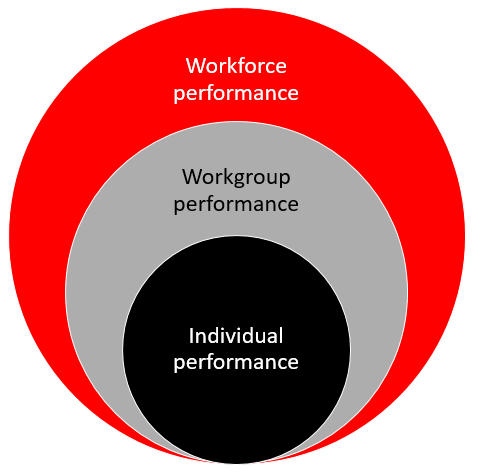
Training that is on target aims to improve performance. Typically, there are three levels of performance.

Workforce performance is dependent on the performance of each workgroup. And workgroup performance is dependent on the performance of each individual.

Training that is on target shall develop each individual within the context of the workgroup and workforce performance needs.

Performance and targets

The workforce purpose, vision or mission are accomplished by performance of workgroups and individuals. Performance targets may be expressed as performance measures, key performance indicators (KPIs), work goals, growth or profit targets.

Performance and competency

Competency is the consistent application of knowledge and skill to the standard of performance required in the workplace. It embodies the ability to transfer and apply skills and knowledge to new situations and environments This is the definition that is used by Australia’s vocational education and training (VET) system.

Training that is on target shall develop competency that supports the consistent application of knowledge and skill to the standard of performance required at work. Australia’s VET system gives an excellent platform for workforce development and training.

For some industry sectors it is essential to pay attention to .the VET system because of Industrial Awards governing wages and work conditions. This includes apprenticeships and traineeships.

Analysing performance problems

Performance targets may be missed for a variety of reasons. For example:

Expectations – does the individual or workgroup understand the performance targets?

Resources – does the individual or workgroup have sufficient resources and clarity about work prioritises?

Consequences – is the individual or workgroup rewarded for achieving performance targets?

Feedback – does the individual or workgroup know if they are achieving

Competence – does the individual have the knowledge and skills to achieve the performance targets?

Training is only required when an individual is lacking the knowledge and work skills to achieve the performance target. An analyses of performance problems may lead to two types of solutions:

  • Training solutions
  • Non-training solutions.

A training solution will not solve a performance problem unrelated to competency. Training is only a solution when the person lacks the knowledge or skills to perform the work.

Learning a new work skill requires the right attitude. The learner must want to learn it and must believe they can learn it. The development of workplace competency requires the learner to have commitment and confidence. As illustrated below, successful workplace learning is often 2/3 attitude and 1/3 knowledge and skills.

First blog 2

Training that is on target recognises the need to help learners get the right attitude while developing the required knowledge and skills.

The On Target logo represents the need to deliver training that targets improved performance of the workforce, workgroup or individual.

Training can be a waste of time, effort and money if it hasn’t been aligned with performance needs, or if the performance problem is unrelated to a person’s knowledge or work skills.

Training that is on target shall only be delivered after the required knowledge and work skills have been identified. This is followed by training that targets the acquisition of knowledge and work skills, and coaching that targets the application of knowledge and work skills.

First blog 3

Training – an activity that targets or facilitates the acquisition of knowledge and work skills. This may occur away from the workplace or at the workplace.

Coaching – an activity that targets or facilitates the application of knowledge and work skills in the workplace. This may include providing performance feedback, guidance, encouragement and motivation.

Assessing – an activity that determine if the person is consistently applying the knowledge and skill to the standard of performance required at work. This should involve gathering evidence to check if performance criteria or other workplace benchmarks are being meet.

Evaluation and training

Evaluation is the measurement of different aspects of training, for example:

  • Did they like it?
  • Did they learn it?
  • Do they use it?
  • Has performance improved?

Evaluating training shall ensure those involve are focus on the desired outcomes and performance targets.

Why invest in training?

Expenditure on training competes against all other expenditure items, and expenditure may be classed as essential or discretionary. All expenditure on training is discretionary except for compliance training.

Training that is on target shall justify a value for money proposition or a return on investment.

Who needs training?

New employees require induction and may require initial work skills training. Initial work skills training may be of short duration or may last for many years for apprentices and trainees.

Existing employees may require training when certain circumstances arise, for example:

  • Compliance
  • New technology
  • New plant and equipment
  • New policies and procedures
  • New roles and responsibilities
  • New work practices
  • Performance problems.
logo otws