

If you are a TAE Student, you are likely to be encouraged or required to create visual aids and handouts. A common visual aid are PowerPoint slides. These PowerPoint slides can be quickly transformed into a handout.
Step 1. Prepare PowerPoint slides for the handout
Make a copy of your PowerPoint slides and remove slides that you do not want included in the handout. For example, you may have slides with quiz answers or administrivia that should be removed.
Step 2. Select ‘Print to PDF’
The handout shall be created as a PDF files. Go to the ‘Print’ function and select ‘Print to PDF’.

Step 3. Open ‘Print Layout’
Use the drop-down menu to open ‘Print Layout’ options.
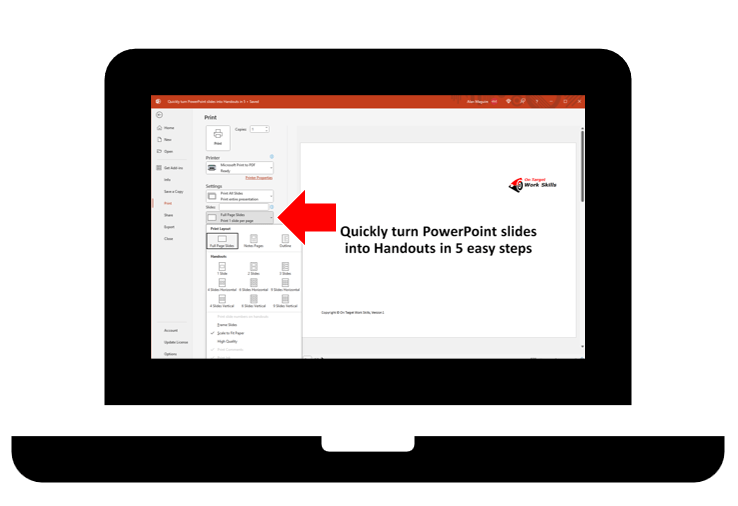
Step 4. Select ‘Handout 3 Slides’
There is a range of handout layouts. Generally, I have found the 3 slides to each page as the most useful layout. This layout provides space for the learner to write their own notes relating to each slides.

Step 5. ‘Print’ and save PDF file
Select ‘Print’ and then you will need to select the location where you want to save the PDF file. This PDF file can be sent to your learners electronically or printed on paper and given to your learners.
In conclusion
Creating a handout from your PowerPoint slides is quick and easy. If you are a TAE Student, this can save you time so that you can move onto other things.
There are some advanced features such as adding RTO details, copyright details, version number or other information to the handout. This is done from the ‘Handout Master’.

What if you don’t have PowerPoint slides?
If you must create a handout and you don’t have PowerPoint slides, then you will need to develop a document. But this needs to be a topic for another article.
Other related articles that I have published are:
- Finding, customising and using learning resources
- Strategies to enhance the clarity and impact of training handouts.
Do you need help with your TAE studies?
Are you a doing the TAE40122 Certificate IV in Training and Assessment, and are you struggling with your studies? Do you want help with your TAE studies?

Ring Alan Maguire on 0493 065 396 to discuss.

Training trainers since 1986

 On Target Work Skills