Dissatisfaction with the TAE40122 qualification

It is no secret that the TAE40122 Certificate IV in Training and Assessment is disliked by many people.

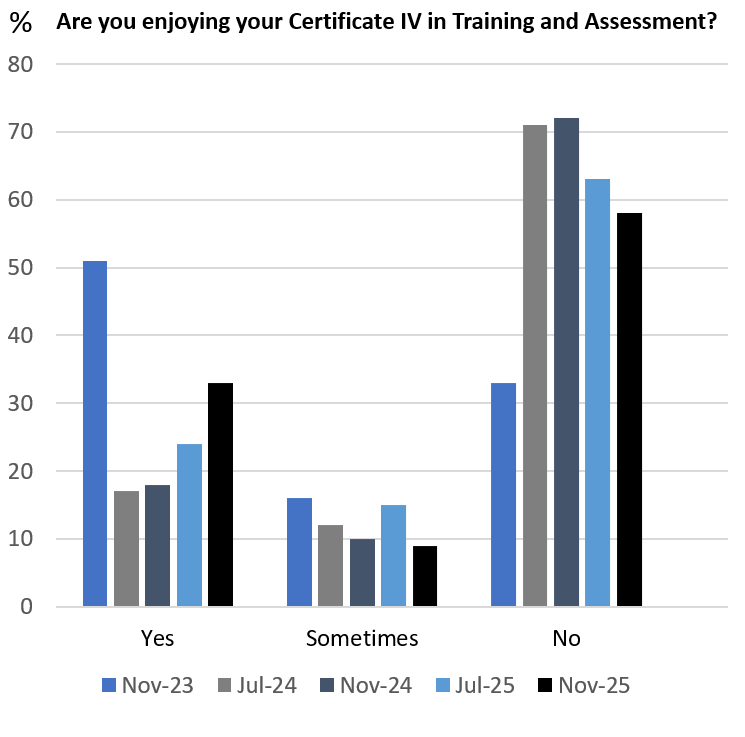
Every six months over the past 2 years I have conducted a poll to find out if people were enjoying their Certificate IV in Training and Assessment.

The following graph shows the most recent poll result and the results from previous polls.

And here is an analysis of the most recent poll compared with previous polls.

The result from November 2023 shows that 50% of people studying for their Certificate IV in Training and Assessment were enjoying it and 50% were not enjoying it, or only sometimes enjoying it. This is when most people were doing the TAE40116 qualification.

The results in July 2024 and November 2024 shows a massive decrease in satisfaction and massive increase in dissatisfaction. This is the year when the TAE40122 qualification began to be implemented by most RTOs.

The two results for 2025 shows an increasing satisfaction and subsequent decreasing dissatisfaction. I have assumed this is because RTOs have been improving the way they deliver the TAE40122 qualification. The November 2025 result shows 33% are satisfied. However, this is not a good result since two thirds of people are dissatisfied.

Does it matter if people enjoy doing their Certificate IV in Training and Assessment? Yes, it matters. If people are not enjoying it, then they become dissatisfied, and some get confused, frustrated, experience self-doubt, and the barriers to learning are increased.

Sadly, if you are not enjoying your Certificate IV in Training and Assessment, you are not alone.

Do you need help with your TAE studies?

Are you a doing the TAE40122 Certificate IV in Training and Assessment, and are you struggling with your studies? Do you need help with your TAE studies?

Ring Alan Maguire on 0493 065 396 to discuss.

Contact now!

logo otws

Training trainers since 1986

Is Australia’s VET system changing?

This afternoon I was preparing the conclusion for a TAE40122 training program, which started in March 2025 and concludes this Thursday. At the commencement of the training program, I stated that “the VET system is complex, and it is continuously changing”.

I thought it would be appropriate to revisit and identify what has changed since this training program started eight months ago.

VETNet.gov.au website

The vetnet.gov.au website has been decommissioned. For the past ten years, this website had been used to give access to Training Package Implementation Guides and other relevant documents that support the implementation of Training Packages.

Training.gov.au website

There have been ongoing changes to the training.gov.au website, including:

  • Providing access to Training Package Implementation Guides
  • Combining the Unit of Competency and Assessment Requirements into one downloadable document.

The single Unit of Competency document is a return to what we had prior to the implementation of the Standards for Training Packages 2012. This is a ‘back to the future’ moment, in other words, something we had in the past that has been recycled in the present.

Standards for RTOs

The Standards for RTOs 2015 has been replaced by the Standards for RTOs 2025. There are now three pieces of legislation rather than one. This tends to make it more difficult to find information.

Also, ASQA has replaced the ‘Users’ Guide to the Standards’ with ‘Practice Guides’. One comprehensive document has been replaced by nineteen documents, and the Practice Guides are vague compared to the Users’ Guide to the Standards. This tends to make it more difficult to find and understand the information relating to compliance.

Training Package Organising Framework

The Standards for Training Packages 2012 has been replaced by the Training Package Organising Framework 2025. The new Training Package Organising Framework includes:

  • Two templates for Units of Competency (instead of one template)
  • One of the two templates removes elements and performance criteria
  • Foundation Skills have been re-defined as ACSF skills only, and digital literacy skills are optional for Training Package developer to include.

The release of Units of Competency using the new templates has yet to occur. Therefore, it is too early to say what will be the impact. However, this could be the beginning of the end for competency-based training and assessment in the Australian VET system.

Vocational Degree

The ‘Vocational Degree’ has been introduced as a new VET qualification in the AQF. Only higher education providers could deliver qualifications at the AQF Level 7 until this introduction of the ‘Vocational Degree’.

Artificial intelligence (AI)

AI has improved and is popping up everywhere. Also, search engines are incorporating AI-generated summaries, for example, Google often presenting an AI Overview when a person conducts a search. These have contributed to an increased use of AI by VET students, in particular when answering questions designed to gather evidence of a person’s knowledge.

Generally, RTOs have been slow to develop assessment strategies to ensure authenticity of evidence. I assume cheating services are declining because AI has become user-friendly and freely available.

In conclusion

Over the past eight months there has been many changes to the VET system.

Some changes have an immediate impact, such as, providing access to Training Package Implementation Guides on training.gov.au website instead of vetnet.gov.au website. Also, this seems to be relatively insignificant.

Some changes are significant and the impact of those changes are delayed. A significant change that has the potential to disrupt the entire VET system are the new templates for Units of Competency as specified by the Training Package Organising Framework. Although the change has been released, the implementation has yet to occur.

Some people have been lobbying for Australia’s competency-based training system to be replaced by a tertiary education system with characteristics like those that we had prior to 1993 when the current VET system was introduced. This is truly a massive ‘back to the future’ moment.

How to analyse or unpack a unit of competency

My advice to people who need to analyse or unpack a unit of competency is to highlight text and write text. But if you don’t know why you are highlighting, then you don’t know what to highlight. And if you don’t know why you are writing text, then you don’t know what text to write.

This article aims to demonstrate how to analyse or unpack a unit of competency and explain why we highlight and write text when we analyse or unpack a unit.

Introduction

I deliver the TAE40122 Certificate IV in Training and Assessment qualification. And frequently I find some people have difficulty understanding what they need to do to analyse or unpack units of competency.

The following shows the original BSBTEC201 Use business software applications unit of competency download from the training.gov.au website.

The next three examples show how some people have unpacked this unit.

Example 1

This example shows parts of the content being highlighted. However, this highlighting has no or limited value in analysing the unit.

Example 2

This example shows different colour highlighting has been used. However, this highlighting has limited value.

In this example, it also shows that the analysis is incomplete. There is no evidence (no highlighting) to show that the Foundation Skills, Knowledge Evidence or Performance Evidence have been analysed.

Example 3

This example shows general comments about the unit rather than an analysis of the unit’s content. In the black text boxes, I’ve tried to make it a bit easier to read the green highlighted text. These comments do not help analyse or unpack the contents of the unit.

The above examples are indicators that someone doesn’t yet understand why they are highlighting or writing text.

Why do we highlight or write text?

Units of competency are designed to be ambiguous. This ambiguity allows us to interpret and contextualise the unit to meet different situations and environments that occur in different workplaces.

What does ‘interpret’ mean?

To ‘interpret’ means to explain the meaning of something, to understand it in a particular way, or to translate it from one language to another. Units of competency have often been written in VET language, and we need to be translated into plain English or into words that are clear and unambiguous for ourselves and others to understand.

For example, let’s interpret ‘software applications’.

The first thing to notice is that it is plural rather than singular. In other words, more than one software application. Therefore, we can interpret ‘software applications’ to mean word processing application, spreadsheet application, presentation application, email application, etc.

What does ‘contextualise’ mean?

The verb ‘contextualise’ means to place something (like a word or piece of information) within a context. The main purpose is to make something clearer, easier to understand, or more relevant.

The BSBTEC201 Use business software applications unit of competency can be contextualised for workplaces that use different software applications.

For example, let’s contextualise ‘software applications’ for three different contexts.

Techniques used to analyse or unpack a unit

Start with a Microsoft Word version of the unit of competency downloaded from the training.gov.au website. Then use the following four techniques when analysing or unpacking the unit:

1. Highlighting

Use different coloured highlights to visually connect similar or related information. Conversely, use distinct coloured highlights to visually separate unrelated information. Essentially, you are using colours to highlight which pieces of information belong together and which do not.

2. Use shapes and lines

Shapes and lines can be used as an alternative or complement highlighting to visually connect related information or visually separate information that is not related. For example, you could draw a box around all related items or use a connecting line (like an arrow) to show the flow between them.

3. Numbering

Sequencing information

Use numbers to establish the logical sequence of information. For instance, even if the Performance Criteria aren’t listed in the order they’re executed, assigning numbers will clearly identify the correct, step-by-step progression (step 1, step 2, etc.).

Cross-referencing information

Also, to simplify cross-referencing information, we can assign a number to Foundation Skills, Knowledge Evidence, and Performance Evidence, as they are not currently numbered. For example:

  • FS plus a sequential number to be allocated to each Foundation Skill (FS1, FS2, etc.)
  • KE plus a sequential number to be allocated to each Knowledge Evidence (KE1, KE2, etc.
  • PE plus a sequential number to be allocated to each Performance Evidence (PE1, PE2, etc.)

We do not need to number the Performance Criteria since they are already numbered (PC1.1, PC1.2, PC2.1, etc.)

This numbering system makes it easier to refer from one section to another without needing connecting lines.

4. Writing text

Add text in the downloaded Microsoft Word version of the unit of competency. The purpose of this text is to record your interpretations and contextualisation. Use red or blue coloured text so that your notes are easily visible and cannot be confused with the original black text of the download unit.

An example of an analysed or unpack unit

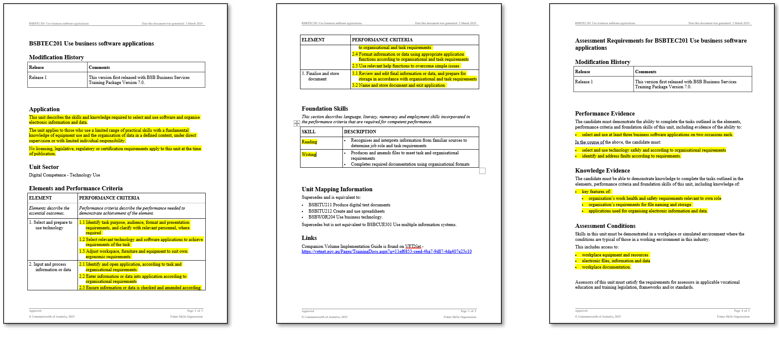
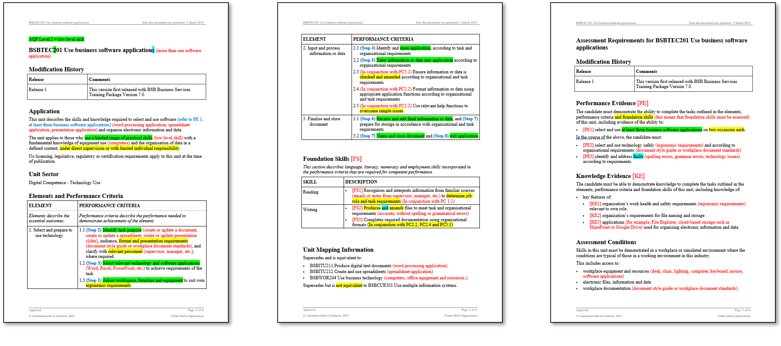
Here is an example showing how highlighting and text has been used to analyse a unit of competency. Visually, it obviously shows that the entire unit of competency and assessment requirements (from start to end) has been analysed.

The above example is a bit hard to see the details.

Here is the first page…

Here is the second page…

And here is the third page.

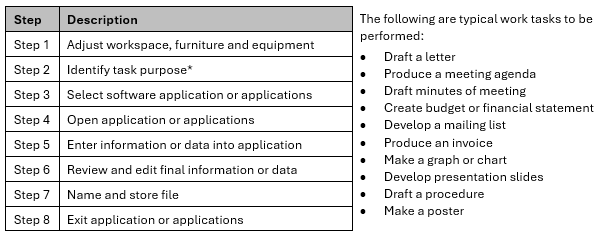
From the analysed or unpacked unit, we can begin to clarify the work task or tasks to be performed. The following is a task breakdown (step-by-step procedure) for the BSBTEC201 Use business software applications unit of competency.

Also, it is important to note that this unit requires a person to be competent at using at least three different software applications.

In conclusion

This article started with an explanation about why we highlight and write text when we analyse or unpack a unit. Then an example has been used to demonstrate how to analyse or unpack a unit of competency.

Units of competency are download from the training.gov.au website as a Microsoft Word file. The following Microsoft Word skills are required to analyse or unpack the unit:

  • Enter text
  • Change text colour
  • Bold and un-bold text
  • Use highlighter tool
  • Change colour of highlighter
  • Insert shapes (select text box, shape or line to be inserted)
  • Change size, location, and colour of a text box, shapes and lines.

Units of competency vary. Each will need to be analysed or unpacked before we can determine the appropriate assessment methods and tasks, and then we can identify the training content and sequence to be delivered. The Australian VET system is competency-based and the ability to unpack a unit of competency is essential for all TAFE teachers, trainers and assessors working for RTOs.

Do you need help with your TAE studies?

Are you a doing the TAE40122 Certificate IV in Training and Assessment, and are you struggling with your studies? Do you need help with your TAE studies?

Ring Alan Maguire on 0493 065 396 to discuss.

Contact now!

logo otws

Training trainers since 1986

Make your own images

Introduction

Recently, I came across the following image that I liked showing five presentation tools.

The copyright of this image is unknown. However, we can assume that copyright applies to this image and probably cannot be freely used.

How to make your own image

Let’s say we want to use this image. Also, let’s say that we want to amend the image by replacing ‘Infographics’ with ‘Whiteboard’.

Here is a demonstration showing how we can use Microsoft PowerPoint to recreate and amend the image. And once we have recreated the image, we have an image that we can freely use.

Step 1. Identify image structure

The first thing I did was to create the image structure by identifying of the key shapes and position of those shapes.

Next, I searched Flaticons to find a simple ‘toolbox’ image.

Removing the original image, reveals the image structure.

Step 2. Add details and style the image

The line thickness of the ‘toolbox’ has been used to determine the thickness of other lines. The aim is to give a visual consistency to the entire image.

The next thing is to source or create some additional visual elements to finish of the image.

The following shows the end result. The image is ready to be used in PowerPoint slides or inserted into a handout. Also, it is free for me to use without breaching copyright.

Step 3. Add colour, if required

Most of the images I use are black and white. My aim is to create a consistent and simple visual style. However, the following shows a coloured version of the image I have created.

In conclusion

The purpose of this article has been to show how an effective and copyright-free image can be quickly created. A picture is worth a thousand words. Visual communication improves understanding by presenting information in an easily digestible format. This allows for faster comprehension and better retention of complex ideas compared to text alone.

Do you need help with making your own images?

Are you a TAFE teacher or RTO trainer? Do you want to learn more about creating your own images to improve communication with your students?

Are you a TAFE or RTO manager? Do you want a group-based PD session designed to improve your trainers capability focused on creating images and developing teamwork?

Are you a TAE student studying for your TAE40122 Certificate IV in Training and Assessment? Do you need to create or customise learning materials, such as PowerPoint slides and handouts?

Please contact Alan Maguire on 0493 065 396 if you want to learn or develop your ability to quickly make your own images.

Do you need help with your TAE studies?

Are you a doing the TAE40122 Certificate IV in Training and Assessment, and are you struggling with your studies? Do you need help with your TAE studies?

Ring Alan Maguire on 0493 065 396 to discuss.

Contact now!

logo otws

Training trainers since 1986

Webinar: Risk-based approach to determining sample size for assessment validation

Description

The new Standards for RTOs 2025 has introduced a significant change to assessment validation. Instead of a fixed requirement determined by a statistically valid sample of assessments, RTOs are now required to adopt a risk-based approach to determine their validation sample size. This means the number of assessments validated will vary considerably across RTOs, reflecting their individual risk assessments.

Standard 1.5 (2) (c) from the Standards for RTOs 2025 states that an RTO must utilise a risk-based approach to determine:

  • the components of the assessment system for a training product which are to be validated
  • the sample size of assessments that are to be validated in respect of a particular training product.

This webinar explores a risk-based approach, focusing on a methodology that can be used to conduct risk assessments and determine the sample size for assessment validation.

Topics covered

  • Introduction to the risk-based approach
  • Selecting units to be validated
  • Identifying risks
  • Determining sample size.

A case study example shall be used to show how the risk-based methodology can be used to conduct a risk assessment and determine the sample size for assessment validation.

Who should attend

  • RTO operational managers
  • RTO compliance managers
  • RTO compliance officers
  • Assessment validation team leaders
  • Assessment validation team members
  • TAFE teachers, RTO trainers and assessors
  • RTO course coordinators and administrators.

A Certificate of Attendance shall be provided. This can be used as evidence of Professional Development activity.

Webinar date

Wednesday 3rd of September 2025

Webinar start time

12:00pm (Australian Eastern Standard Time)

Webinar duration

1 hour

Webinar fee

$65

Payment is required prior to attendance. Please see the webinar enrolment form for details about how to pay.

Webinar enrolment form

Contact Alan Maguire on 0493 065 396 if you want to discuss or need further information.