Document design principles: A guide for trainers and TAFE teachers

Introduction

From my experience, many new and existing trainers and TAFE teachers struggle with the design and development of learning resources. And some struggle with the basics of using software applications and developing basic documents. Over a series of articles, I will explore how to design and create basic documents.

In my first article titled, A guide to designing and developing basic document for trainers and TAFE teachers, I introduced the following 9-step procedure based on the ICTICT216 Design and create basic organisational documents unit of competency.
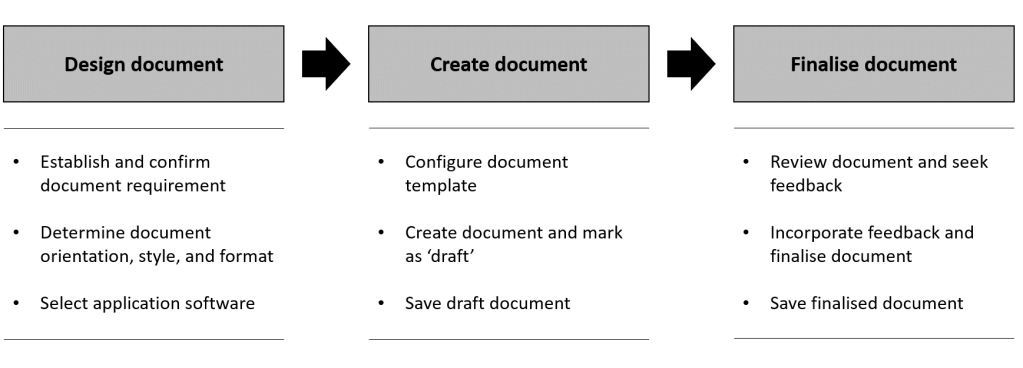
Also, in my first article, I established the need for a person to understand document design principles and have the skills to use software applications.
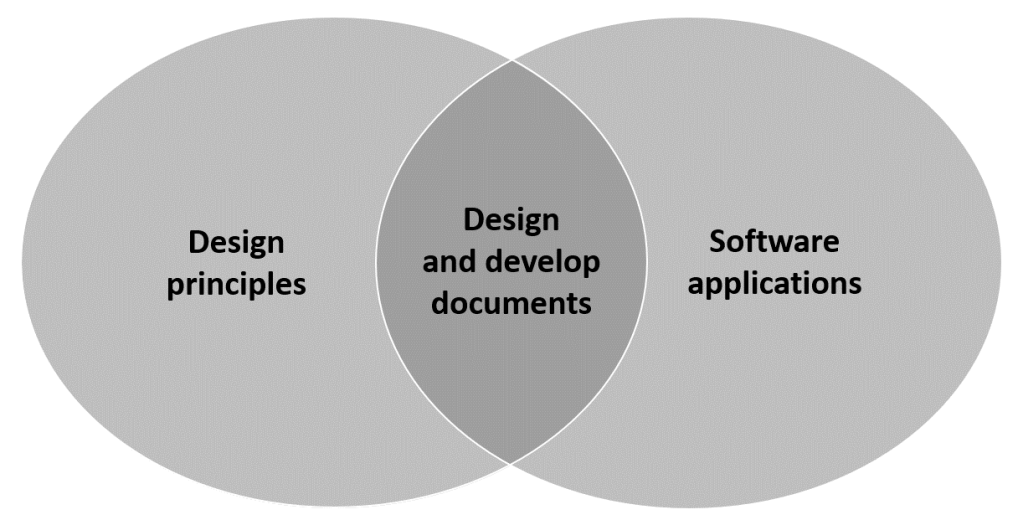
In this article I shall begin to explore document design principles.

I suggest that there is an ‘art and science’ to designing and developing documents. I consider myself as an ‘artist’ rather than a ‘scientist’. The information I provide is based on more than three decades of experience. During this time, I am sure that some of what I have learnt has been based on science (and some based on pseudoscience).

Before we can design a document, we need some principles to help and guide us.

What are the principles of document design?

An internet search for ‘principles of document design’ will give you many results. I like the principles of document design described by Ricky Telg. In his introduction to the topic, he says:

“Good design does not call attention to itself, but good designers use the principles of document design to make sure their layouts look pleasing and attractive. The principles of document design are balance, proportion, order, contrast, similarity, and unity.” [1]

[1] https://edis.ifas.ufl.edu/wc128 accessed 9 March 2021

Ricky Telg’s article provides a clear and concise description for each of the six principles.

I have decided to create my own list of document design principles. My three principles are:

  • Easy to navigate
  • Easy to read and use
  • Looks good.

Easy to navigate

We want our readers and users to easily and quickly navigate their way through documents that we produce. The following are five suggestions for making our document easy to navigate.

  • Headings and sub-headings
  • Page numbers
  • Table of Contents
  • Page breaks
  • Decimal numbering.

Headings and sub-headings

In recent times, I still encounter documents being produced without a title. We should always tells our readers what they are looking at. Heading and sub-headings are essential for document navigation.

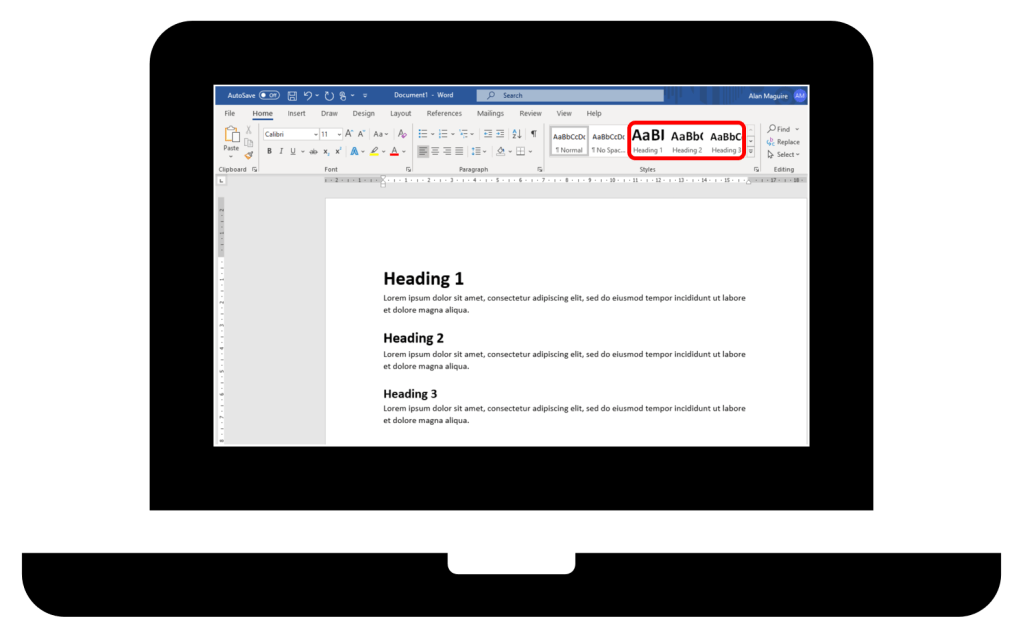
If you are using Microsoft Word, I recommend using heading styles, and I recommend using a maximum of three layers of headings: Heading 1, Heading 2, and Heading 3.
Page numbers

Add page numbers to your document. I like to use ‘Page X of Y’ format.

Table of Contents

It is a good idea to include a table of contents when a document has ten or more pages. However, documents with less pages may still benefit from having a table of contents if it would improve access of the information.

Microsoft Word makes it easy to insert a table of contents if you have used ‘heading styles’. Also, it would be important for you to have added page numbers to your document. If you are using Microsoft Word, go to [References] then select [Table of Content].

Access to information is quick and easy from the Table of Contents because each line item is a link. Ctrl + Click is used to follow the link to the place in the document where the heading is.

Page breaks

As an option, I sometimes insert page breaks so that every Heading 1 and Heading 2 will be at the top of a page. The aim is to make it easier for the reader to skim through the document.

Also, as an option, I sometimes insert page break so that paragraphs or blocks of associated information are not split over two pages.

Decimal numbering

Decimal numbering is another option. It does not always have to be used but is can be useful to help give clear sequence and hierarchy to your document. This is useful for long or complex documents with many headings and sub-headings. The following gives an example of decimal numbering.
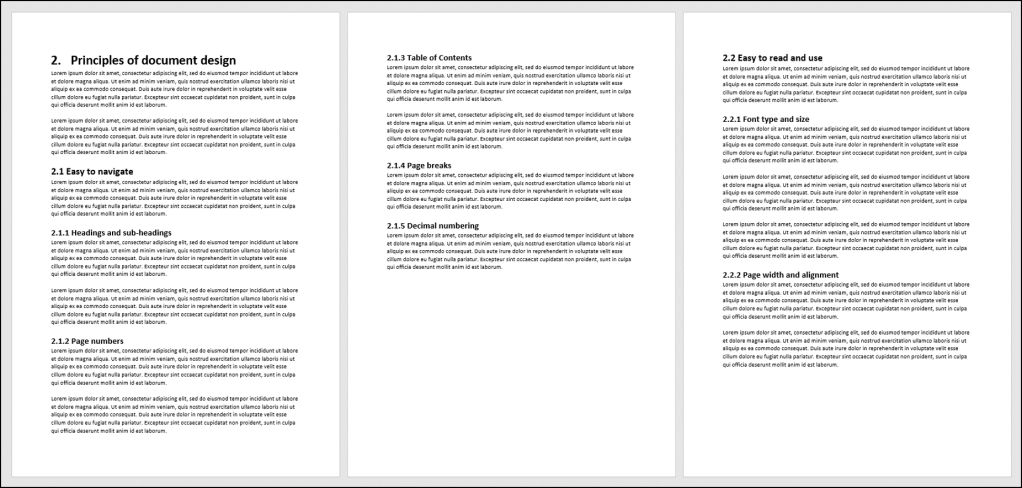
As previously stated, I recommend a maximum of three layers of headings: Heading 1, Heading 2, and Heading 3. For example:

  • 2. [Heading 1]
  • 2.1 [Heading 2]
  • 2.1.1 [Heading 3]

Easy to read and use

Readability

The documents we produce should be easy to read. This includes being written in plain English, and written in a style that is clear and concise. Terminology, abbreviations and acronyms can make reading difficult. Therefore, these things will need to be explained.

Readability is also determined by the document’s style and format, such as:

  • Font type and size
  • Page width and alignment
  • Bullet points and numbered lists
  • Tables
  • Charts and graphic organisers.

These will be covered by the next article in this series.

Usability

If we produce documents that are to be used, such as forms or checklists, then they should be easy to use. Ask someone to use these types of documents before they are implemented. Seek feedback about the usability of the document and how the document could be improved.

Looks good

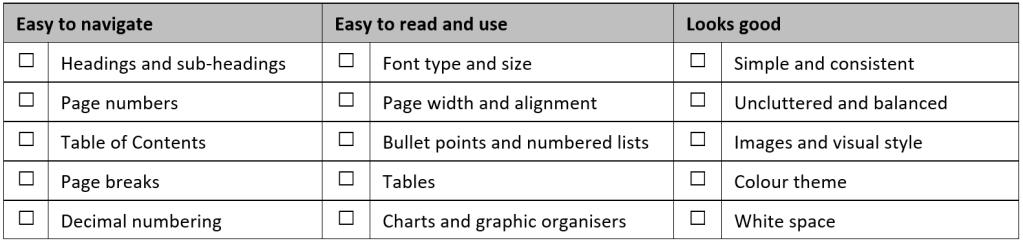
The principles of document design aim to ensure documents are attractive. The following are five suggestions for making our document look good.

  • Simple and consistent
  • Uncluttered and balanced
  • Images and visual style
  • Colour theme
  • White space

Simple and consistent

My one most important guiding principle is to keep our documents simple. Simple can be defined as ‘plain, basic, or uncomplicated in form, nature, or design; without much decoration or ornamentation‘.

In addition to keeping our documents simple, we should keep the style and layout consistent throughout the entire document:

  • Left alignment
  • Same heading and sub-heading structure
  • Same font type and size
  • Same colour theme
  • Same image styles.

We should always think about the readers or users of the documents that we produce. We want them to find our documents to be easy to read and easy to use. Keeping our documents simple and consistent will be greatly appreciated by them.

Uncluttered and balanced

Uncluttered means that we do not include unnecessary things. Do not decorate your documents. Decoration can be a distraction to the reader or user of your document. Avoid having ‘dense text’ by keeping paragraphs short and insert a line space between paragraphs.

Balanced means having different elements in the correct proportions. Microsoft PowerPoint has some standard features that can help in creating balance. Guidelines and grid lines assist with positioning blocks of information, such as; headings, images, text, etc.

If you are using Microsoft PowerPoint, go to [View] and select [Guidelines], [Grids], or both.
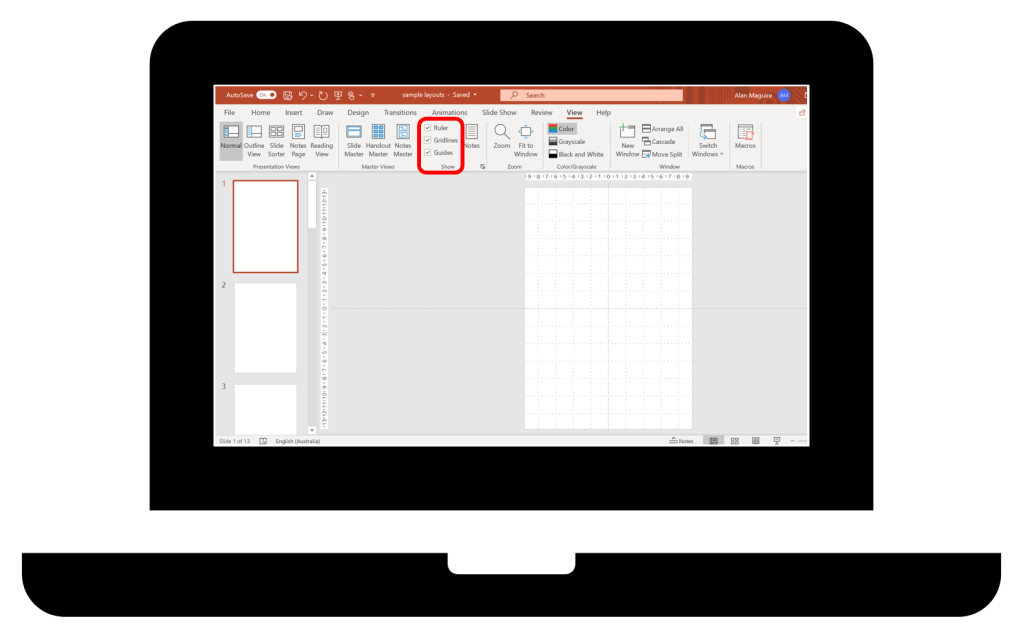
Another feature of Microsoft PowerPoint are Smart Guides. These are red, dotted lines that appear and then disappear when repositioning objects. Smart Guides will help position objects evenly and easily. For example:

  • Same width
  • Same height
  • Same space between objects
  • On the same level
  • Centred.

A method for creating a balanced document is to mock up some different versions of the same document, then compare which one looks best. The time to create a different version may range from a few seconds to a few minutes. Brochures, posters and PowerPoint slides are the types of documents that benefit from being balanced.

The following are some examples of different versions of the same document.

Example 1
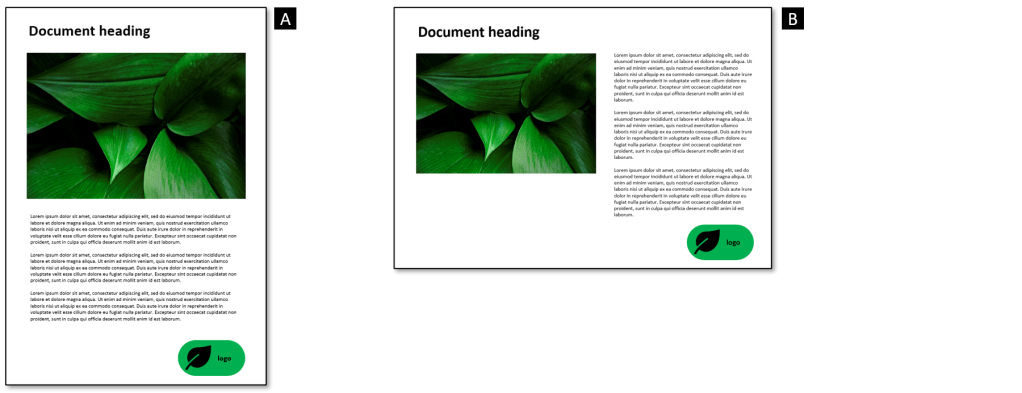
Do you prefer the page to have portrait [A] or landscape [B] orientation?

Most documents will have a portrait orientation with the exception of presentation slides. However, a document may include a diagram or table that would require a landscape orientation. A document can have a mix of portrait and landscape pages.

Example 2
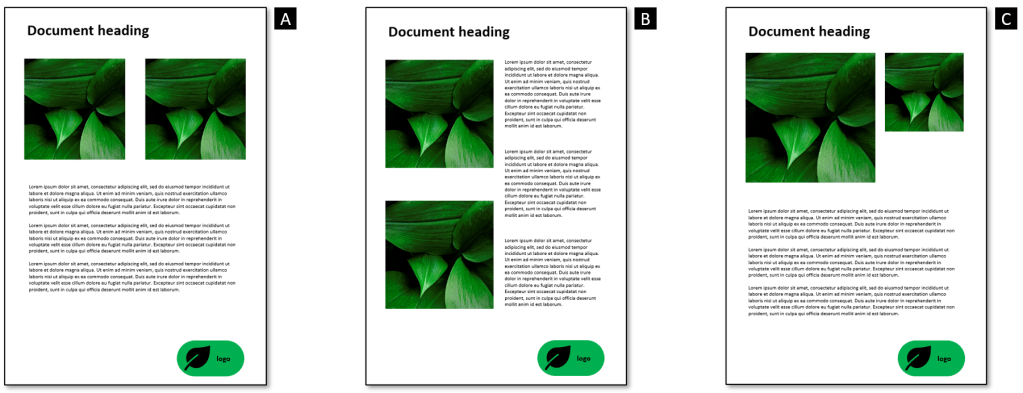
In the above example, do you prefer A, B, or C? Why?

Often, there is no right or wrong way of laying out your document. Usually, there is more than one way to present information. Your challenge is to quickly create a document that looks good and is effective.

Example 3
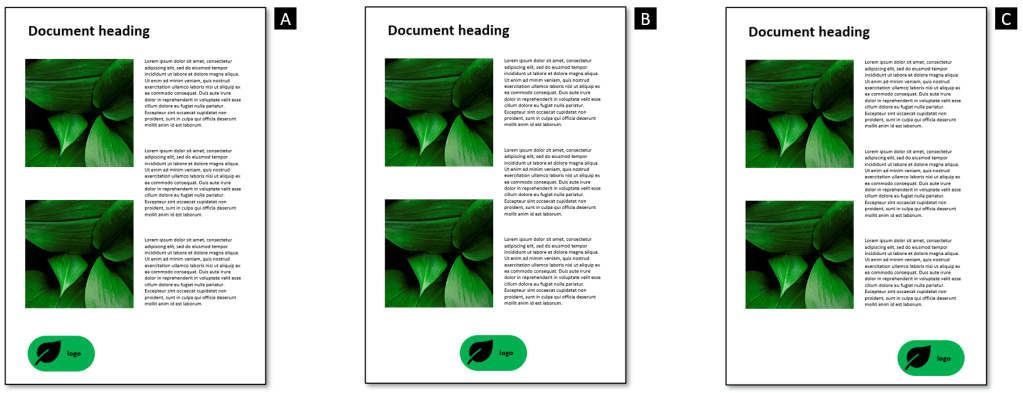
In the above example, do you prefer the logo on the left, centred, or on the right? Which looks more balanced?

My preference is to locate an organisation’s logo at the bottom right corner of a document. For me, the next best location is the top right corner. These locations are based on how we read English. We start at the top left corner and our eyes move to across to the right, and pause for a moment. Then our eyes repeat this movement from left to right until reaching the bottom right corner. And that is when we stop for a moment. I like to reserve the top left corner of the document for the heading or title.

Example 4
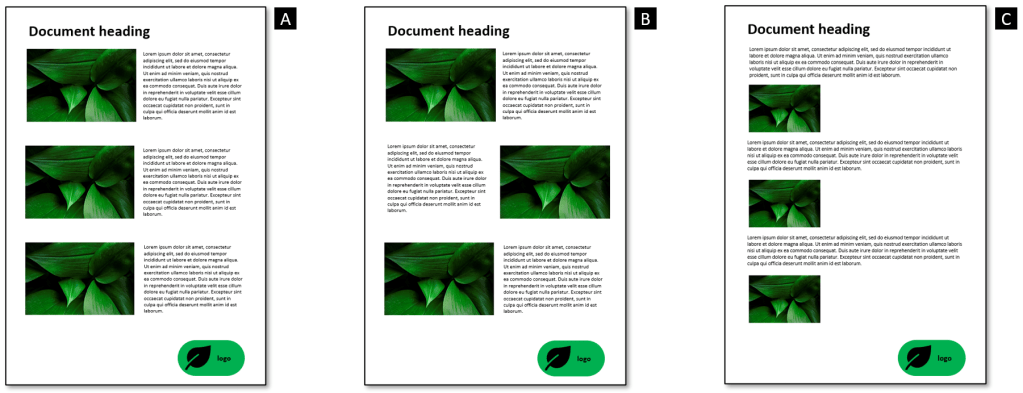
In above example, do you prefer A, B, or C?

I think [A] looks good for a document to be printed on paper. I think [B] makes the reader work too hard reading from one side to the other, then back again. And I think [C] works best if being read on screen because the text and photos are all left aligned making all elements of the document flow.

The qualities of uncluttered and balanced can be subjective. However, I believe we should invest a little time and effort to make our documents look good. An attractive document is more likely to read and used. And a good looking document says to a reader or user that the creator of the document cared about their reading or using experience.

Images and visual style

A picture is worth a thousand words. Most people will respond quickly to visual images compared to a block of text. And people will have better retention of an image. Images may include:

  • Charts and graphs
  • Pictures and icons
  • Diagrams.

These will be covered by the future articles in this series. However, there are two things I want to briefly raise in this article:

  • Consistent visual style
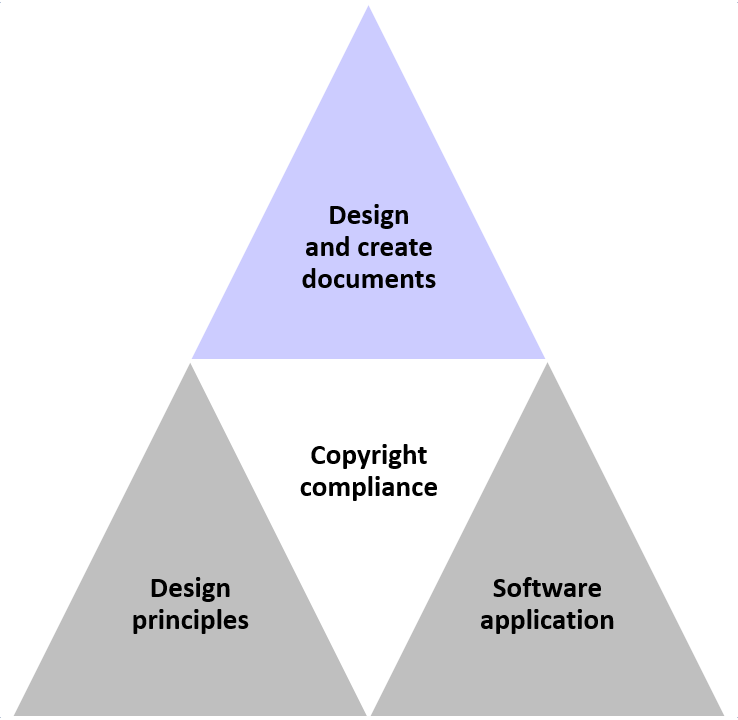
  • Copyright compliance.

I recommend using a limited and consistent visual style throughout an entire document. I prefer to keep the images plain and simple.

In the above example, which icon would be consistent with the picture?

Importantly, we should comply with copyright law. This will be covered by an article dedicated to copyright compliance.

Colour theme

The internet has a lot of information about colour theory – some theory is based on science, some pseudoscience, and some make-believe.

It is common for colours to be used to represent types of information, convey meanings, or evoke emotions. Hot colours may represent energy or action. Cool colours may represent calmness.
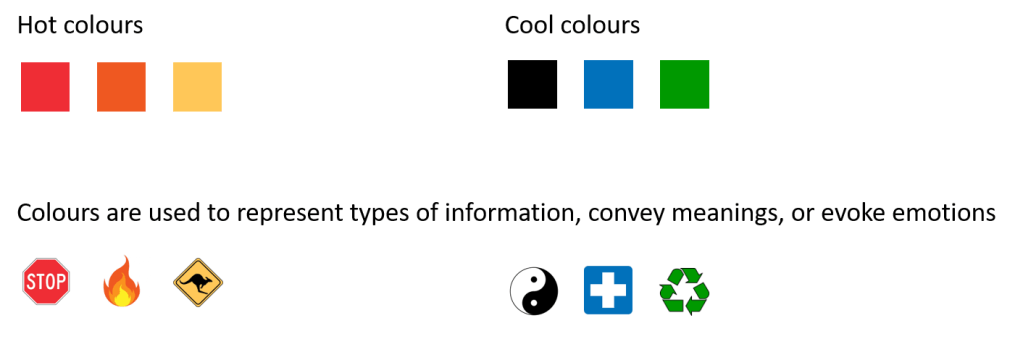
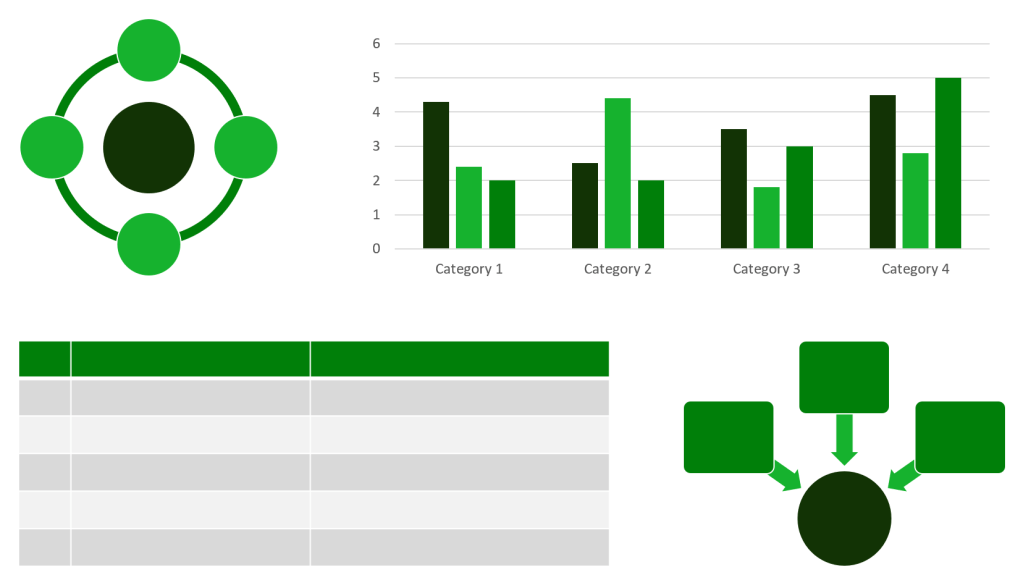
I recommend using a limited and consistent colour theme throughout an entire document. You can use a standard colour scheme or create your own. Microsoft PowerPoint has an’eyedropper’ tool that can help select colours that match of images or pictures. These can be used as the basis for a colour scheme.

If you are using Microsoft PowerPoint, go to [Home], then select [Shape Fill]. The following example shows how the ‘eyedropper’ tool can be used to create a small selection of greens from the photo of leaves.
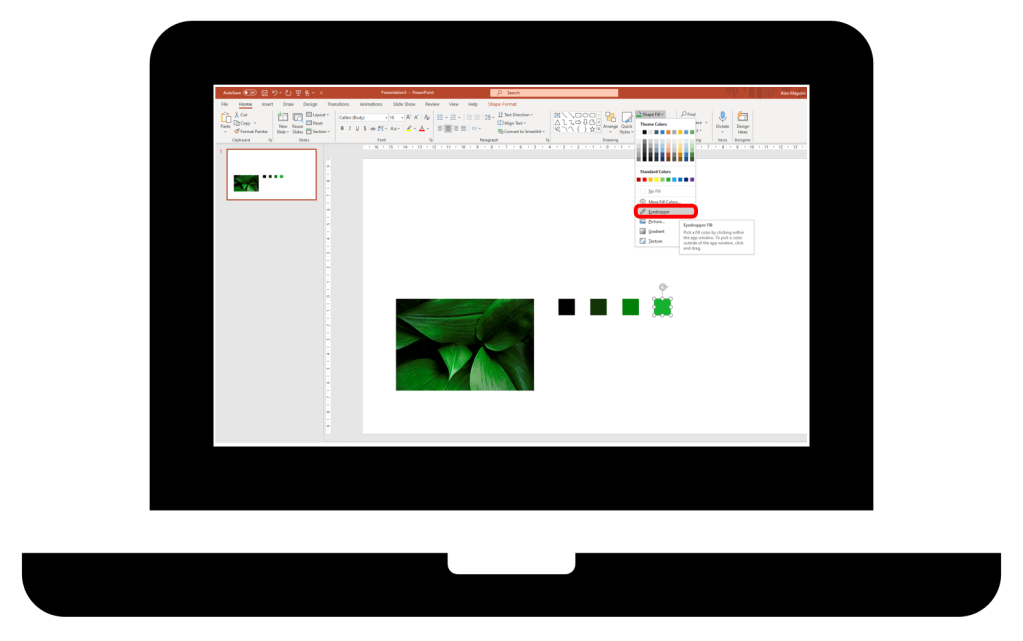
The above greens can then be used for charts, graphs, tables, and diagrams to give a consistent colour theme throughout the document.
White space

‘White space’ is any part of a document that is unused or space around an object. It helps to separate headings, paragraphs of text, images, and other elements of a document. White space avoids having dense text that is difficult to read, and it helps a document from looking crowded or cluttered.
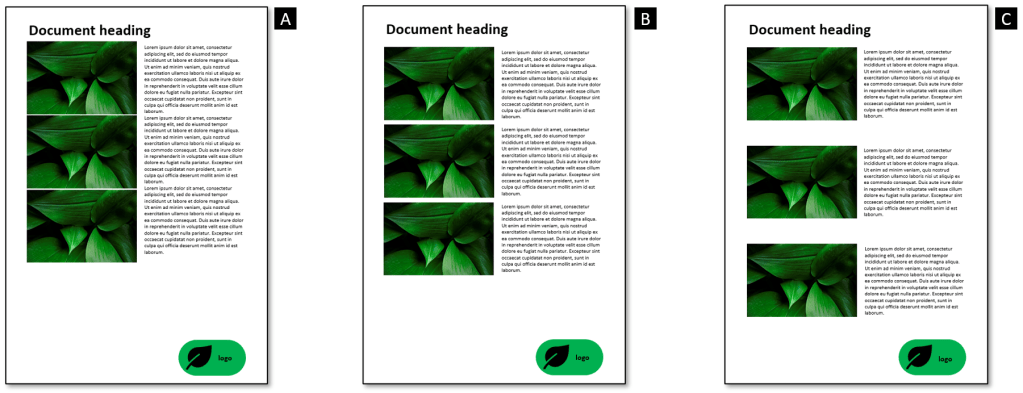
In the above example, do you prefer A, B, or C?

White space can be used to balance the various design elements and better organise content to improve the readers or users experience.

In conclusion

This article has explored some principles of document design. The following summaries my three principles and identifies five suggestions for applying each principle.
My one most important guiding principle is to keep our documents simple. We should always think about the readers or users of the documents that we produce. We want them to find our documents to be easy to read and easy to use.

The principles of document design are based on art and science. Good design can be subjective. And usually there is more than one way to design documents that can be effective. We want our documents to look good but they must be readable and usable. It is a good idea to collect samples of documents that you like and create a ‘scrapbook’. This can be used as a sources of reference or inspiration for the document you produce in the future.

This has been the second of a series of articles about how to design and develop basic documents. Future articles shall cover:

  • Copyright compliance
  • Document style and format
  • Screen-based document layout.

I hope you have liked this article. And I hope you will ‘like‘ it.

I welcome your feedback and comments. Also, it would be great to hear about your experience:

  • What are some examples of well designed documents?
  • What are some impacts of poorly designed documents?
  • Do you have other suggestions for good design?

Do you need help with your TAE studies?

Are you a doing the TAE40116 or TAE40122 Certificate IV in Training and Assessment, and are you struggling with your studies? Do you want help with your TAE studies?

Ring Alan Maguire on 0493 065 396 to discuss.

Contact now!

logo otws

Training trainers since 1986

Designing and developing basic documents: A guide for trainers and TAFE teachers

Introduction

From my experience, many new and existing trainers and TAFE teachers struggle with the design and development of learning resources. And some struggle with the basics of using software applications and developing basic documents.

The Australian VET system has units that can provide a structured approach to learning the basics:

  • BSBTEC201 Use business software applications
  • ICTICT216 Design and create basic organisational documents.

These two low level units of competency can be seen as foundations for others units, such as the TAEDES502 Design and develop learning resources unit.

Also, a person studying for their TAE40116 Certificate IV in Training and Assessment qualification need basic computer skills. Most trainers and TAFE teachers use technology on a daily basis to perform their role.

Using software applications

The BSBTEC201 Use business software applications unit of competency can cover:

  • Using a word processing application, such as Microsoft Word
  • Using a presentation application, such as Microsoft PowerPoint.

Managing files including version control of documents is another basic skill required. And a trainer or TAFE teacher will usually need technology skills for:

  • Using an Learning Management System (LMS), such as Moodle or Canvas
  • Using a web conferencing application, such as Zoom.

Developing basic documents

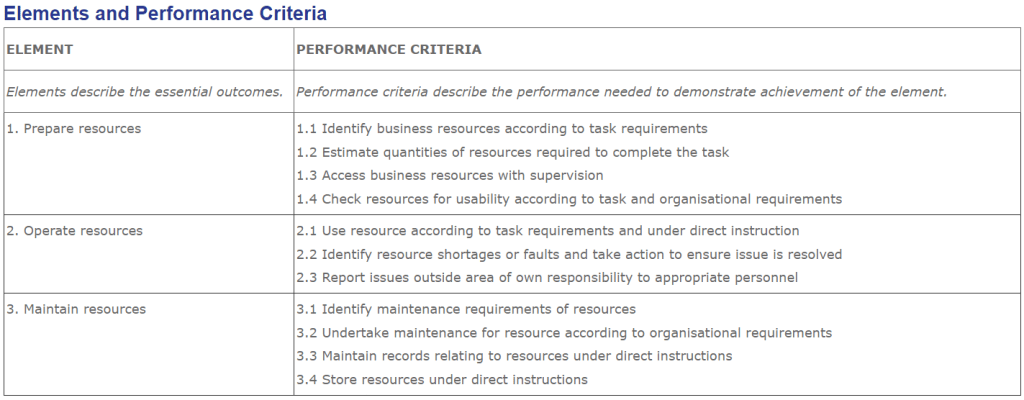
The ICTICT216 Design and create basic organisational documents unit of competency gives a useful framework for learning how to design and develop basic documents. The following lists the elements and performance criteria for the ICTICT216 unit.

I have interpreted, simplified, and reworded the above performance criteria to develop a 9-step procedure for designing and creating documents. The following outlines the nine steps with reference to the associated ICTICT216 performance criteria.

The ‘design document stage’ can be relatively quick compared with creating the document. The time and effort required to create a document can vary greatly depending on the type and size of the document being developed. The time and effort for the ‘finalise document stage’ can also vary depending on the feedback received.

How to design and create basic documents

Over a series of articles, I will explore how to design and create basic documents. Some key topics I will cover are document design principles, copyright compliance, and how to use software applications to create basic documents.

What is a basic document?

My aim to cover the basic knowledge and skills required to produce basic documents. I won’t go beyond the basics. I believe that we can create quality documents without having advanced capabilities. However, the more experience we get, the better our documents will become.

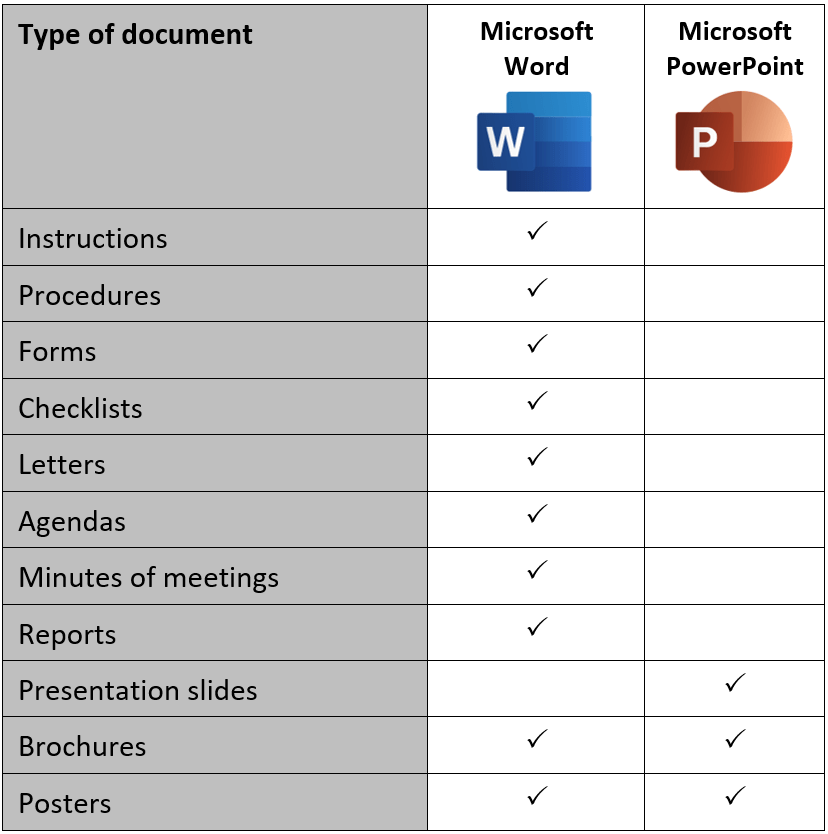
Basic documents that may be produced by a trainer or TAFE teacher are:

  • Instructions
  • Procedures
  • Forms
  • Checklists
  • Presentation slides
  • Brochures
  • Posters.

Other basic documents may include letters, agendas, minutes of meetings, and reports.

The 9-step procedure

I will use the 9-step procedure to guide my exploration of how to design and develop basic documents.

Let’s start looking at the first three steps associated with the ‘design document phase’.

Step 1. Establish and confirm document requirements

The following questions can help us establish and confirm the document requirements:

  • What type of document is to be created?
  • Who will read or use the document?
  • Who will provide the content?
  • Is there a style guide?
  • Are there any special requirements?

Step 2. Determine document orientation, style, and format

A document can be ‘paper-based’ or ‘screen-based’.

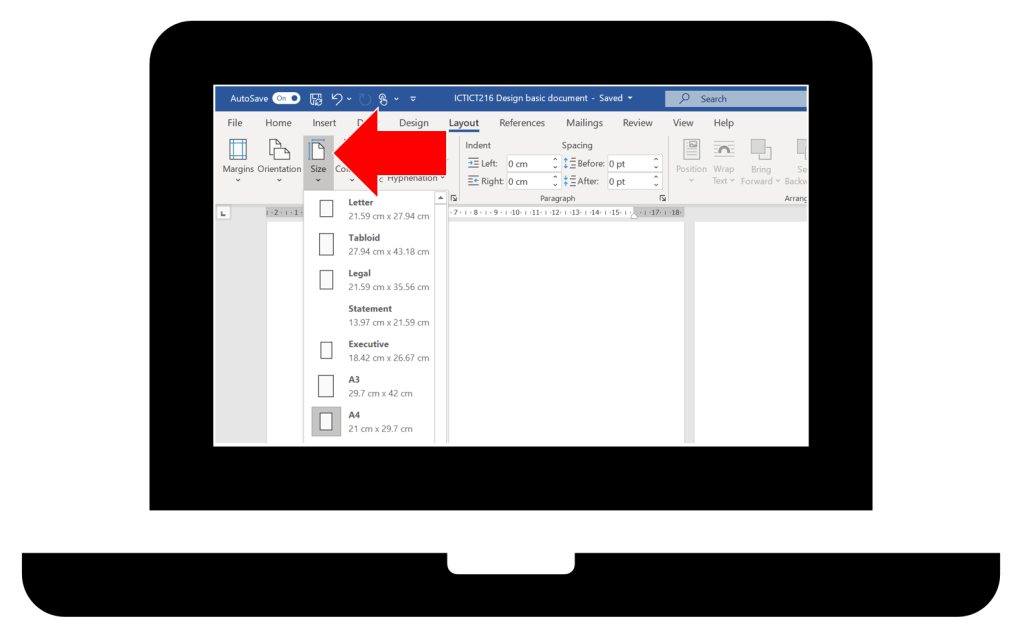
A ‘paper-based’ document will usually be A4 sized or A3 sized. Typically, the default size will be A4. If we are using Microsoft Word and want to change the size to A3, we select [Layout] then [Size].

The design of screen-based documents, such as presentation slides and web pages, is different than paper-based documents. I will cover this topic in greater depth in later articles.

Document orientation

A document can be orientated in two directions: portrait and landscape. If we are using Microsoft Word we select [Layout] then [Orientation].

Most basic documents will have a portrait orientation with the exception of presentation slides. However, a basic document may include a diagram or table that would require a landscape orientation. A document can have a mix of portrait and landscape pages.

Another consideration is the width of margins. If we are using Microsoft Word we select [Layout] then [Margins].

I recommend ‘normal’ margins for most basic documents. But ‘narrow’ margins might be used for some forms, checklists or landscape documents if required.

Document style and format

Document formatting refers to the way a document is laid out on the page, in other words, the way it looks and how it is visually organised. It may include:

  • Font type, size, and colour
  • Line and paragraph spacing
  • Margins and alignment.

I do not recommend the use of columns. It is becoming more common for ‘paper-based’ documents not to be printed on paper. Instead, these documents are being read and used onscreen. Reading up and down columns on a screen decreases readability and increases the time it takes to read the document.

My one most important guiding principle is to keep our documents simple. We should always think about the readers or users of the documents that we produce. We want them to find our documents to be easy to read and easy to use.

Style guides

If your organisation has a style guide, this eliminates the need for you to devise your own style and format for documents. A style guide is a reference point that sets standards for creating documents within an organisation. It may include:

  • Logo size and placement
  • Colour scheme to be used
  • Image and photography guidelines
  • Layout and document formatting.

The topic of style and format will be comprehensively covered in the articles:

Step 3. Select application software

From my experience working with Registered Training Organisations (RTOs), Microsoft applications are more widely used compared with Apple or Google applications. Having said this, I know that some trainers and TAFE teachers prefer and use Apple, Google and other software applications.

Microsoft Word will be used for most basic documents, and Microsoft PowerPoint will be used for presentation slides. Either of these Microsoft applications can be used to produce brochures or posters. However, I have a preference to use Microsoft PowerPoint. This will get explained in the next and later articles.

In conclusion

The ICTICT216 Design and create basic organisational documents unit of competency can be used to provide a structured approach to learning how to produce basic documents.

The ICTICT216 unit has been interpreted and simplified, resulting in a 9-step procedure for designing and creating documents. The first three steps can be relatively quick to complete:

  • What type of document is to be developed?
  • What software application will be used?
  • Will the document use a portrait or landscape orientation?
  • Will the document be A4 or A3 sized?
  • Should the margins be kept at ‘normal’ or changed to ‘narrow’?
  • Is there a style guide to be complied with?

This has been the first of a series of articles about how to design and develop basic documents.

Also, it would be great to hear about your experience:

  • What software applications does your RTO use?
  • What types of document do you need to produce?
  • Does your RTO have a style guide?

Australia’s VET system

Australia’s vocational education and training (VET) system is complex and forever changing. People studying for their TAE40122 Certificate IV in Training and Assessment qualification may find useful information on this website. Tap or click on the following ABC logo to find out more.

ABC logo

Contact now!

logo otws

Training trainers since 1986
How to use the Australian Core Skills Framework (ACSF) to identify LLN skill gaps

This is the second of two articles covering the Australian Core Skills Framework (ACSF). My first article describes the Australian Core Skills Framework (ACSF).

In this article I shall cover how to use the ACSF to identify LLN skill gaps.

Although this article has been primarily written for people studying for their TAE40116 or TAE40122 Certificate IV in Training and Assessment qualification, qualified VET practitioners may still get something from the content or the way the content has been presented.

The information covered by this article is relevant to the following units of competency:

  • TAELLN411 Address adult language, literacy and numeracy skills
  • TAELLN421 Integrate core skills support into training and assessment.

LLN skills

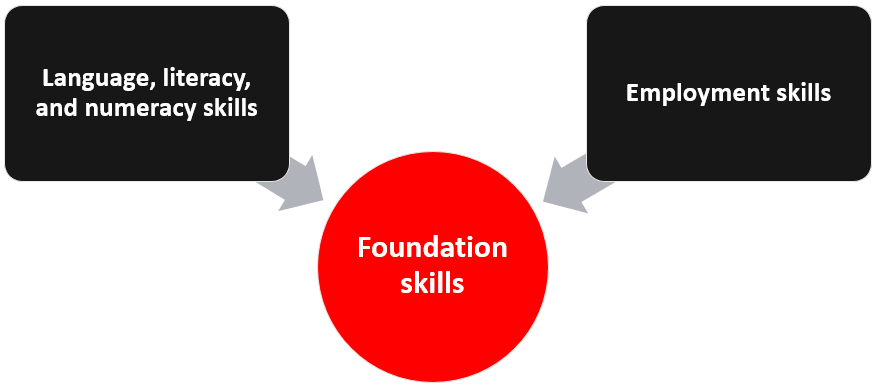
In the Australian VET system, foundation skills consist of language, literacy, and numeracy (LLN) skills and employment skills. In other words, LLN skills are a sub-set of foundation skills.

Let’s broadly define these LLN skills:

  • What are language skills?
  • What are literacy skills?
  • What are numeracy skills?
  • What are digital literacy skills?

What are language skills?

Wikipedia defines ‘language’ as a structured system of communication used by humans consisting of speech (spoken language) and gestures (sign language). The ACSF identifies Oral Communication as a core skill and its covers:

  • Speaking skills
  • Listening skills.

The Australian VET system mostly delivers training and assessment services using the English language. Sometimes, a training program may be delivered in Auslan or a local indigenous language.

It may be possible to use translation services for people who speak languages other than English. However, most workplaces in Australia require a person to communicate in English to managers, supervisors, work colleagues, customers, suppliers, and others. An RTO must ensure that the people they train and qualify have the oral communication skills required to work safely and effectively in an Australian workplace.

What are literacy skills?

Wikipedia states that literacy is popularly understood as an ability to read and write. The ACSF has the two core skills:

  • Reading skills
  • Writing skills.

What are numeracy skills?

Numeracy in the ACSF is about using mathematics to make sense of the world and applying, representing and communicating mathematics and mathematical results. Numeracy includes:

  • Measuring and using measuring equipment
  • Calculating
  • Using data
  • Using graphs, diagrams and tables
  • Using maps or plans.

Numbers, algebra, quantities, time, geometry, statistics and probability are numeracy skills. Often numeracy skills support analysis and problem solving at work.

What are digital literacy skills?

In 2020, the Digital Literacy Skills Framework was published by the Australian Government Department of Education, Skills and Employment. This framework adds onto the ACSF.

A focus on digital literacy is not new. Computers and other digital devices are frequently used when people read information or write documents. Technology is used for communicating and collaborating with others. And various digital devises and software applications are used to measure, calculate, analyse, display data, create graphs, etc.

Digital literacy skills are integrated with the five core skills covered by the ACSF. In the future, digital literacy skills are likely to be treated as a sixth core skill alongside learning, reading, writing, oral communication, and numeracy.

For more details about the ACSF go to: What is the Australian Core Skills Framework (ACSF)?

4-steps to using the ACSF to identify LLN skill gaps

The following 4 steps provides a relatively simple procedure for using the ACSF to identify LLN skill gaps:

  • Step 1. Identify and describe the required LLN skills
  • Step 2. Analyse the complexity of the required LLN skills
  • Step 3. Use ACSF Performance Indicators to estimate the required ACSF Levels
  • Step 4. Compare an individual’s ACSF Levels with the required ACSF Levels.

Step 1. Identify and describe the required LLN skills

The ACSF can be used to identify the LLN skill requirements of a VET program. There are two methods for identifying the required LLN skills:

  • Method 1. Identifying the required LLN skills for units of competency with foundation skills
  • Method 2. Identifying the required LLN skills for units of competency without foundation skills.

Method 1. Identifying the required LLN skills for a unit of competency with foundation skills

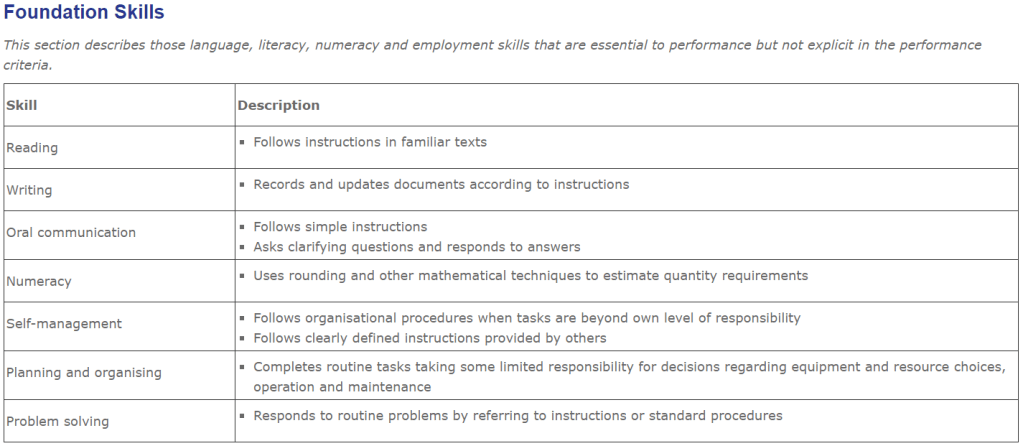
Some Training Package Developers have identified and described the foundation skills for a unit of competency. The following is an example for the BSBOPS101 Use business resources unit of competency.

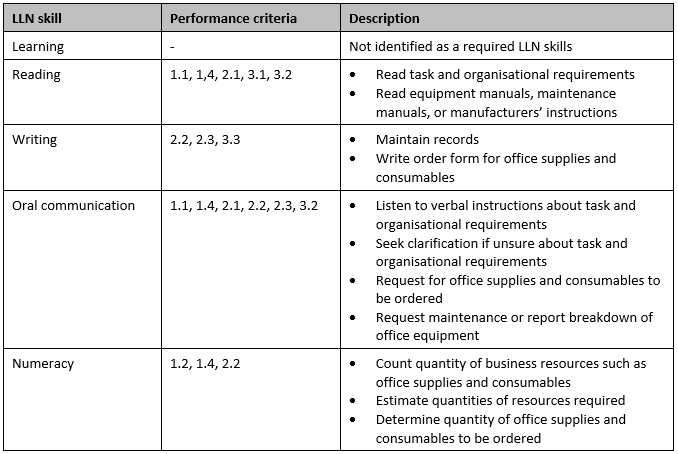
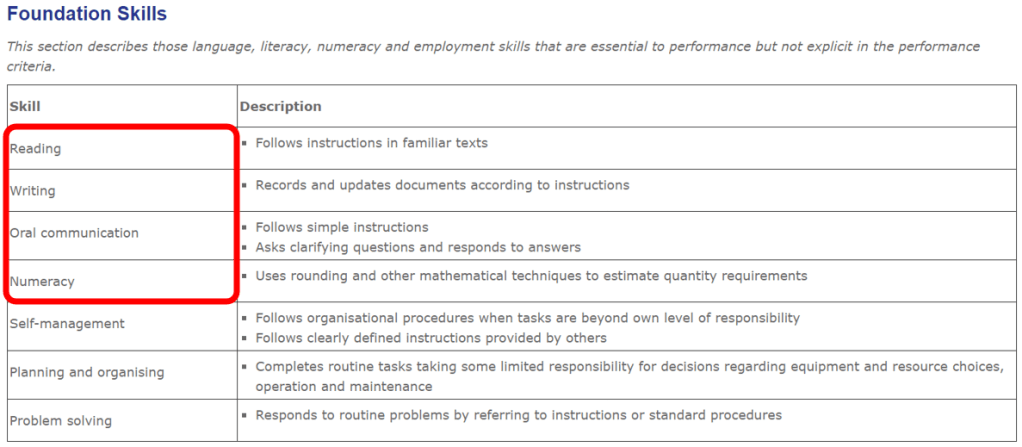
In the above example, four of the seven foundation skills are LLN skills. And a brief descriptions helps to give a scope or context for each skill.

Method 2. Identifying the required LLN skills for a unit of competency without foundation skills

Some Training Package Developers have not identified or have only provided limited information about the foundation skills for a unit of competency. And many Accredited Courses have units of competencies in a format that did not require foundation skills to be identified. These situations will require you to identify and describe the LLN skills.

Step 1.1 Create an LLN skill template

Create a table.

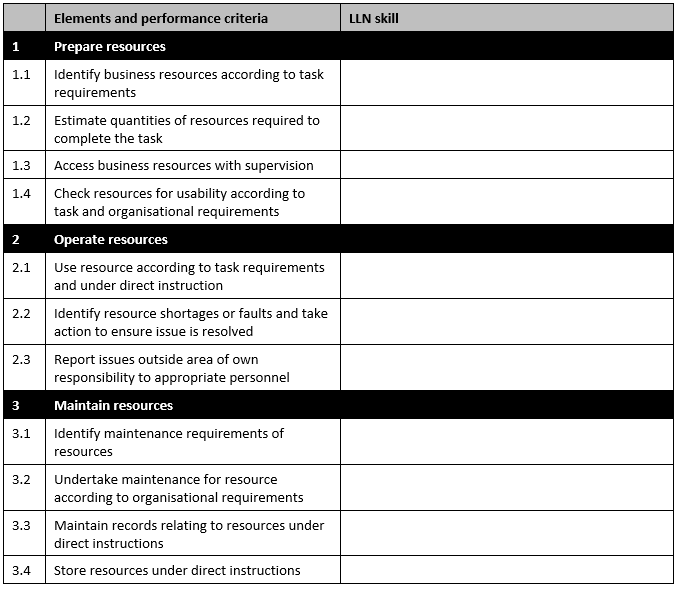
Then insert the elements and performance criteria for the unit of competency that will be analysed. The following is an example for the BSBOPS101 Use business resources unit of competency.

You should also read the Assessment Requirements because there may be relevant information relating to LLN skills required to perform the work task or activities.

Step 1.2 Identify the LLN trigger words

LLN trigger words are the ‘verbs’. These words help us locate the underpinning LLN skills required to perform the work task or activities specifed by the unit of competency. Others terms may also indicate underpinning LLN skills. For example, ‘within a designated timeframe’ indicates the need for numeracy skills.

The following example highlights the LLN trigger words for the BSBOPS101 Use business resources unit of competency.

Step 1.3 Use trigger words to identify LLN skills

ASQA has published Foundation Skills Trigger Words. These can be used to identify LLN skills. For example, the ‘identify’ verb can indicate that reading skills and oral communication skills are likely to be required. Using the BSBOPS101 Use business resources unit of competency as an example, the identification of these underpinning LLN skills for the ‘identify’ verb is relevant for Performance criteria 1.1 and 3.1 (see the table below).

The following example identifies the all the underpinning LLN skills for the BSBOPS101 Use business resources unit of competency.

Step 1.4 Describe each LLN skill

The above information can be restructured, simplified and any duplication can be removed. The description can be re-written to give a clear and concise scope or context for each LLN skill.

The following example describes the LLN skills for the BSBOPS101 Use business resources unit of competency.

Step 2. Analyse the complexity of the required LLN skills

Think about the typical tasks or activities performed in the workplace. How complex is the task to perform? Is the task performed with or without supervision? What is the relevant AQF level? Answers to these questions will help you analyse the complexity of the required LLN skills.

The following examples analyse the LLN skills for the BSBOPS101 Use business resources unit of competency. Business resources may include printers, phone and intercom systems, laminators, binding machines, and other office equipment. Also, business resources may include consumables such as paper, printer toner cartridges, laminating supplies, and binding supplies.

Reading requirement for the BSBOPS101 unit

What reading is required when performing the work task specified by the unit of competency? How complex are the required reading skills?

A competent person will need to read task lists or emails giving instructions about what and when tasks are to be completed. Workplace procedures about operating and maintaining office equipment will need to be read. And equipment manuals and manufacturers’ instructions giving details about using, maintaining and trouble-shooting will need to be read. Each procedural document or equipment manual can vary in content and layout, and some will require a moderate level of concentration and comprehension to read.

Writing requirement for the BSBOPS101 unit

What writing is required when performing the typical work tasks or activities specified by the unit of competency? How complex are the required writing skills?

A competent person will need to complete simple forms and maintenance records, or write emails.

Oral communication requirement for the BSBOPS101 unit

What oral communication is required when performing the typical work tasks or activities specified by the unit of competency? How complex are the required oral communication skills?

A competent person will need to clarify priorities or negotiate deadlines with their supervisor or other people in the workplace. Also, they will need to speak with maintenance or repair technicians to explain and discuss equipment faults or issues.

Numeracy requirement for the BSBOPS101 unit

What numeracy is required when performing the typical work tasks or activities specified by the unit of competency? How complex are the required numeracy skills?

A competent person will need to count office supplies and consumables. Also, they will need to estimate qualities required to complete tasks. The timeframe for each estimate can vary from quantities required to perform a task immediately, or quantities required during a day, or quantities required over a week. Usage rates from the past or order records can be used to inform estimate for the future.

Step 3. Use ACSF Performance Indicators to estimate the required ACSF Levels

Step 2 above and Step 3 may be combined and completed at the same time.

The ACSF Performance Indicators are used to estimate the ACSF Level required for each LLN skill. For more background information about the ACSF Performance Indicators go to: What is the Australian Core Skills Framework (ACSF)?

Step 3.1 Estimate the required ACSF Levels

The ACSF Performance Indicators are used to estimate the required ACSF Level for each LLN skill. The following example will show how to estimate the ACSF Level for the reading skills required for the BSBOPS101 Use business resources unit of competency.

Start by reviewing the ACSF Performance Indicators for ACSF Level 1.

A competent person would need reading skills greater than at the ACSF Level 1. Move on to review the ACSF Performance Indicators for ACSF Level 2.

A competent person would need reading skills greater than at the ACSF Level 2 because some unfamiliar texts or topics may need to be read. Move on to review the ACSF Performance Indicators for ACSF Level 3.

The ACSF Performance Indicators for ACSF Level 3 seem to be a reasonable description for the reading skills required by a competent person. Some information would be familiar, but some unfamiliar. And there would be a range of document types.

Before making a final decision, review the ACSF Performance Indicators for ACSF Level 4.

The critical analysis of complex text is beyond the scope for the BSBOPS101 Use business resources unit of competency. Therefore, the estimated ACSF Level for reading is 3.

The above procedure is repeated using the ACSF Performance Indicators for writing, oral communication, and numeracy.

Step 3.2 Record the required ACSF Levels

Use the following template to record the required ACSF Levels for each LLN skill.

Step 4. Compare an individual’s ACSF Levels with the required ACSF Levels

RTO will conduct a pre-training review (PTR) before someone enrols into a training program. Part of the PTR will be a diagnostic assessment of a person’s current ACSF Levels, and these can be compared with the ACSF Level required to perform the work tasks or activities specified by the unit of competency.

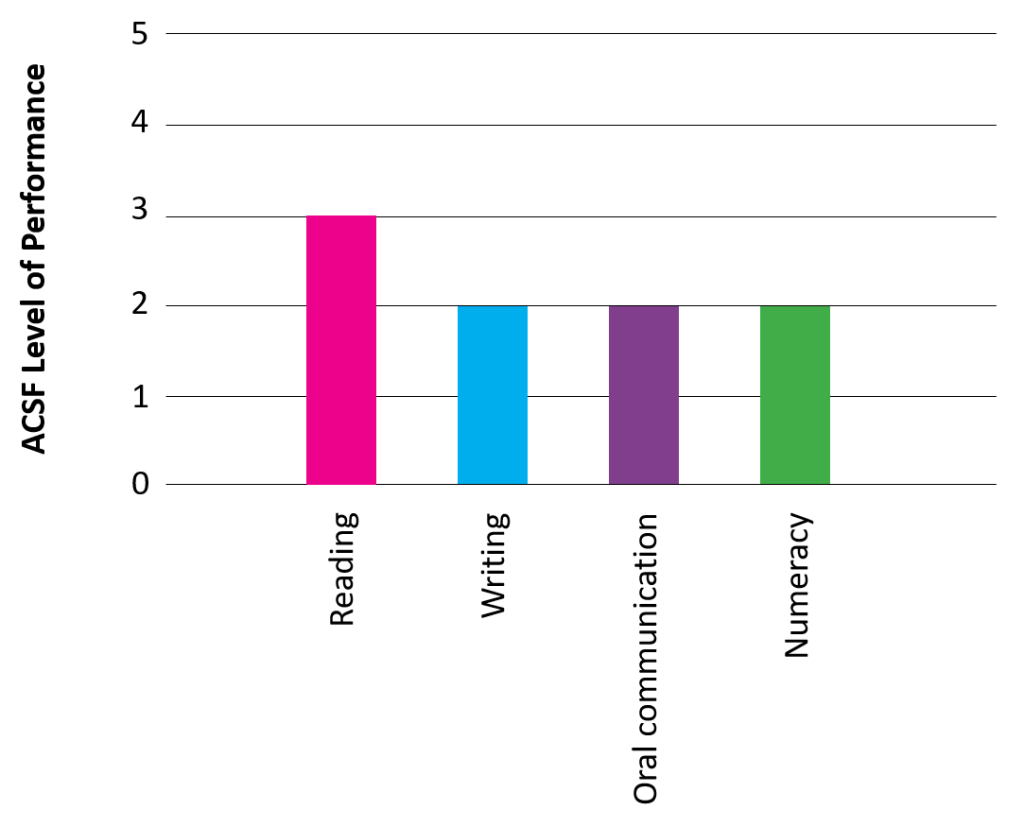
The ACSF encourages us to graph this information about ACSF Levels. These graphs may be refers to as being a ‘spiky profile’. A ‘spiky profile’ is a visual representation that provides valuable information about an individual’s areas of strength and specifically identifies any areas where there is a gap. An LLN skill gap may require additional training or support.

Step 4.1 Plot the required ACSF Levels

Plot the required ACSF Level for each LLN skill. The following example plots the ACSF Levels required for the BSBOPS101 Use business resources unit of competency.

Step 4.2 Plot the individual’s ACSF Level

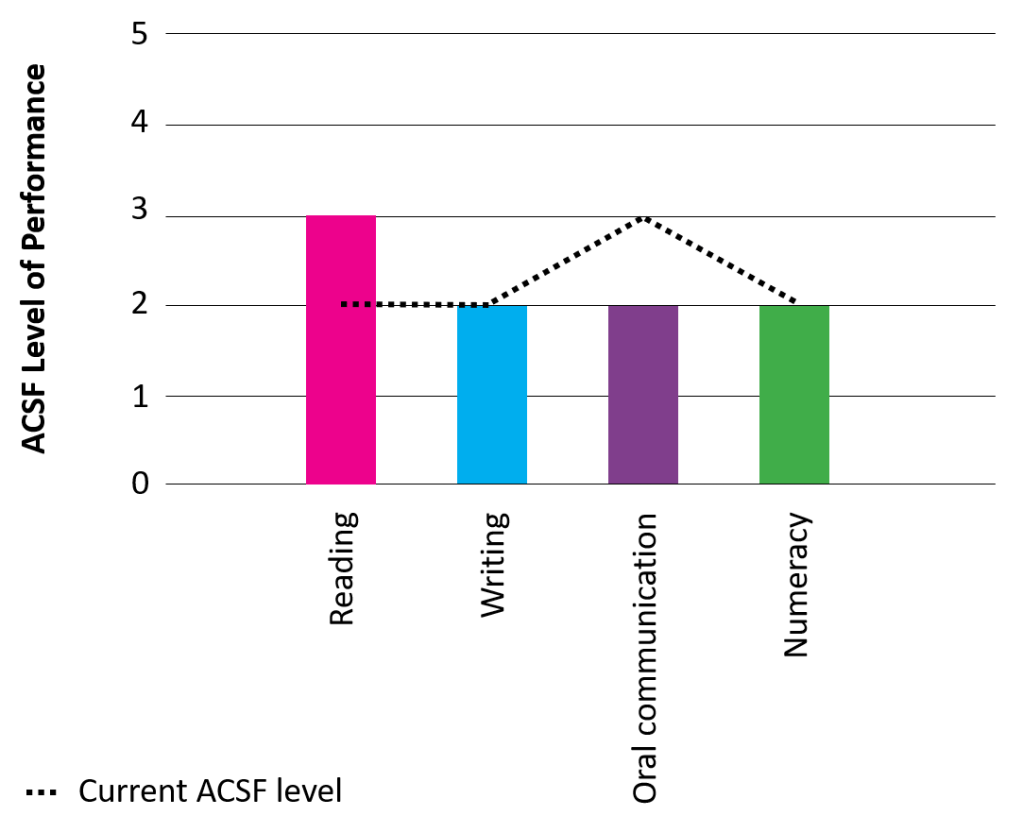
For the purpose of this example, let us say that an individual has been assessed as having reading skills at the ACSF Level 2, writing skills at the ACSF Level 2, oral communication skills at the ACSF Level 3, and numeracy skills at the ACSF Level 2. The following graph shows this person’s current ACSF Levels plotted.

The comparison between required and current LLN skills can be easily seen. In this example, an LLN skill gap for reading is apparent.

Qualification

Throughout this article, I have demonstrated how to use the ACSF to identify LLN skill gaps for a single unit of competency. Usually, we will determine the required LLN skills for an entire qualification. The following is an example of the ACSF Levels required for the BSB20120 Certificate II in Workplace Skills qualification.

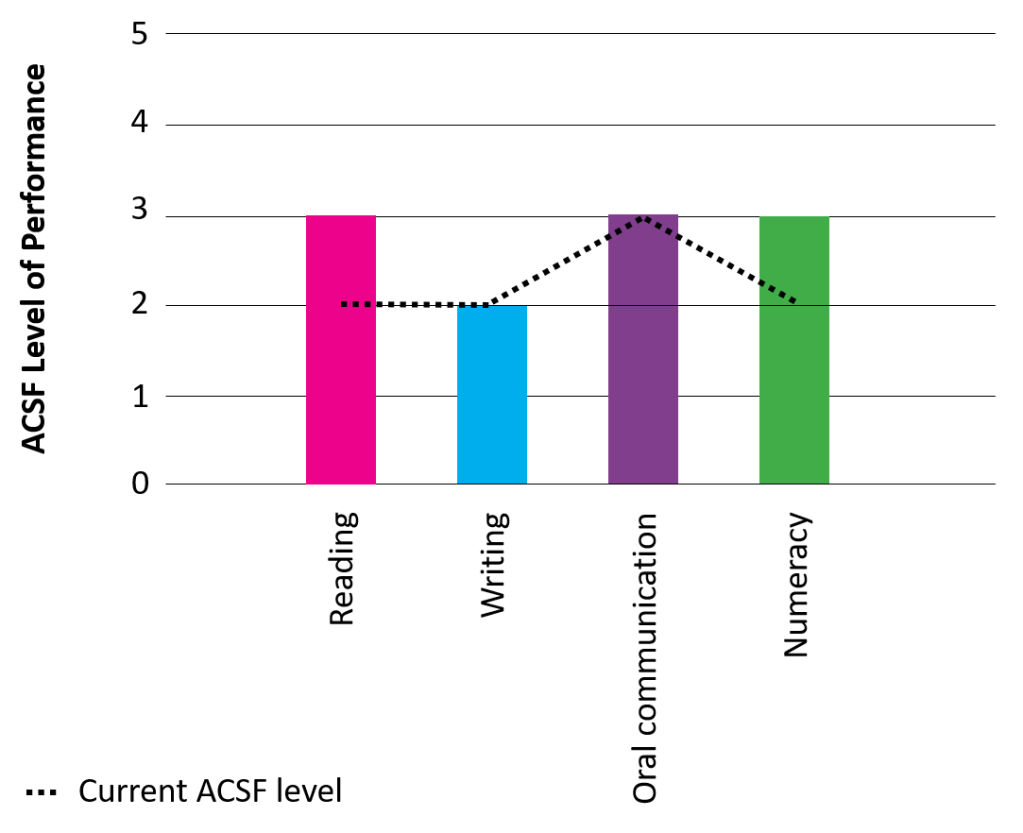
Here is a revised ‘spiky profile’ for the BSB20120 qualification, instead of the BSBOPS101 unit.

The person can be identified as having two LLN skill gaps: reading skills and numeracy skills.

Identifying an LLN skill gap or gaps is only the first step. Next, we mostly will need to take action:

  • Discuss the LLN skill gap or gaps with the learner
  • Develop an agreed action plan with the learner
  • Implement the action plan, and this may include the involvement of other people such as LLN specialists or support services.

In conclusion

The identification of LLN skill gaps using the ACSF takes time and effort.

There is a high chance that all trainers and TAFE teachers will frequently have learners with LLN skills lower than what is required, and this includes having lower digital literacy skills than what is needed. I think it is important for VET practitioners to understand the ACSF and how LLN skill gaps are identified.

Identifying LLN skill gaps is the starting point for providing or arranging additional training and support for those learner who need it. Without this some learners will not succeed at attaining competency.

Do you need help with your TAE studies?

Are you doing the TAE40122 Certificate IV in Training and Assessment, and are you struggling with your studies? Do you want help with your TAE studies?

Ring Alan Maguire on 0493 065 396 to discuss.

Contact now!

logo otws

Training trainers since 1986

What is the ACSF? And what are the ACSF Performance Indicators?

This is the first of two articles covering an overview of the Australian Core Skills Framework (ACSF). My aim is to answer the following questions:

  • What is the Australian Core Skills Framework (ACSF)?
  • What are the ACSF Performance Indicators?
  • Is there a connection between the ACSF and the AQF?
  • What is the Digital Literacy Skills Framework (DLSF)?
  • Is there a connection between the DLSF and the ACSF?

The second article explains how to use the Australian Core Skills Framework (ACSF) to identify LLN skill gaps.

This article has been primarily written for people studying for their TAE40116 Certificate IV in Training and Assessment qualification. However, qualified VET practitioners may still get something from the content or the way the content has been presented.

The information covered by this article is relevant to the TAELLN411 Address adult language, literacy and numeracy skills unit of competency. It is essential knowledge required by trainers and TAFE teachers.

I don’t think I need to repeat everything that is readily available from the internet. If you need more details than what I am providing in this article, I would highly recommend reading the following documents:

Also, general information about the ACSF can be accessed from the Australian Government Department of Education, Skills and Employment website.

What is the Australian Core Skills Framework (ACSF)?

The Australian Core Skills Framework (ACSF) was introduced in 2012. It is a tool used to describe an individual’s performance in the following five core skills:

  • Learning
  • Reading
  • Writing
  • Oral communication
  • Numeracy.

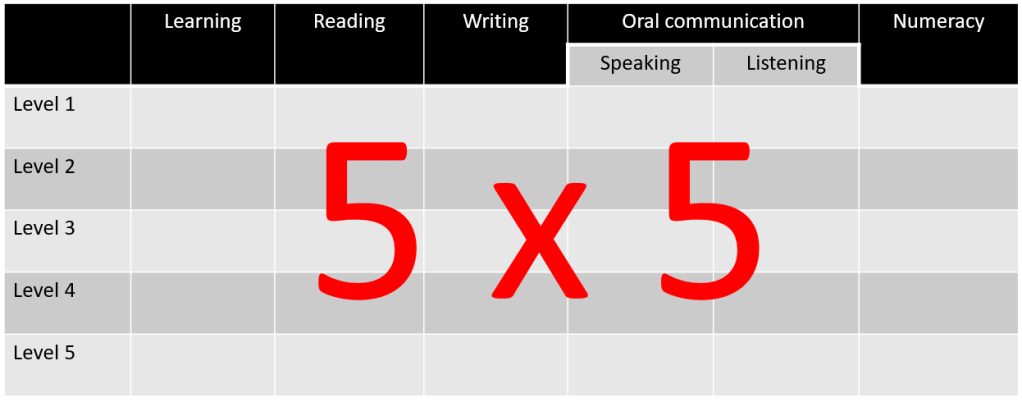
A 5 x 5 framework

Each core skill is described using five levels of performance ranging from one (low level performance) to five (high level performance).

The ACSF is a 5 x 5 framework:

  • Five core skills (learning, reading, writing, oral communication, numeracy)
  • Five levels of performance for each core skill.

ACSF Level 3

In 2006, the Australian Bureau of Statistics (ABS) released the results of the Adult Literacy and Life Skills Survey. It proposed that ‘Level 3’ in language, literacy, and numeracy skills was the minimum required for individuals to meet the complex demands of everyday life and work.

This ABS survey was conducted before the ACSF was published. However, it is common for people to consider that a minimum of ACSF Level 3 is required by skilled workers in today’s world of work.

ACSF Pre-Level 1

In  2017, a new Pre-Level 1 was introduced. Most trainers or TAFE teachers wouldn’t normally have learners that have been assessed with Pre-Level 1 core skills. These learners would usually need to participate in a qualification from the FSK Foundation Skills Training Package . And they would probably need extensive support from an LLN specialist.

Are you interested in finding out more about the ACSF Pre-Level 1? Please refer to the Pre-Level 1 supplement to the Australian Core Skills Framework (ACSF).

What are the ACSF Performance Indicators?

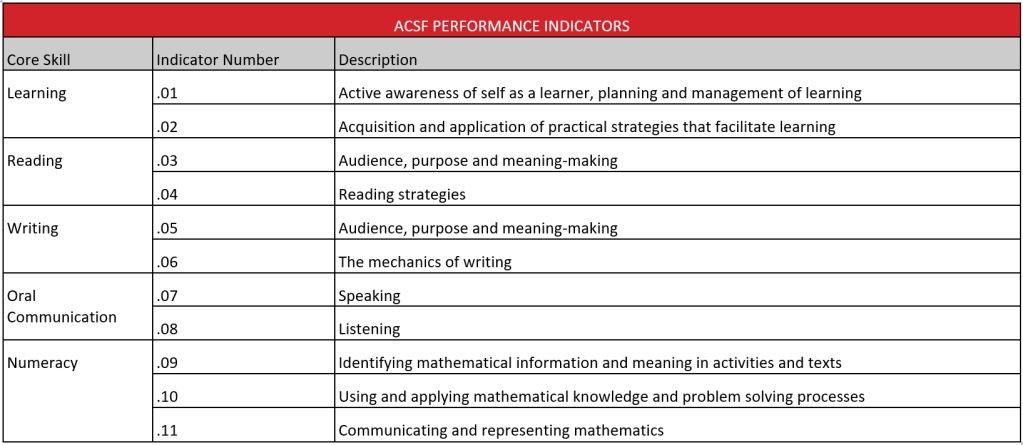
The ACSF Performance Indicators are statements that briefly describe performance at each level of the five core skills. There are eleven ACSF Performance Indicators:

  • 2 ACSF Performance Indicators for the Learning core skill
  • 2 ACSF Performance Indicators for the Reading core skill
  • 2 ACSF Performance Indicators for the Writing core skill
  • 2 ACSF Performance Indicators for the Oral Communication core skill
  • 3 ACSF Performance Indicators for the Numeracy core skill.

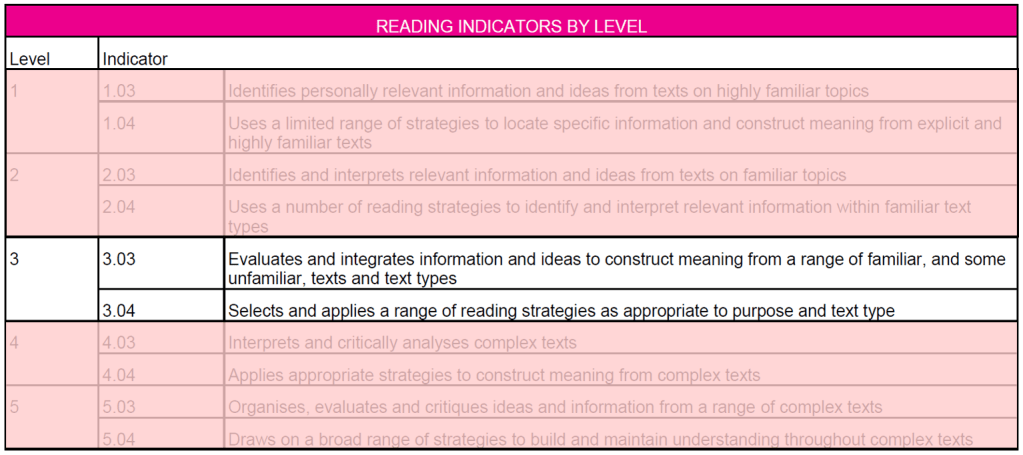
The following table has been copied from the ACSF (page 9). It gives a brief description for each ACSF Performance Indicators.

Some people can get confused by the numbering of the ACSF Performance Indicators. If you get confused, please come back to the above table to see how the numbering starts at .01 and .02 for the Learning core skill and continues until .09, .10 and .11 for the Numeracy core skill. It is just the way the core skills have been numbered.

Also, the ACSF has colour-coded each core skill. The following information uses the colours that are consistent with the ACSF document.

ACSF Performance Indicator for the Learning core skill

The following table has been copied from the ACSF (page 17). It briefly describes the ACSF Performance Indicators of each ACSF Level for the Learning core skill.

ACSF Performance Indicator for the Reading core skill

The following table has been copied from the ACSF (page 41). It briefly describes the ACSF Performance Indicators of each ACSF Level for the Reading core skill.

ACSF Performance Indicator for the Writing core skill

The following table has been copied from the ACSF (page 65). It briefly describes the ACSF Performance Indicators of each ACSF Level for the Writing core skill.

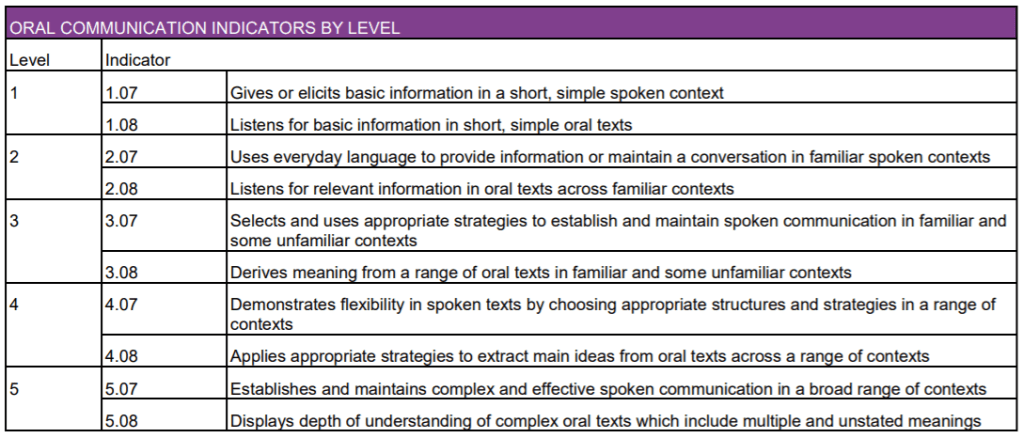
ACSF Performance Indicator for the Oral Communication core skill

The following table has been copied from the ACSF (page 90). It briefly describes the ACSF Performance Indicators of each ACSF Level for the Oral Communication core skill.

ACSF Performance Indicator for the Numeracy core skill

The following table has been copied from the ACSF (page 114). It briefly describes the ACSF Performance Indicators of each ACSF Level for the Numeracy core skill.

Numbering of ACSF Performance Indicators

The first number of the ACSF Performance Indicator is the ACSF Level. For example, all core skills at the ACSF Level 2 will start with the number 2.

The numbers after the decimal point are for the indicators that describe a specific ACSF core skill . For example, 2.03 and 2.04 refer to the two indicators used to determine if the Reading core skill is at the ACSF Level 2.

Note: The ACSF Performance Indicators provide a brief description. Additional information and examples are provided by the ACSF document. There are several pages of additional information for each ACSF Performance Indicator, and this information helps us understand the ACSF Level for each core skill.

Is there a connection between the ACSF and the AQF?

No. The Australian Core Skills Framework (ACSF) does not correlate with the Australian Qualification Framework (AQF). The levels of the AQF do not match up directly with the levels of the ACSF.

It is possible for a Certificate III (AQF Level 3 qualification) to have units of competency that require core skills at an ACSF Level greater than 3. For example, several units from the UEE30820 Certificate III in Electrotechnology Electrician require Numeracy skills at the ACSF Level 4 or 5.

And it is possible for a Diploma (AQF Level 5 qualification) to have units of competency that would only require core skills as the ACSF Level 3 or 4.

Digital literacy

Technology is frequently used to perform work tasks and activities. For example, screen-based reading and writing is common. Computers and other digital devices have transformed the type and amount of data available. This and other factors require improved numeracy skills. And during 2020, there was a massive increase in workers using web conferencing platforms, such as Zoom. This has required many people to further develop there speaking and listening skills to effectively communicate and collaborate online.

The world of work requires people to have effective language, literacy, and numeracy (LLN) skills, and these LLN skills are interrelated with digital literacy. Digital literacy covers the physical operations of digital devices and the software operations in those devices.

Is there a connection between the DLSF and the ACSF?

In 2020, the Digital Literacy Skills Framework (DLSF) was published by the Australian Government Department of Education, Skills and Employment. The DLSF adds onto the ACSF. The following table has been copied from the DLSF (pages 10 and 11).

You can see that Digital Literacy has been added to the five core skills of the ACSF. The two ACSF Performance Indicators for Digital Literacy (.12 and .13) have a descriptive statement for ACSF Levels 1, 2, and 3. There are no details given for ACSF Levels 4 and 5.

The following table has been taken from the DLSF (page 12). It briefly describes the ACSF Performance Indicators of ACSF Levels 1, 2, and 3 for the Digital Literacy core skill.

In conclusion

The Australian Core Skills Framework (ACSF) is a tool used to describe an individual’s performance in essential core skills. Descriptive statements, known as ACSF Performance Indicators, are used to determine the level of each core skill.

This article is the first of two articles about the ACSF. The how-to use the ACSF to determine levels and identify LLN skill gaps is covered by the second article.

There are three separate documents relating to the Australian Core Skills Framework, and this can make things complicated:

  • Australian Core Skills Framework (ACSF), 2012
  • Pre-Level 1 supplement to the Australian Core Skills Framework, 2017
  • Digital Literacy Skills Framework, 2020.

The future

Creating an updated version of the Australian Core Skills Framework (ACSF) that incorporates all three documents would significantly simplify things. The following diagram illustrates my suggestion.

This updated ACSF would become a 6 x 6 framework:

  • Six core skills (learning, reading, writing, oral communication, numeracy, digital literacy)
  • Six levels of performance for each core skill (Pre-Level 1, Level 1, Level 2, Level 3, Level 4, Level 5)

The following table shows what is currently available but we have to get the information from three different documents.

Note: The current Digital Literacy Skills Framework does not describe Digital Literacy Levels 4 and 5. Therefore, the above table show that information is ‘Not available’.

Do you need help with your TAE studies?

Are you doing the TAE40122 Certificate IV in Training and Assessment, and are you struggling with your studies? Do you want help with your TAE studies?

Ring Alan Maguire on 0493 065 396 to discuss.

Contact now!

logo otws

Training trainers since 1986

Foundation Skills and the Australian VET system

This is the first of two articles covering foundation skills in the Australian VET system. In this article, I shall provide an overview of foundation skills:

  • What are foundation skills?
  • When were foundation skills introduced?
  • What is the FSK Foundation Skills Training Package?
  • When was the FSK Foundation Skills Training Package introduced?

The second article explains how to incorporate foundation skills when we design and develop competency-based training.

This article has been primarily written for people studying for their TAE40116 Certificate IV in Training and Assessment qualification. However, qualified VET practitioners may still get something from the content or the way the content has been presented.

What are foundation skills?

The Australian VET system uses ‘foundation skills’ in two ways:

  • Foundations skills from the units of competency
  • FSK Foundation Skills Training Package.

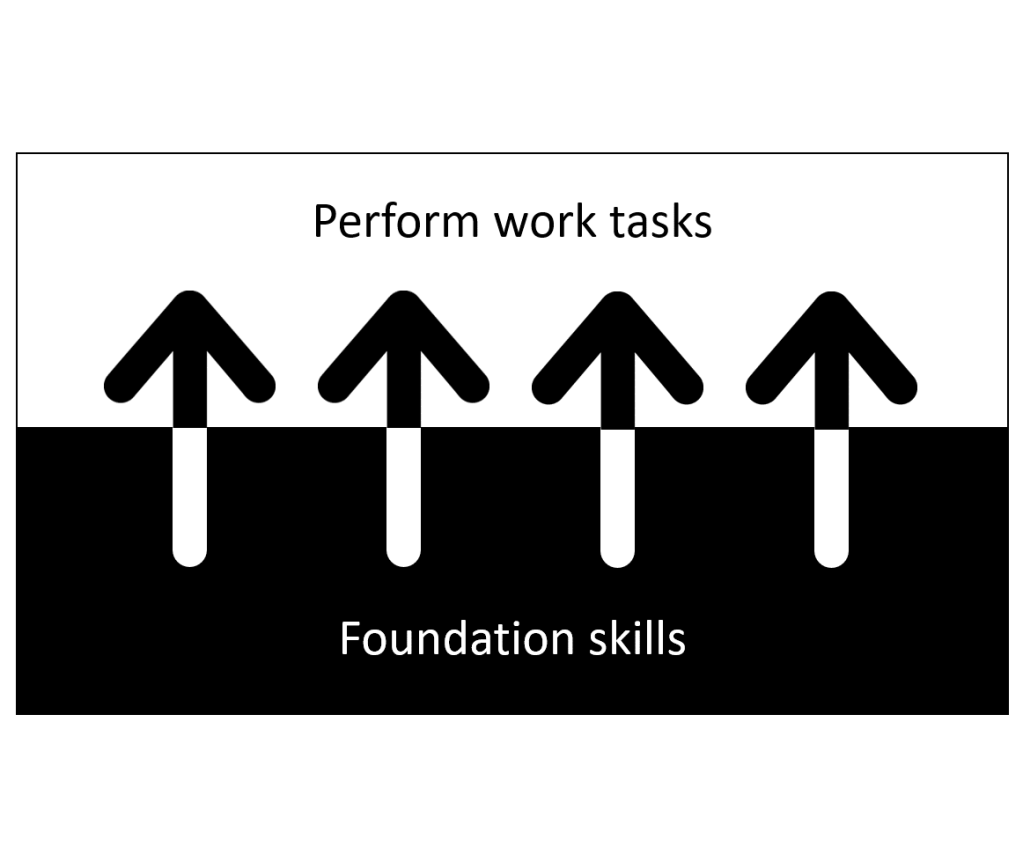
The following illustrates how foundation skills underpin the performance of work tasks and activities.

Foundation Skills from the units of competency

The prime function of Australia’s VET system is to help people learn to perform work tasks and activities. Units of competency describe the work tasks and activities to be performed and specify the standards of performance expected by industry and employers.

And the Australian VET system defines competency as the consistent application of knowledge and skills to the standard of performance required in the workplace. This definition acknowledges that a person needs knowledge and skills to have the ability to perform work tasks and activities.

The following are examples of information from units of competency.

Description of performance

Performance of work tasks and activities are described by elements and performance criteria. The following is an example for the BSBOPS101 Use business resources unit of competency:

Knowledge required to perform a work task

The essential knowledge required to perform work tasks and activities are described by Knowledge Evidence. The following is an example for the BSBOPS101 Use business resources unit of competency:

Skills required to perform a work task

And the essential skills required to perform work tasks and activities are described by Foundation Skills. The following is an for example for the BSBOPS101 Use business resources unit of competency:

Definition of foundation skills

Foundation skills are defined as those language, literacy, numeracy and employment skills that are essential to the performance of a work task or activity but are not explicit in the performance criteria.

Language, literacy, and numeracy (LLN) skills

The Australian Core Skills Framework (ACSF) is used by Training Packages developers to describe the language, literacy, and numeracy (LLN) skills that underpin the performance of a work task or activity.

The following is an for example for the BSBOPS101 Use business resources unit of competency. It shows that the underpinning LLN skills are reading, writing, oral communication, and numeracy skills.

In the above table, you can see a clear and concise description beside the LLN skills. This gives us context and helps us understand the scope and application of each LLN skill.

Employment skills

There are two frameworks used by Training Packages developers to describe the employment skills that underpin the performance of a work task or activity:

  • Employability Skills Framework
  • Core Skills for Work Developmental Framework.

The Employability Skills Framework was introduced in 2002. It was replaced by the Core Skills for Work Developmental Framework in 2012. Both frameworks are currently in use.

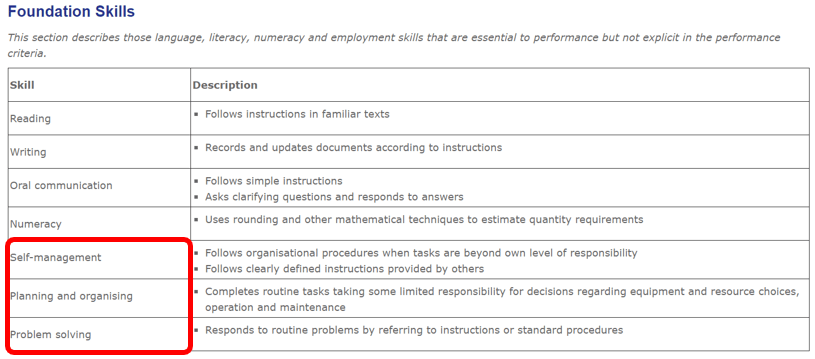
The following is an for example for the BSBOPS101 Use business resources unit of competency. It shows that the underpinning employment skills are self-management, planning and organising, and problem solving skills.

Again, in the above table, you can see a clear and concise description beside the employment skills. This gives us context and helps us understand the scope and application of each employment LLN skill.

If you like history …

If you like history, then you may like to know that before foundations skills and before employability skills, the Australian VET system had Key Competencies, also known as the Mayer Key Competencies. They were introduced in 1992.

A significant change came in 2012, when the new Standards for Training Packages were released. Employablity skills were removed from qualifications, and foundation skills were added to the units of competency.

Unfortunately, Training Package developers have implemented foundation skills in different ways. There is a lack of consistency across different training packages. Here are some examples.

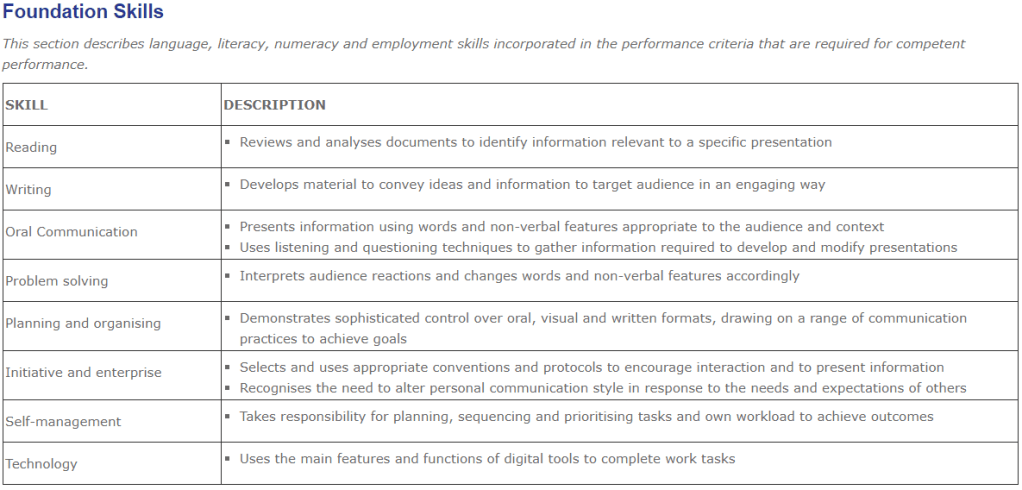
The following shows the foundation skills for the TAELLN411 unit. It provide useful information connecting each foundation skill with the relevant performance criteria. And it is using the 2012 Core Skills for Work framework to specify the employment skills required.

The following shows are the foundation skills for the BSBCMM411 unit. It has used the 2002 Employability Skills framework to specify the employment skills required.

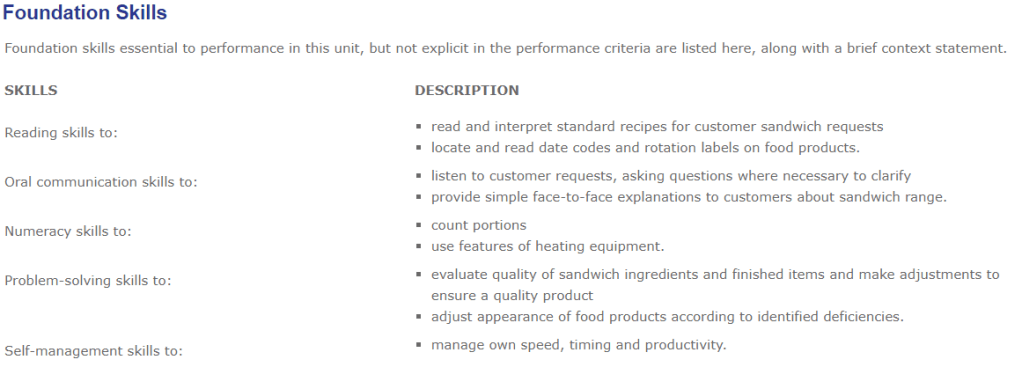
The following shows the foundation skills for the SITHCCC003 unit. It is not as easy to read without table lines.

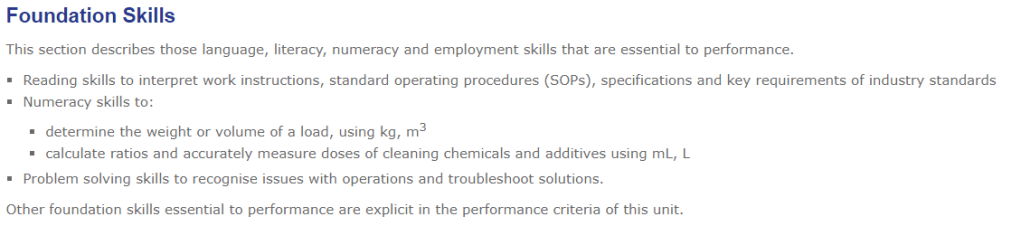
The following shows the foundation skills for the MSTDC2013 unit. It has not used a table format. I think that the information is better when presented in a table (and with table lines).

The following is from the TLID2010 Operate a forklift unit, and it is an example when a Training Package developer has decided not to specify the foundation skills. I do not believe that the foundation skills to operate a forklift have been explicitly described by the performance criteria. I do believe that the Training Package developer did not do the work required to identify the underpinning skills required to perform the task.

There are many units of competency that do not provide information about foundation skills. And in the case of the HLT Health and CHC Community Services Training Packages, there is a Foundation Skills Guide (available from the vetnet.gov.au website). This guide identifies foundation skills for many HLT and CHC units of competency.

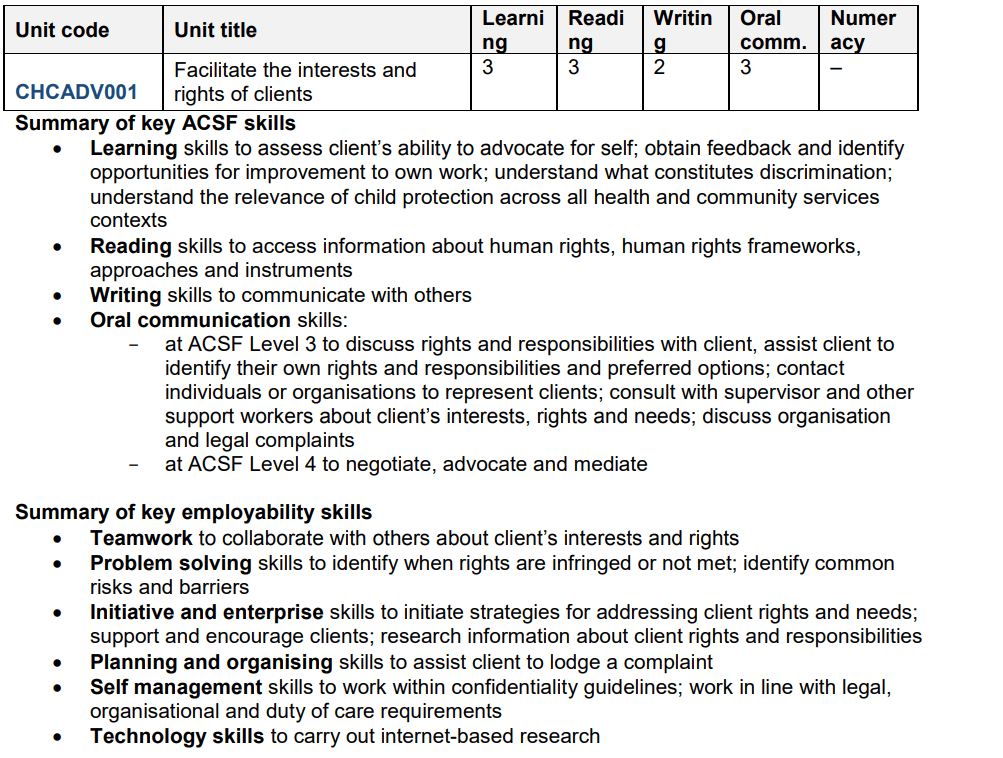
The following shows the foundation skills for the CHCADV001 unit.

Are Foundation Skills assessable?

The recently released units of competency in the BSB Business Services, FNS Financial Services, and ICT Information and Communications Technology Training Packages are stating that foundation skills are assessable. The following is an example for the BSBOPS101 Use business resources unit of competency:

FSK Foundation Skills Training Package

The following information was extracted from the Implementation Guide for the FSK Foundation Skills Training Package (Release 2).

Foundation skills have regularly been identified by employers as essential for successful performance in the workplace. The National Foundation Skills Strategy for Adults reports that 40 per cent of employed Australians do not have the foundation skills needed to meet the complex demands of the modern workplace. These individuals may have difficulty participating in workforce development opportunities and may be limited in their ability to build new vocational skills and knowledge.

The FSK Foundation Skills Training Package was first released in 2013. It was designed to support a greater emphasis on building foundation skills within VET programs, enabling individuals to:

  • acquire the foundation skills that will enable them to participate successfully in education and training
  • build the foundation skills that underpin vocational competence.

There are three qualifications in the FSK Foundation Skills Training Package:

  • FSK10119 Certificate I in Access to Vocational Pathways
  • FSK10219 Certificate I in Skills for Vocational Pathways
  • FSK20119 Certificate II in Skills for Work and Vocational Pathways.

These qualifications are prevocational and do not provide specific vocational outcomes. However, RTOs delivering the FSK qualifications are expected to contextualise the units of competency to enable learners to develop the specific skills and knowledge that are relevant to an industry sector or a typical workplace. This contextulaisation will prepare learners for entry into a vocational learning pathway. In other words, enroll into a vocational qualification.

The FSK Foundation Skills Training Package differs from all other training packages in that it is designed to work in combination with other training packages to support learner achievement of vocational outcomes. It can be delivered before starting a vocational qualification or delivered in conjunction with a vocational qualification.

Most groups of learners will be using the FSK Foundation Skills Training Package to develop or enhance foundation skills in one or more of the following areas:

  • learning
  • reading
  • writing
  • oral communication
  • numeracy
  • digital technology.

Many learners who undertake qualifications from the FSK Foundation Skills Training Package will need considerable support from LLN specialists to address and overcome severe barriers to learning.

In conclusion

Foundation skills are important because they underpin the performance of work tasks and activities.

The Australian VET system uses ‘foundation skills’ in two ways:

  • Foundations skills from the units of competency
  • FSK Foundation Skills Training Package.

I have published another article that describe how to incorporate foundation skills in vocational education and training. The 5-step procedure described in that article will become useful as more Training Packages mandate the assessment of foundation skills.

Do you need help with your TAE studies?

Are you doing the TAE40122 Certificate IV in Training and Assessment, and are you struggling with your studies? Do you want help with your TAE studies?

Ring Alan Maguire on 0493 065 396 to discuss.

Contact now!

logo otws

Training trainers since 1986