Assessment methods, assessment tasks and other jargon used by RTOs

This article aims to clarify some of the jargon used by RTOs relating to assessments:

  • Assessment methods
  • Assessment instruments
  • Assessment tasks
  • Assessment mapping matrix.

Assessment methods

ASQA has published a Guide to assessment tools. This is a reputable source of information about assessment.

On pages 4 and 5 of this guide, it describes four types of assessment methods:

  • Questioning
  • Direct observation
  • Product based methods
  • Third-party evidence.

All other assessment methods are a variation of these four assessment methods. For example, an interview or competency conversation is questioning. And a Portfolio of Evidence is a product based method.

Questioning is applicable for gathering knowledge evidence. The other three types of assessment methods are applicable to gathering performance evidence.

Assessment instruments

The assessment instrument is the document used to support the gathering of evidence and recording the assessor’s judgements about the quality of the evidence (Satisfactory or Not Yet Satisfactory).

The following shows the assessment instrument relevant for each assessment method.

Assessment tasks

RTOs will use assessment tasks to organise and implement their assessment strategies. I would usually plan to gather the knowledge evidence first unless otherwise stated. Therefore, the first assessment tasks would be Knowledge Questions (the candidate provides oral or written answers to questions).

One or more assessment tasks would be needed to gather sufficient performance evidence. These days, many units of competency specify a frequency or volume of Performance Evidence.

For example, the Performance Evidence for the BSBCMM411 Make presentations states that the candidate must demonstrate the ability to complete the tasks outlined in the elements, performance criteria and foundation skills of this unit, including evidence of the ability to prepare and deliver at least two different presentations.

Therefore, one assessment task can be used to gather the knowledge evidence and two assessment tasks can be used to gather the performance evidence.

The following table shows the relationship between assessment tasks and assessment methods.

Unit of Competency: BSBCMM411 Make presentations

The above table shows that Assessment Task 2 uses two assessment methods to gather the performance evidence (direct observation and the review of product, and Assessment Task 3 also uses two assessment methods (third-party report and the review of product).

In this example, products may include relevant emails, presentation plans, feedback forms, visual aids, presentation materials, evaluation reports, self-reflections, etc.

Assessment mapping matrix

Competency-based assessment is assessment based the competency, and competency is described by the Unit of Competency and its associated Assessment Requirements. We use a matrix to visually connect the unit of competency with the assessment methods or assessment tasks.

There are two types of assessment matrix:

  • Mapping against assessment methods
  • Mapping against assessment tasks

Mapping assessment methods

The following is an example a mapping the assessment methods for the BSBCMM411 Make presentations unit of competency.

The above example visually shows that questioning is not being used to gather the performance evidence.

Mapping assessment tasks

The following is an example a mapping the assessment tasks for the BSBCMM411 Make presentations unit of competency.

The above example visually shows that questioning is not being used to gather the performance evidence.

Adding cross-referencing details

The following is an example of an assessment mapping matrix that provides cross referencing details relating to the assessment instruments for the BSBCMM411 Make presentations unit of competency.

The level of detail in the above example supports the review, validation or audit processes conducted by an RTO.

In conclusion

The jargon associated with competency-based assessments can be confusing, especially if the person is new to the Australian VET system. And using a matrix for mapping the assessment may take time to understand.

Competency-based assessment is assessment based the competency. We use a matrix to visually connect the unit of competency with the assessment methods or assessment tasks.

Step 1. Copy and paste the unit of competency

Step 2. Identify the assessment methods or assessment tasks that will be used to gather evidence of competency

My preference is to use assessment tasks rather than assessment methods to organise and implement the assessments.

Do you need help with your TAE studies?

Are you a doing the TAE40122 Certificate IV in Training and Assessment, and are you struggling with your studies? Do you want help with your TAE studies?
Ring Alan Maguire on 0493 065 396 to discuss.

Contact now!

logo otws

Training trainers since 1986

Making a start on designing competency-based training programs and training sessions

The TAEDES412 Design and develop plans for vocational training unit of competency will require the TAE Student to:

  • design and develop plans for group learning that covers at least 2 entire units of competency
  • design and develop the detail for 3 consecutive training sessions for each different unit of competency.

Designing a group-based training program

The following information focuses on designing a training program that covers one unit of competency. If you are a TAE Student, you will need to do the following twice because you will required to design a training program that covers two units of competency. Avoid integrating the delivery of the two units because this will make it more complicated than it needs to be. Keep you approach as simple as possible.

The TAEDES412 unit does not specify the duration a training session. It does not specify that the training plan covering a unit of competency must consist of 30-minute training sessions. The duration of 30 minutes is not a realistic timeframe for a training session to train a group of learners. When designing a training program, I start by creating a training agenda consisting of one-hour blocks of time.

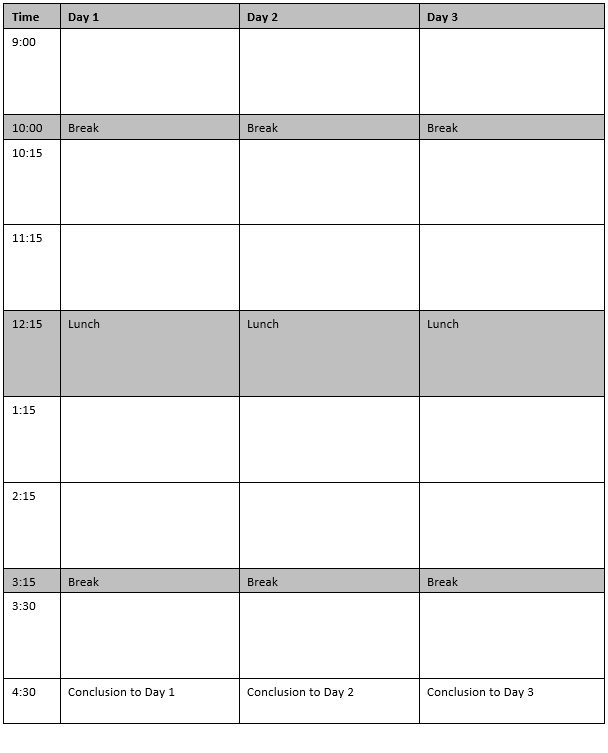
The following shows the outline for a 3-day training program with 6 one-hour blocks of time for each day.

Most units of competency in the Australian VET system will require more than one training day. The total training duration will usually be between 2 and 5 days.

The one-hour block of time structure is simple and makes it easier to figure out the chunking and sequencing of content to be delivered. And remember to factor in time for learning activities, including the practice of skills and tasks. I like to allocate at least 50% of the available time for conducting learning activities.

I design the training using one hour as the duration for a ‘standard training session’. Sometimes a period of time greater than one hour is required. This usually is required to cater for learning activities that need more time, such as, case studies or role playing.

The following shows two examples of training sessions with a duration greater than one hour:

  • Day 1 has used two one-hour blocks of time for a two-hour training session
  • Day 3 has used three one-hour blocks of time for a three-hour training session.

Design three 30-minute training sessions

The TAEDES412 Design and develop plans for vocational training unit of competency requires the TAE Student to design and develop the detail for 3 consecutive training sessions for each different unit of competency.  And the TAEDEL411 Facilitate vocational training unit of competency requires the TAE Student to deliver a series of 3 sequential training sessions of at least 30 minutes duration each to a group of at least 4 learners.

The following table compares the requirements specified by the TAEDES412 unit and the TAEDEL411 unit.

Many RTO delivering the TAE40122 Certificate IV in Training and Assessment qualification will ask their TAE Student to design, develop and deliver a series of 3 sequential training sessions. Unfortunately, there can be a disconnect between designing a realistic training program consisting of training sessions with a duration that are greater than 30 minutes and the requirement of delivering 30-minute training sessions.

The duration of 30 minutes for training sessions is unrealistic. The timeframe of 30 minutes was influenced by RTOs delivering the Certificate IV in Training and Assessment qualification. These RTOs wanted to make it easier for themselves to organise the observation of training sessions being delivered by their TAE Students, and minimise the time consumed by their assessors. The timeframe was not based on the ‘real’ requirements and duration of delivering this type of training session.

If you are a TAE Student, it is best to think that the 30-minute training sessions are an exercise to prove you can deliver training. These training sessions do not represent what happens in the real world. This raises a question: how do you deign a realistic training program and then extract a series of 3 sequential 30-minute training sessions for delivery?

After you have designed the training program covering the unit of competency, split the one-hour blocks of time in half and select a series of three 30-minutes to be your training session to deliver.

The following shows an example of picking three 30-minute blocks of time that can form the basis for a series of 3 sequential 30-minute training sessions.

In conclusion

The total duration of training will need to be estimated before staring to design the competency-based training program. This is required to know how many columns your training agenda will need.

Design the training program using one-hour blocks of time. Blocks of time can be merge to create training sessions with a duration that is greater than one hour.

Recognise the disconnect between the requirements specified by the TAEDES412 Design and develop plans for vocational training unit of competency and the TAEDEL411 Facilitate vocational training unit of competency. Identify 90 minutes from your competency-based training program that can be transformed into series of 3 sequential training sessions for delivery.

Do you need help with your TAE studies?

Are you a doing the TAE40122 Certificate IV in Training and Assessment, and are you struggling with your studies? Do you want help with your TAE studies?

Ring Alan Maguire on 0493 065 396 to discuss.

Contact now!

logo otws

Training trainers since 1986

Quickly turn PowerPoint slides into Handouts in 5 easy steps

If you are a TAE Student, you are likely to be encouraged or required to create visual aids and handouts. A common visual aid are PowerPoint slides. These PowerPoint slides can be quickly transformed into a handout.

Step 1. Prepare PowerPoint slides for the handout

Make a copy of your PowerPoint slides and remove slides that you do not want included in the handout. For example, you may have slides with quiz answers or administrivia that should be removed.

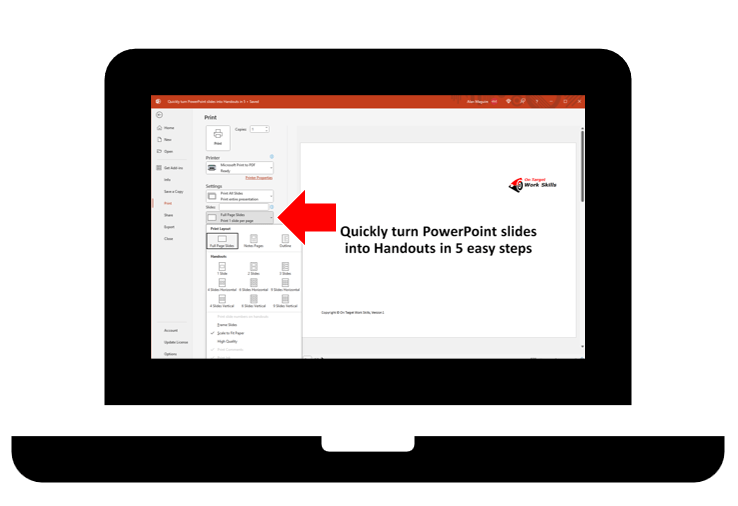
Step 2. Select ‘Print to PDF’

The handout shall be created as a PDF files. Go to the ‘Print’ function and select ‘Print to PDF’.

Step 3. Open ‘Print Layout’

Use the drop-down menu to open ‘Print Layout’ options.

Step 4. Select ‘Handout 3 Slides’

There is a range of handout layouts. Generally, I have found the 3 slides to each page as the most useful layout. This layout provides space for the learner to write their own notes relating to each slides.

Step 5. ‘Print’ and save PDF file

Select ‘Print’ and then you will need to select the location where you want to save the PDF file. This PDF file can be sent to your learners electronically or printed on paper and given to your learners.

In conclusion

Creating a handout from your PowerPoint slides is quick and easy. If you are a TAE Student, this can save you time so that you can move onto other things.

There are some advanced features such as adding RTO details, copyright details, version number or other information to the handout. This is done from the ‘Handout Master’.

What if you don’t have PowerPoint slides?

If you must create a handout and you don’t have PowerPoint slides, then you will need to develop a document. But this needs to be a topic for another article.

Other related articles that I have published are:

Do you need help with your TAE studies?

Are you a doing the TAE40122 Certificate IV in Training and Assessment, and are you struggling with your studies? Do you want help with your TAE studies?

Ring Alan Maguire on 0493 065 396 to discuss.

Contact now!

logo otws

Training trainers since 1986

Why are examples and demonstrations important during training?

It is unbelievable that some RTOs delivering the TAE40116 or TAE40122 Certificate IV in Training and Assessment qualification are bad at giving examples. Sometimes examples are provided but they don’t help to clarify what needs to be done. Sometimes examples are provided but they are not consistent with the templates that are to be used. And sometimes no or very few examples are provided.

RTOs delivering the TAE qualifications should provide a model of good practice. This allows TAE students to learn what to do from good experience rather than learn what not to do from bad experience. Also, I cannot believe that ASQA has allowed RTOs to deliver such an important qualification with deficient learning resources. This is probably an outcome from a regulator that relies on RTOs to self-regulate .

The importance of examples and demonstrations

Examples and demonstrations are incredibly important during training for a variety of reasons. Here are three of those reasons:

  • Enhanced understanding
  • Improved engagement and motivation
  • Skill development and confidence building.

Enhanced understanding

Concepts come to life: Abstract ideas can be difficult to grasp. By providing concrete examples and demonstrations, learners can see and experience the concept in action, making it more relatable and easier to understand.

Bridges the gap between theory and practice: Training often involves learning theoretical knowledge. Examples and demonstrations show how to apply that knowledge in practical situations, creating a clear connection between the two.

Visual learners benefit: Not everyone learns best through listening to trainers or reading. For visual learners, seeing examples and demonstrations is crucial for effectively processing and retaining information.

Improved engagement and motivation

More interesting and interactive: Training with examples and demonstrations can be more engaging and interactive than lectures or reading alone. This can keep learners more interested and motivated, leading to better learning outcomes.

Provides opportunities for active participation: Learners can participate in discussions about the examples, ask questions, and even practice the demonstrated skills themselves. This active participation further enhances engagement and learning.

Reduces cognitive load: Examples and demonstrations can break down complex information into smaller, more manageable chunks, making it easier for learners to process and remember. This reduces cognitive load and promotes better understanding.

Skill development and confidence building

Seeing things done correctly: By seeing completed examples, learners can get clarity about what needs to be done and expected standards. And by observing a demonstration, learners can learn the proper technique and avoid common mistakes. This leads to faster skill development and improved performance.

Provides a chance to practice: Demonstrations can be followed by guided practice, allowing learners to apply what they learned in a controlled environment. This builds confidence and helps them refine their skills.

In conclusion

Overall, examples and demonstrations are powerful tools that can significantly enhance the effectiveness of training. They make learning more engaging, improve understanding, and promote skill development, ultimately leading to better performance and improved outcomes.

A recent poll of TAE40116 or TAE40122 Certificate IV in Training and Assessment students found that 40% were being given good examples from their RTO, but 60% said that no or sub-standard examples were provided by their RTO. It is a shame, and it is ironic, that many TAE students are experiencing ‘bad practice’ from RTOs during their TAE course, rather than ‘good practice’.

Do you need help with your TAE studies?

Are you a doing the TAE40122 Certificate IV in Training and Assessment, and are you struggling with your studies? Do you want help with your TAE studies?

Ring Alan Maguire on 0493 065 396 to discuss.

Contact now!

logo otws

Training trainers since 1986

7 actionable strategies to enhance the clarity and impact of your training handouts

If you are a TAE40116 or TAE40122 Certificate IV in Training and Assessment student, you will be required to find, customise and use learning resources. A common learning resource is the training handout.

Creating professional and effective training handouts is crucial for ensuring that your learners grasps and retains the information you’re presenting. Here are seven strategies to help you develop high-quality training handouts.

  1. Consistent formatting
  2. Visual appeal
  3. Organised structure
  4. Engaging content
  5. Clarity and simplicity
  6. Include practical exercises
  7. Headers and footers

1. Consistent formatting

Maintain a consistent and professional layout throughout the handout. Use a clean and readable font, appropriate font size, and consistent formatting for headings, subheadings, and bullet points.

The following illustrates the differences between three font types.

Usually, Microsoft Word uses the Calibri font and 11-point font size as the default settings. This is a clean and readable font, and the 11-point font size is likely to be appropriate for most situations.

Here are three general rules to enhance a handout’s readability:

  • Avoid the overuse of bold text, italic text, and underlined text
  • Use ‘left alignment’ for all headings and text
  • Don’t ‘justify’ the text.

The following are my recommendations for font type and size of headings, sub-headings and text.

2. Visual appeal

Incorporate visuals like charts, graphs, and images to enhance understanding. Ensure that visuals are relevant, high-quality, and contribute to the overall clarity of the content.

Don’t breach copyright.

Don’t use irrelevant images.

Don’t ‘decorate’ your handout.

Do use ‘white space’ to enhance the visual appeal and readability.

3. Organised structure

Organise information logically, following a clear structure. Use headings, subheadings, and bullet points to break down content into easily digestible sections. Consider a chronological order or a step-by-step approach.

4. Engaging content

Keep the content engaging by using a conversational tone and avoiding overly technical jargon. Include examples and real-life scenarios to illustrate key points and make the material relatable.

5. Clarity and simplicity

Ensure that your language is clear and concise. Avoid unnecessary complexity and use simple language to convey your message. Be mindful of the reading comprehension level of your learners.

6. Include practical exercises

Integrate practical exercises or activities within the handout. This encourages active participation and helps reinforce learning. Include space for participants to jot down their thoughts or answers.

7. Headers and footers

Use headers and footer for recording information about the handout, such as:

  • Title of handout
  • Unit code and title (if applicable)
  • Copyright or organisation’s details
  • Version number
  • Page number.

In conclusion

By adhering to these guidelines, you can create training handouts that are not only professional but also effective in facilitating a successful learning experience for your learners.

It is highly likely that a TAE40116 or TAE40122 Certificate IV in Training and Assessment student will be encouraged to develop training handouts using a word processing application, such as, Microsoft’s Word. I acknowledge that Word is not the only word processing application, but it is commonly used. You will likely need the ability to use key features and functions of Microsoft Word, such as:

  • Use ‘copy and paste’
  • Change font type and size
  • Use ‘Format Painter’
  • Create bullet points and numbered lists
  • Insert and format tables
  • Insert headers and footers
  • Insert images (pictures, icons, graphs, etc.)
  • Change page orientation (portrait, landscape)
  • Use spell check.

After reading this article, you may like to read another relevant article that I have recently published. It is titled, ‘Finding, customising and using learning resources‘.

Do you need help with your TAE studies?

Are you a doing the TAE40116 or TAE40122 Certificate IV in Training and Assessment, and are you struggling with your studies? Do you want help with your TAE studies?

Ring Alan Maguire on 0493 065 396 to discuss.

Contact now!

logo otws

Training trainers since 1986