Foundation Skills have changed

The 2025 Training Package Organising Framework has replaced the 2012 Standards for Training Packages. The 2025 Training Package Organising Framework makes a significant change regarding Foundation Skills:

  • The definition of Foundation Skills has changed, and
  • The information about Foundation Skills has changed.

The definition of Foundation Skills has changed

The 2012 Standards for Training Packages required Foundation Skills to be documented at the Unit of Competency level. Also, the 2012 Standards for Training Packages clearly defined Foundation Skills as the language, literacy, numeracy and employment skills. [1]

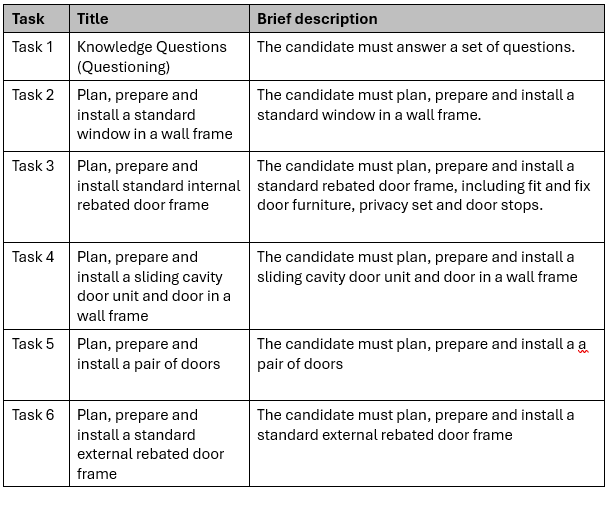
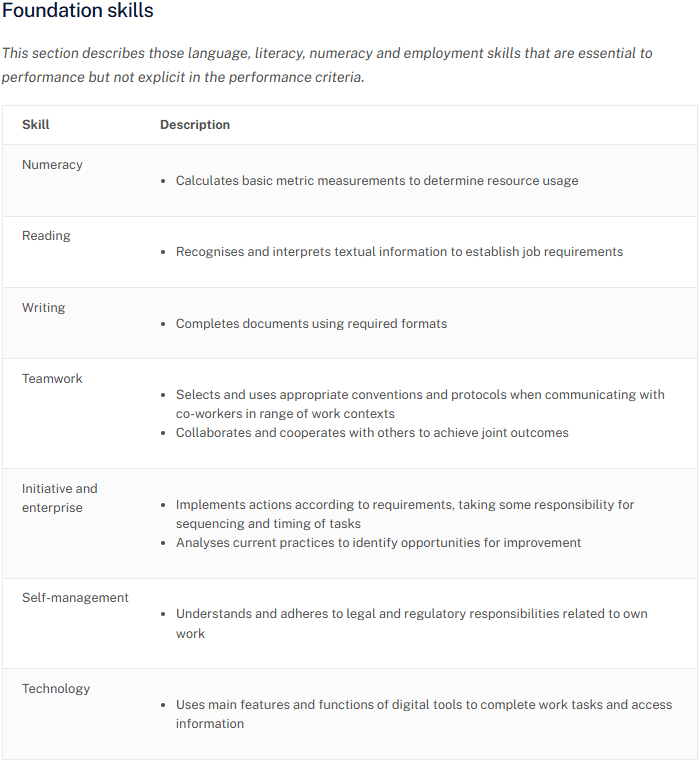
Training Package developers described Foundation Skills that specifically related to the Unit of Competency. For example, the following shows the Foundation Skills that have been specified for the BSBSUS211 Participate in sustainable work practices unit.

In the above example it describes three language, literacy and numeracy skills and several employment skills (teamwork, initiative and enterprise, self-management, and technology). This information about Foundation Skills will no longer be required at the Unit of Competency level. Also, this detailed information about Foundation Skills that specifically relates to the Unit of Competency will no longer be provided.

The 2025 Training Package Organising Framework makes a significant change to Foundation Skills. Instead of specifying Foundation Skills at the Unit of Competency level, Foundation Skills are to be specified within the Qualification or Skill Set. However, a Training Package developer may document Foundation Skills for a Unit of Competency that is a standalone unit or has high delivery as a single unit. [2]

A standalone unit is defined as a unit that is not packaged as part of a qualification. Previously, all units had to be packaged as part of a qualification. This requirement has changed. [2]

An example of a single unit with high delivery is First Aid. [2]

The 2025 Training Package Organising Framework redefines Foundations Skills. Foundation Skills are now defined as the five Australian Core Skills Framework (ACSF) skills: [2] [3]

  • Learning skills
  • Reading skills
  • Writing skills
  • Oral communication skills
  • Numeracy skills.

Specifying digital literacy skills is optional. [2]

The information about Foundation Skills has changed

The 2025 Training Package Organising Framework require Foundation Skills to be specified within the Qualification or Skill Set. The Training Package developer may document Foundation Skills within a Unit of Competency that is a standalone unit or has high delivery as a single unit, but this is optional. [2]

Importantly, the information about Foundation Skills provided by Training Package developers has changed. Instead of providing detailed information about relevant Foundation Skills for a Unit of Competency, the Training Package developers will state the required ACSF level for each of the five Core Skill from the ACSF and display this information as a bar chart. For example: [2]

Specifying digital literacy skills is optional. The Training Package developer may specify digital literacy skills as a descriptive statement below the Foundation Skills bar chart. [2]

The following table compares pre-2025 Foundation Skills and post-2025 Foundation Skills.

I hope the last row in the above table clearly shows how information about Foundation Skills provided by Training Package developers are significantly changing.

In conclusion

Units of Competency are the building blocks for Qualifications and Skill Sets. Each Unit of Competency has its own unique foundation skill requirements. The Foundation Skills bar chart for a Qualification or Skill Set provides no information relevant to foundation skills required to perform work tasks covered by any particular Unit of Competency.

When the 2012 Standards for Training were implemented many people complained about losing useful Range Statement information. As the 2025 Training Package Organising Framework are implemented, I wonder if people are going to complain about losing useful Foundation Skills information.

“You don’t know what you have until it’s gone.”

References

[1] 2012 Standards for Training Packages (last updated in 2022)

[2] 2025 Training Package Organising Framework

[3] Australian Core Skills Framework

Do you need help with your TAE studies?

Are you a doing the TAE40122 Certificate IV in Training and Assessment, and are you struggling with your studies? Do you need help with your TAE studies?

Ring Alan Maguire on 0493 065 396 to discuss.

Contact now!

logo otws

Training trainers since 1986

Using AI is not learning

Introduction

As a trainer and assessor, I have been delivering the Certificate IV in Training and Assessment qualification since it was released in 2004. Over the past two decades I have seen many changes. A new phenomenon has recently appeared.

Over the past two years the answers to knowledge questions that are submitted for assessment have significantly improved. Two years ago, I would have seen many poorly written answers with spelling and grammatical errors. Last year, there was a noticeable improvement with far less spelling and grammatical errors. This year, most answers to knowledge questions are very well written.

Usually, at least half of the participants attending my Certificate IV in Training and Assessment courses have English as their second language. And I have come to expect spelling and grammatical errors. But things have changed. Miraculously, I am now assessing written answers to questions that seem to be too good to believe.

Also, I am seeing many more people spelling words using American English rather than Australian English. I am seeing the letter ‘z’ far too often.

What has happened?

Over the past two years there has been a substantial uptake in people using AI. Like many people, I too use AI often. And like many people, I find it to be useful.

As a trainer, I tell my participants that AI may be useful. However, I asked them not to use AI for answering their knowledge questions. I tell them that there are five ways I can tell if a response has been generated by AI:

  • Consistency: AI responses are often highly consistent in tone, style, and factual accuracy, making them seem almost too perfect.
  • Pattern Recognition: Look for repetitive phrases, unnatural sentence structures, or overreliance on certain keywords.
  • American English Bias: AI may favor American English, using “z” instead of “s” in words like “analyze” or “realize.”
  • Numbered Lists: AI often generates numbered lists, even when they are not explicitly requested.
  • Key Phrase Followed by Colon: Pay attention to responses that frequently use a key phrase followed by a colon, followed by additional information. This is a common pattern in AI-generated text.

By the way, I used AI to generate the above list.

People are using AI

I am assuming that many participants studying for a vocational education and training (VET) qualification are using AI. And I will assume that the number of participants using AI will grow. It is likely that some participants will be tempted to use AI to help them answer their knowledge questions.

Some participants make it easy to identify when an answer has been generated by AI. I see answers with the following characteristics:

  • Key Phrase Followed by Colon: Responses that have used a key phrase followed by a colon, followed by additional information.
  • Over capitalisation (using too many capital letters)
  • The letter ‘z’.

Grammarly is AI

Recently, I asked one of my participants if they were using AI to answer the knowledge questions. They told me that they were not. As I showed the participant why I had asked my question, they told me that they use Grammarly. Luckily, I knew that Grammarly is AI because I was able to inform them that the use of this application was likely to be doing more than just correcting spelling and grammatical errors. The participant agreed and said that they would immediately remove the application.

The following is a snippet from the Grammarly homepage.

Grammarly will write text, not just correct spelling and grammar. The same thing is likely to be happening for people with English as their second language when they are using translation apps. I’m not sure, but if you know, I would be happy to hear from you.

Using AI to investigate the use of AI

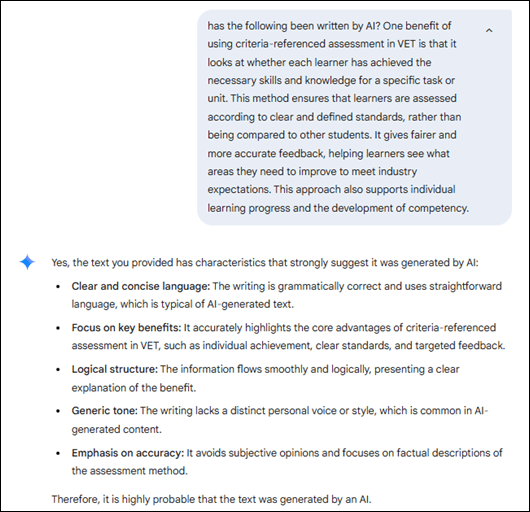
Many answers to knowledge questions are looking too perfect to have been written by a human. But, how do I know if an answer has been generated by AI? I provided the answer from one of my participants and I asked AI if it had been written by AI. Here is AI’s response.

AI tells me that it is highly probable that the text was generated by AI.

This backs up my hunch that the participant’s answer to the knowledge question was likely to have been generated by AI. And I have a hunch that many participants are using AI to write answers to their knowledge questions.

AI is getting better

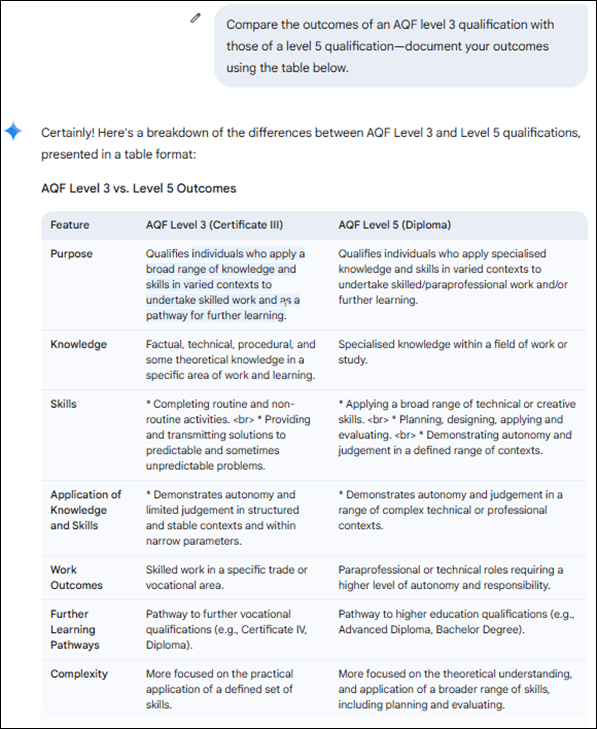
Two years ago, even a year ago, I would have been getting many more incorrect answers from AI. It is continuously getting better and because it is connected to the internet, the AI-generated responses can be astonishingly accurate. Here are examples when I have asked AI to answer two different knowledge questions.

Example 1

I did not provide the table. AI generated it.

Example 2

There was no need to go to the website. AI provided the link.

AI can give wrong answers

Although AI is getting better, it still can give the incorrect answers.

Here is an answer to a knowledge question submitted by a participant.

The correct answer that I’m looking for is, ‘JSA stands for Jobs and Skills Australia’.

I asked AI, ‘what does JSA stand for’, and the following is what I got.

This tells me that the participant probably got their answer from AI. As an assessor, it is good that AI is still providing some incorrect answers.

In conclusion

Participants studying for VET qualifications are using AI. On one hand we are encouraging our participants to use AI to help them perform their work. But on the other hand, we tell our participants not to use AI to answer the knowledge questions.

Regardless of what we say, some participants are using AI to answer their knowledge questions. Their answers may have the following characteristics:

  • Answers that are very well written without spelling and grammatical errors
  • Answers that are in a format that looks AI-generated
  • Answers with the letter ‘z’
  • Answers that are obviously incorrect.

I believe that many participants will use AI. And I believe that many participants will not use AI as a tool to help them learn something. Instead, it is only being used to blindly answer questions – no thinking involved.

Using AI is not learning.

It would be good to hear what you think about this topic.

Please contact me, Alan Maguire on 0493 065 396, if you need to learn how to legitimately use AI as a trainer and assessor, or legitimately use AI if you are studying for their TAE40122 Certificate IV in Training and Assessment qualification.

Do you need help with your TAE studies?

Are you a doing the TAE40122 Certificate IV in Training and Assessment, and are you struggling with your studies? Do you want help with your TAE studies?

Ring Alan Maguire on 0493 065 396 to discuss.

Contact now!

logo otws

Training trainers since 1986

A short history of online learning

This is a short history of online learning. It may be incomplete but I have tried to capture the big historical events. Also, I have written this article with a connection to Australia and the Australian VET system.

Distance learning

Before online learning we had distance learning. Distance learning was traditionally conducted by correspondence where the student corresponded with the school, university, or learning institution via mail. Wikipedia tells me that one of the earliest attempts to provide a correspondence course was in 1728. [1]

In the 1930s, two hundred years later, there was a rapid spread of radio. This led to the wide-spread use of radio for distance education in the USA.

In Australia, the School of the Air started broadcasting lessons to school children in 1951.

The Australian Broadcasting Commission (ABC) started using television to broadcast education programs to schools in the 1960s.

The use of broadcast television for adult education has been limited.

During the 1980s audio cassettes and video cassettes were being widely used for educational purposes. This included personal development, motivational and business training. Some business training topics covered by audio and video cassettes included selling skills, customer service skills, meeting skills, and presentation skills.

Computer-based training

I was working in an office in 1986 when the first desktop computer arrived. It was a ‘share computer’ for everyone in the office to use. There was about 25 people working in the office at that time. A second computer arrived soon after the first, but it was for the exclusive use of the office administrator.

Personal computers started to take off in the mid 1980s and early 1990s. Computers were becoming part of the office and more people were buying computers for their home. At this time I was working for Telecom Australia (now known as Telstra Corporation), and we were beginning to develop computer-based training. I bought my first computer in 1986. It had MultiMate word processing software, a 5-¼ inch floppy disk drive, monochrome monitor, and a dot matrix printer.

Data storage

The early personal computers had limited data storage capability. Over the years the internal storage capacity increased. And the ability to install new software increased as we went from big floppy disks, to smaller floppy disks, to CD-ROMs. Later, USB memory sticks made it even easier and quicker for the installation of new software and transfer of files.

During the 1990s, everyone in the office I was working at was using a computer. And the new, big thing was email. Email and word processing revolutionalise the way we worked. But internet access was limited to a few ‘trusted people’ because it was thought that productivity would be lowered if everyone had it.

The installation of games onto home computers, including educational games for children, was happening during the late 1990s and the early 2000s. Using computers for the purpose of learning was beginning to gain general acceptance.

Internet

The internet changed everything. I can still remember connecting to the internet via dial-up modem. Connecting to the internet was slow and the speed of the internet was slow. The next big thing was fast broadband internet with the capability to support voice and video.

The widespread use of computers and the internet have made distance learning easier and faster, and today virtual schools and virtual universities deliver full curricula online.

Faster, smaller and cheaper computers and the development of applications

In recent years, computers have got faster, smaller and cheaper. And access to strong, stable and fast internet connections are reasonably priced. I understand that some Australians in remote and rural areas may not have the same connectivity or they still have internet issues. And, it is said that, some Australians may struggle to afford access to the internet. However, the vast majority of people in Australia today have at least one device connected to the internet.

Ready access to computer hardware and software has removed many of the technology barriers to accessing online learning. Today’s personal computers have access to a large number of applications, such as email and word processing. Learning management systems (LMS) can be easily downloaded and installed. And many personal computers come with a camera and microphone that enable video conferencing.

Smart phone

By the mid-2010s, the smartphone had become common. These days, it is rare for someone to have a dumb-phone.

Smart phones are ubiquitous. Many people have got use to using technology in their everyday life. People use their smart phone for communicating with others by voice, by text, by email, by video. And people use their smart phone for social media, banking, shopping, searching the internet, etc.

Generally, people have overcome many of their fears and concerns about using technology. Therefore, using technology for learning has been legitimised.

COVID-19

In 2020, COVID-19 arrived in Australia. Work went online, school went online, university went online, so much of our lives went online for many people. And during this time a significant number of RTOs shifted training delivery online in response to the COVID-19 pandemic. Getting learning resources to learners and using video conferencing for training became common. For many trainers, this was their first experience at facilitating online learning. This crisis became an opportunity for many trainers to develop their capability to deliver online learning.

Many trainers will no longer be resistant to changing from ‘traditional training methods’ to using online learning. However, many things in vocational education and training can not be delivered or assessed using online methods. The future will be a blended approach, combining traditional and online methods.

In conclusion

There are still some real barriers to using online learning. For example:

  • Some people have no or limited experience using computers. This continues to be a barrier for them to participate in online learning.
  • Some developers of online learning lack the ability to design and develop user-friendly and effective online learning programs and resources. This frustrates learners and creates unnecessary barriers to learning, regardless of the learner’s technology skills.

The TAE40122 Certificate IV in Training and Assessment qualification has recognised that many trainers and assessors will need the capability to deliver online learning and conduct assessments using online methods. Two elective units of competency that are likely to be included in the TAE40122 Certificate IV in Training and Assessment qualification are:

  • TAEDEL405 Plan, organise and facilitate online learning
  • TAEASS404 Assess competence in an online environment

Reference

[1] https://en.wikipedia.org/wiki/Distance_education accessed 23 October 2023

Do you need help with your TAE studies?

Are you a doing the TAE40122 Certificate IV in Training and Assessment, and are you struggling with your studies? Do you want help with your TAE studies?

Ring Alan Maguire on 0493 065 396 to discuss.

Contact now!

logo otws

Training trainers since 1986

If Thing 1 is ChatGPT, then Thing 2 is the new Microsoft Bing

Everyone may be talking about ChatGPT, but what about the new Bing?

I had the new Bing pushed onto my computer on the 15th of March, 2023. And I finally got around to looking at it today.

What is the new Bing?

The new Bing is Microsoft’s revamped search engine that provides up-to-date and complete answers to your questions. It consolidates sources across the internet to give you a single, summarised answer. It also cites the sources of information. The new Bing is powered by ChatGPT-4, but it gives a different experience to the user.

What is the different between ChatGPT and the new Bing?

ChatGPT and Bing Chat are both AI chatbots that can understand when you ask them questions or make statements in natural, human language. Both services support a range of languages, though ChatGPT is more focused on English, where Bing Chat offers a wider array of non-English languages.

Bing Chat is available on more platforms than ChatGPT, including Android, iOS, and even the Skype app. However, it currently requires you to join a waitlist whereas you can use ChatGPT immediately. Bing primarily functions as a search engine, so the new Chat feature can access web results and up-to-date information.

ChatGPT has an optional paid Plus subscription, which grants you priority access over the free tier. Bing is also free to use, but Microsoft restricts the number of conversations you can have per day.

Note: The above answer was provided by the new Bing.

What restrictions has Microsoft put on Chat function?

Currently, the Bing Chat allows up to 15 chat items per session and a total of 150 chat items per day. These restrictions may change over time. Microsoft introduced these restrictions for Bing Chat because long sessions can ‘confuse’ the program’s computing model and produce uneven or inappropriate responses.

What does the Bing Chat look like?

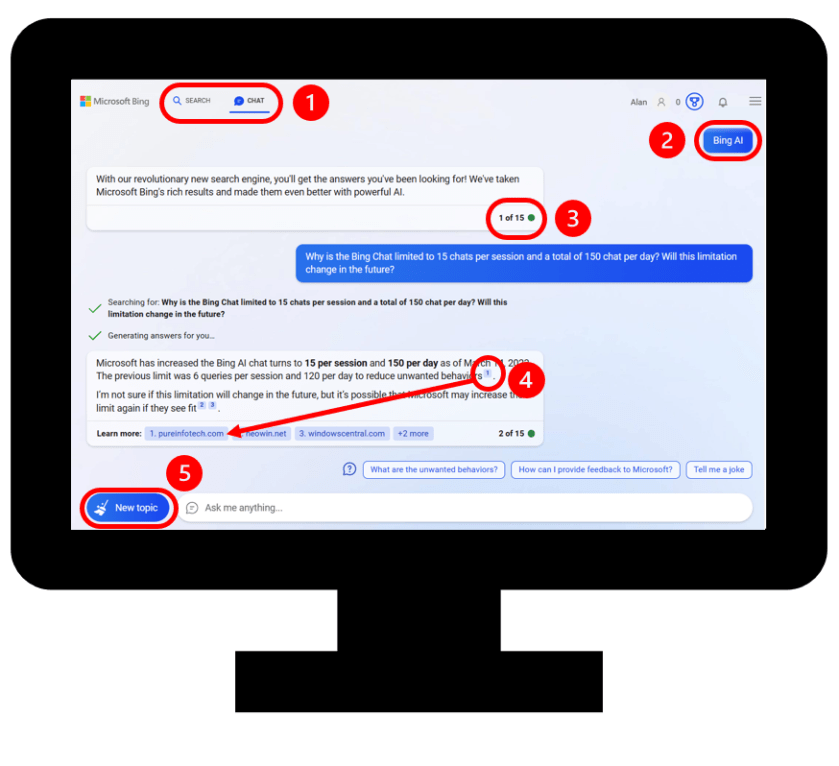
The following illustrates what the Bing Chat looks like. In ‘red’, I have highlighted a few points (see below for my comments).

  1. The new Bing allows us to toggle between searching the internet and using the chat function. This is a useful feature.
  2. Our questions are left-justified and the responses are right-justified. ChatGPT left justifies both questions and response which I find better for readability.
  3. The number of chat items in a session are clearly recorded as 1 of 15, 2 of 15, etc. Remember that each chat is restricted to 15 items.
  4. The new Bing clearly cites the sources of the information and it provides a link to the web page. This is useful for verifying the information.
  5. A new chat for a new topic can be easily started. However, when you start a new topic the previous topic is removed. It does a ‘clean sweep’ of the previous chat.

Is the new Bing Chat any good?

The new Bing Chat is impressive. It provides a different user experience than ChatGPT. For example, I found the new Bing slower to respond than ChatGPT, but I am talking about having to wait a few more seconds.

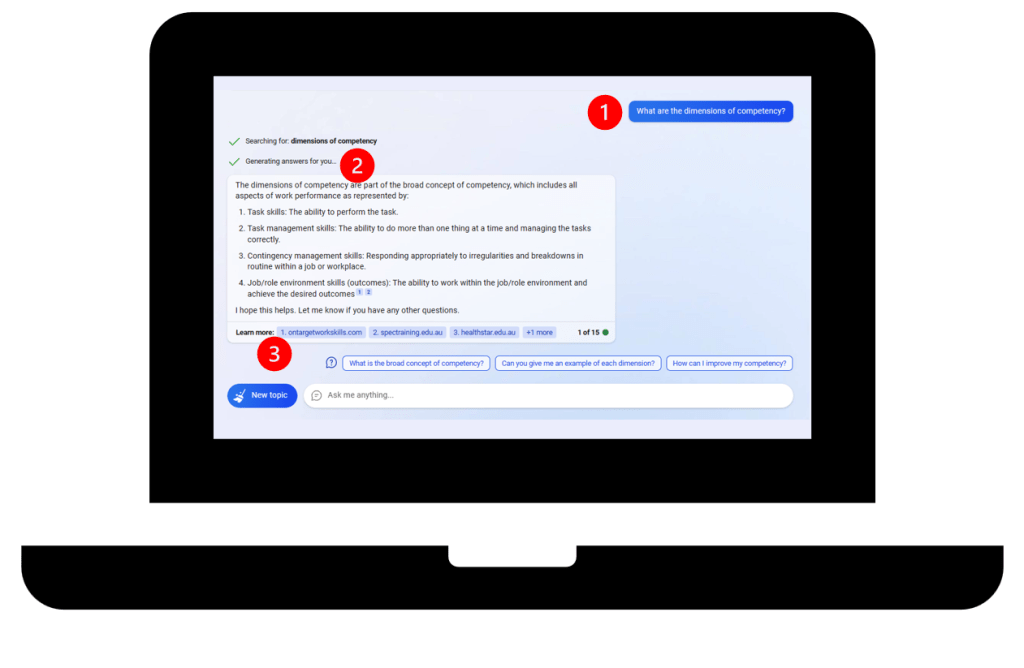
I asked Bing Chat, “What are the dimensions of competency?” Within 15 second I was given the correct answer and it was within the context of the Australian VET system. I hadn’t specified the context but it was exactly what I was wanting.

The following show my question and the answer I received. In ‘red’, I have highlighted a few points (see below for my comments).

  1. This was my questions.
  2. This was the answer to my question.
  3. The answer must be good since it has cited my website as a source of the information it has provided. (And my ontargetworkskills.com website was listed as number 1!)

Upcoming webinar

I am delivering a webinar titled, ‘ChatGPT and how to use it before and during training’. At this webinar, I will include information about the new Bing.

If you would like to attend this webinar, follow this link for details : ChatGPT and how to use it before and during training.

Ring Alan Maguire on 0493 065 396 if you would like further information.

Contact now!

logo otws

Training trainers since 1986

Sneak preview of webinar about ChatGPT and how to use it for training purposes

Anyone who knows me, knows that I love PowerPoint. And anyone who knows me, knows that I create PowerPoint presentations to support the delivery of training programs and webinars.

I am delivering an interactive webinar titled, ‘ChatGPT and how to use it before and during training’. This webinar includes real-time demonstration of ChatGPT and the opportunity for your questions to be asked.

Here is a sneak preview of some PowerPoint slides that I have developed for this webinar. These cover some of the background information about ChatGPT before getting into how to use it for training purposes.

I hope you enjoy having a ‘walk-through the gallery’.

Come along to the webinar if you like to know more about how ChatGPT can be used for training purposes. Follow this link for details: ChatGPT and how to use it before and during training.

Ring Alan Maguire on 0493 065 396 if you would like further information.

Contact now!

logo otws

Training trainers since 1986