Finding, customising and using learning resources

If you are a Certificate IV in Training and Assessment student, you will be required to find, customise and use learning resources.

A learning resource may include:

  • Learner Guide or textbook
  • Fact Sheet, Information Sheet, etc.
  • Handout or activity sheet
  • Presentation aid.

And a presentation aid may include:

  • Slide show presentation application
  • Physical object (prop, model, etc.)
  • Whiteboard or poster.

A 5-step process

The following is a 5-step process for finding, customising and using learning resources:

  • Step 1. Search for existing learning resources
  • Step 2. Review learning resources (Performance Criteria 1.3)
  • Step 3. Customise or develop learning resources (Performance Criteria 2.2)
  • Step 4. Prepare learning environment and check equipment prior to use (Performance Criteria 3.1)
  • Step 5. Use presentation aids (Performance Criteria 3.4).

The above steps have referenced the relevant Performance Criteria from the TAEDEL411 Facilitate vocational training unit of competency. However, the development and use of learning resources is applicable to several TAE units of competency. Therefore, it is highly likely that a Certificate IV in Training and Assessment student will be required to develop and use learning resources many times throughout their training program.

Step 1. Search for existing learning resources

If you’re working for a training provider, you may have access to existing learning resources. And if you don’t have access to existing learning resources, you could search for learning resources on the internet. Some people think that they can freely use whatever resources they find on the internet. We must think that all resources are copyright. Some copyrighted resources can be freely used, but the use of many copyrighted resources is prohibited.

Step 2. Review learning resources

When reviewing learning resources before use, trainers should consider a variety of criteria to ensure the resources are effective, engaging, and appropriate for their learners. Here are some key aspects to consider.

  • Accuracy and currency: Does the information presented align with current industry standards and best practices? Are facts and figures reliable and verifiable?
  • Relevance and alignment: Does the content directly address the learning objectives and target the specific needs of the learners? Is it aligned with the unit of competency or training program?
  • Read-ability or usability: Is the information presented in a clear, concise, and well-organised manner? Are key concepts and ideas easily identified and understood?
  • Cost and availability: Is the resource readily available and affordable for the trainer and learners? Does it fall within budget constraints or licensing agreements?

In addition to the above criteria, check that copyright allows the resource to be used or customised.

Step 3. Customise or develop learning resources

The customisation or development of a learning resource can be time-consuming. Various factors will determine how much time it takes to create the learning resources to support the delivery of a training session. One factor is a person’s computer skills, such as:

  • Ability to use Microsoft Word for producing handouts
  • Ability to use Microsoft PowerPoint for producing presentation slides
  • Ability to ‘copy and paste’ and modify content from the internet
  • Ability to use artificial intelligence (AI) to generate content.

Handouts

Limit the size of your handout. A one, two or three-page handout may be sufficient for a 30-minute training session. However, the number of pages may be more than three, if required.

Here is a short list of qualities for a professional handout:

  • Heading at the top of the handout
  • Simple and consistent style and layout
  • Reference to unit of competency, if relevant
  • Photos, illustrations and diagrams, if appropriate
  • Page numbers and version number
  • Correct grammar and spelling.

Handouts can provide learners with information or can be used to support learning activities. Scenarios, case studies, research questions, discussion questions, quizzes and exercises are some of the ways a handout can become an activity sheet. A handout can be a combination of information and activities.

PowerPoint slides

It is highly likely that a Certificate IV in Training and Assessment student will be encouraged to develop and use a slide show presentation application, such as, Microsoft’s PowerPoint. I acknowledge that PowerPoint is not the only slide show presentation application, but it is commonly used.

Here is a short list of qualities for professional PowerPoint slides:

  • Heading at the top of each slide
  • Simple and consistent style and layout
  • Reference to unit of competency and version control
  • Key points (bullet points and sub-bullet points)
  • Icons, photos, illustrations and diagrams
  • Correct grammar and spelling.

PowerPoint can be used to quickly create a handout. For example, use the ‘Microsoft Print to PDF’ feature, and under ‘Settings’ select ‘Handouts (3 slides per page)’.

Step 4. Prepare learning environment and check equipment prior to use

It is a good idea to list the learning resources and equipment required for the training session. Also, it is a good idea to list the things to be done to prepare the learning environment before commencing the training session; for example:

  • Print sufficient copies of handouts
  • Ensure learning environment is clean, tidy and safe
  • Set up tables and chairs with an appropriate layout
  • Check projection equipment and speakers
  • Display the first PowerPoint slide.

You may want to add make coffee or fill up water bottle to your list.

The physical set up of the learning environment is not required when the training is delivered by a video conferencing application, such as, Zoom or Microsoft’s Teams. However, the trainer will need to ensure learners have access to the learning resources. This may include emailing information, documents or links to documents to the learner before commencing the training session.

Step 5. Use learning resources and presentation aids

The final step is to use the learning resources and presentation aids. After delivering your training session, it is a good practice to review the effectiveness of the learning resources and presentation aids we have used.

In conclusion

Finding existing learning resources can be difficult, and the customising or development of learning resources can be time-consuming.

If you are a Certificate IV in Training and Assessment student, my TAE tutoring service can save you time and help you develop effective learning resources to support the delivery of your 30-minute training sessions. I can assist you with internet search strategies to find existing learning resources. I can help you use the main features and functions of Microsoft Word to develop handouts and activity sheets. And I can help you use the main features and functions of PowerPoint to develop and display information. I can help you learn:

  • How to use Microsoft Word for producing handouts
  • How to use Microsoft PowerPoint for producing presentation slides
  • How to ‘copy and paste’ and modify content from the internet
  • How to use artificial intelligence (AI) to generate content.

Do you need help with your TAE studies?

Are you a doing the TAE40122 Certificate IV in Training and Assessment, and are you struggling with your studies? Do you want help with your TAE studies?

Ring Alan Maguire on 0493 065 396 to discuss.

Contact now!

logo otws

Training trainers since 1986

Are you shopping around for a TAE40122 course?

There are more than 100 Registered Training Providers (RTOs) that are able to deliver the TAE40122 Certificate IV in Training and Assessment qualification. And each RTO can deliver a different product, for example:

  • Different costs
  • Different duration
  • Different training methods
  • Different elective units of competency.

Many people shop around for the cheapest training with the shortest duration. Price and duration are only two things to consider when shopping for a suitable TAE40122 course. This article explores many factors to consider before deciding which RTO to select.

Cost

Some RTOs offer the TAE40122 course cheaper than other RTOs, and some RTOs offer the course for free. A free course that saves a person thousands of dollars is extremely desirable, but some students have had bad experiences with their free course – including poor quality materials to use, insufficient training, and lack of support. Be cautious of cheap or free TAE40122 courses because cheap or free is not an indicator of quality.

Quality

There is no official or credible source of information about which RTOs deliver a quality service. Many people shop around on the internet before selecting an RTO. However, a good website does not automatically mean that the TAE40122 course will be good. A recommendation from a trusted friend or family member may be valuable but the quality delivered by an RTO can be variable. A student may experience good quality from an RTO, while another student with the same RTO may experience bad quality of training and assessment services – this includes poor quality training and assessment materials.

Method of training delivery

Some people prefer self-paced online training, while others prefer group-based training delivered by a trainer. These days group-based training can be delivered in a training room or via video conference application, such as, Zoom or Microsoft’s Teams. Also, it has become common for the training to be delivered using a mix of delivery methods – some of the training is self-paced learning and some group-based training delivered by a trainer. Everyone will have their own preferences and unique circumstances to consider, for example:

  • Do you have adequate computer skills to undertake online training?
  • Do you have the motivation and discipline to undertake self-paced training?
  • Do you prefer guidance from a trainer? And do you prefer to learn with others?
  • What delivery method best suits your busy family and work commitments?

Location of training delivery

Location of training delivery is not a concern for people undertaking a self-paced online training or training delivered via video conference application. However, location becomes important for people who are wanting to attend training. A local location with access to public transport or onsite parking is desirable. Another consideration is whether the parking is free or not. Paid parking adds to the cost of the training.

Time and amount of training

After considering preferred delivery methods and preferred delivery location, we may then consider time – including the amount of training provided by the RTO which influences the duration of the training course.

  • How is training delivered?
  • Where is training delivered?
  • When and how long is the training?

The start date of the training can be important. The number of training days to be attended can be important. And the total period of time between the first and the last training day can be important.

The amount of training days offered by an RTO can range from none to many. Many people will shop around for a TAE40122 course with the shortest duration. For example, some people like the idea of attending a two-week intensive training course. This is equal to 10 days of training, but this approach requires a lot more time and effort after the training to complete assessment tasks without regular guidance from a trainer or interaction with other students.

Another RTO might deliver the course with 25 or more days of training scheduled over 6 or more months. Usually, this approach requires attendance at one training day each week, but the learner would have regular access to a trainer for guidance during the entire course. The training day could be a weekday, or some RTOs will deliver on Saturdays. The training schedule may include breaks – this means that some weeks do not have a training day scheduled. An alternative to attending one training day each week, is attending evening classes. Usually, two evening classes is equivalent to one training day. Evening classes may be once or twice a week.

Online self-paced training usually have a 12-month enrolment period and this approach may not require the need to attend training days.

Getting sufficient training is a key success factor. Many RTOs tend to minimise the amount of training they deliver. This minimses the cost of delivery and maximises profit for the RTO.

Learner support

Many people find the Certificate IV in Training and Assessment qualification very demanding. It can be difficult, and it will require considerable time and effort to complete.  It is highly likely that all RTOs will say that they provide excellent support to their students. This promise is not always delivered. Be cautious of recommendations from RTO owners, RTO managers and RTO staff about their own RTO. Also, the level of support or standard of support is variable. A student may experience good support from an RTO, while another student with the same RTO may experience insufficient or poor support.

In conclusion

Many people who commence their Certificate IV in Training and Assessment qualification do not complete it. There are a range of reasons why this occurs. From my experience as a TAE Trainer and TAE Tutor, I believe that most non-completion is usually caused by the RTO:

  • Insufficient or no training
  • Lack of individualised support
  • No or slow response to requests for help
  • Complicated or confusing assessment tasks.

If you want or need help while studying for your Certificate IV in Training and Assessment qualification, please contact me to discuss my TAE tutoring service. I have helped people who have lost their motivation or are so frustrated that they want to quit. I have helped people who have difficulties understanding or progressing their assessment tasks. And I have helped people who want to speed up their progress or are running out of time to complete their assessments before their enrolment period ends.

Do you need help with your TAE studies?

Are you a doing the TAE40122 Certificate IV in Training and Assessment, and are you struggling with your studies? Do you want help with your TAE studies?

Ring Alan Maguire on 0493 065 396 to discuss.

Contact now!

logo otws

Training trainers since 1986

Do you need help with your TAE40122 studies?

Over the years, I have helped many people as they have struggled with the study and assessment requirements of the Certificate IV in Training and Assessment qualification. It is not an easy qualification to get, and it can be very time consuming.

I have established a TAE Tutoring service to help people who need assistance with their TAE studies, or are wanting to speed-up their progress. Central to my service are tutoring sessions via Zoom video conferencing (frequently using the ‘Share Screen’ function). These sessions are supplemented by emails, text messages, and the occasional phone call.

TAE Tutoring sessions can be weekly, or as required. And some people have had multiple sessions in the one week. My tutoring service is tailored for each individual, and it is totally flexible.

Common problems experienced by TAE40122 students

Some common problems that are experienced by many TAE40122 students include:

  • Unsupported self-paced online learning
  • Complicated assessment instructions
  • Insufficient or unhelpful training.

Unsupported self-paced online learning

Many people doing their Certificate IV in Training and Assessment qualification as self-paced online learning often feel unsupported for various reasons, including:

  • Slow or no response from the RTO when help is needed
  • Lack of timely useful information and advice
  • Unfriendly or uncaring attitude.

Complicated assessment instructions

Many people find the instructions for their assessments are complicated and confusing. And jargon or terminology is often used that is difficult to understanding; especially for people new to the Australian VET system.

In addition to complicated assessment instruments, many TAE students are confronted with a range of templates that must be completed. Sometimes, these templates can be challenging to understand. Also, these templates can be challenging to use; especially if a person only has limited or basic word processing skills.

Insufficient or unhelpful training

The Certificate IV in Training and Assessment qualification can be delivered in different ways, for example:

  • Training delivered by a trainer in a training room
  • Training delivered by a trainer via video conferencing application; such as, Zoom or Teams
  • Self-paced online learning
  • Combination of the above.

Regardless of how the qualification is being delivered, many people find the training they received is insufficient or unhelpful. And in some cases, people feel that they haven’t received any training relevant to their assessment tasks. Without proper training, many people often find themselves wasting time and getting frustrated.

Do you need help with your TAE studies?

Are you a doing the TAE40122 Certificate IV in Training and Assessment, and are you struggling with your studies? Do you want help with your TAE studies?

Ring Alan Maguire on 0493 065 396 to discuss.

Contact now!

logo otws

Training trainers since 1986

The 30-minute training session

Many people studying for their TAE40122 Certificate IV in Training and Assessment qualification will be required to complete the following three units of competency:

These TAE units of competency specifies the following:

  • The TAEDEL311 Provide work skill instruction unit of competency requires the delivery of three training sessions, with each training session being of at least 30 minutes duration.
  • The TAEDEL411 Facilitate vocational training unit of competency requires the delivery of five training sessions, with each training session being of at least 30 minutes duration.
  • The TAEDEL405 Plan, organise and facilitate online learning unit of competency requires the delivery of two training sessions, with each training session being of at least 30 minutes duration.

There will be some differences between the training sessions. Some training sessions must be delivered face-to-face, while other training sessions must be delivered online. Some training sessions must be delivered to small groups, while other training sessions must be delivered to individual learners. And some training sessions must cover content relating to a unit of competency, while other training sessions do not need to relate to a unit of competency.

The TAE40122 Student can expect to deliver at least ten training sessions as specified by the above three TAE units of competency, and each training session must be at least 30 minutes. That adds up to the delivery of at least 5 hours of training.

How much time does it take develop training?

The TAE Student will be required to develop:

  • Training session plans
  • Training materials.

Training materials may include:

  • PowerPoint slides
  • Handouts.

Some training materials may exist and be ready to use without breaching copyright laws. However, some training materials may need to be created, while other training materials may exist but need to be customised.

A TAE40122 Student may need a day to develop their training session plan and training materials for a 30-minute training session. Various factors may increase or decrease the time required to develop the training, such as:

  • Type of content
  • Amount of content
  • Type of learning activities
  • Availability of relevant training materials
  • Computer skills of the person developing the training.

The TAE40122 Student may need 10 days to prepare for delivering ten 30-minute training sessions. Depending on the elective units selected for the TAE40122 Certificate IV in Training and Assessment qualification, there may be more than ten training sessions that will need to be delivered.

What can be achieved in 30 minutes?

Very little learning can be achieved during a 30-minute training session.

As a general rule, allocate at least 50% of the available time to learning activities. This means that 15 minutes of every 30-minute training session should be used for one or some of the following:

  • activity to learn or apply knowledge
  • quiz to check if knowledge has been attained
  • brainstorming solutions to a problem
  • discussing a case study or scenario
  • practicing a skill or performing a task.

A TAE40122 Student will be expected to conduct an introduction and conclusion to the training session. These segments of training session will take about 5 minutes.

Therefore, there will be 10 minutes or less, available for presenting information or demonstrating the performance of a skill or task. Time will also be needed to answer questions raised by your learners.

Timeframe for a knowledge training session

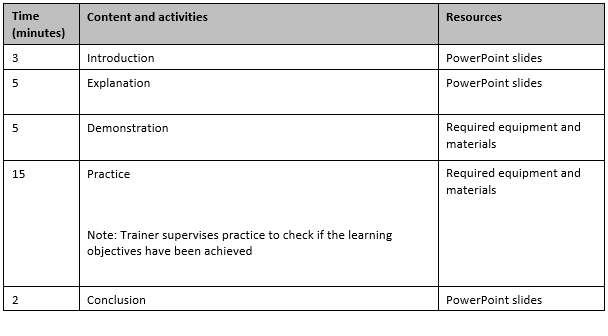
The following is an example that shows how time can be used for a knowledge training session.

Timeframe for a skill or task-based training session

The following is an example that shows how time can be used for a skill or task-based training session.

In conclusion

The TAE40122 Student is likely to be required to deliver many 30-minute training sessions. Very little learning can be achieved in 30 minutes. Therefore, do not try to cover too much content.

The development of a training session plan and training materials can be very time-consuming. Are you wanting to learn effective and efficient ways to prepare your training sessions?

My tutoring services can hep you learn:

  • How to write learning objectives
  • How to develop a task breakdown
  • How to identify the knowledge and skills required to perform a task
  • How to determine key content points to be covered during the training session
  • How to develop a training session plan
  • How to find, develop or customise learning resources
  • How to develop PowerPoint slides and handouts
  • How to use artificial intelligence (AI) to reduce the time to develop the training.

Do you need help with your TAE studies?

Are you a doing the TAE40122 Certificate IV in Training and Assessment, and are you struggling with your studies? Do you want help with your TAE studies?

Ring Alan Maguire on 0493 065 396 to discuss.

Contact now!

logo otws

Training trainers since 1986

A short history of online learning

This is a short history of online learning. It may be incomplete but I have tried to capture the big historical events. Also, I have written this article with a connection to Australia and the Australian VET system.

Distance learning

Before online learning we had distance learning. Distance learning was traditionally conducted by correspondence where the student corresponded with the school, university, or learning institution via mail. Wikipedia tells me that one of the earliest attempts to provide a correspondence course was in 1728. [1]

In the 1930s, two hundred years later, there was a rapid spread of radio. This led to the wide-spread use of radio for distance education in the USA.

In Australia, the School of the Air started broadcasting lessons to school children in 1951.

The Australian Broadcasting Commission (ABC) started using television to broadcast education programs to schools in the 1960s.

The use of broadcast television for adult education has been limited.

During the 1980s audio cassettes and video cassettes were being widely used for educational purposes. This included personal development, motivational and business training. Some business training topics covered by audio and video cassettes included selling skills, customer service skills, meeting skills, and presentation skills.

Computer-based training

I was working in an office in 1986 when the first desktop computer arrived. It was a ‘share computer’ for everyone in the office to use. There was about 25 people working in the office at that time. A second computer arrived soon after the first, but it was for the exclusive use of the office administrator.

Personal computers started to take off in the mid 1980s and early 1990s. Computers were becoming part of the office and more people were buying computers for their home. At this time I was working for Telecom Australia (now known as Telstra Corporation), and we were beginning to develop computer-based training. I bought my first computer in 1986. It had MultiMate word processing software, a 5-¼ inch floppy disk drive, monochrome monitor, and a dot matrix printer.

Data storage

The early personal computers had limited data storage capability. Over the years the internal storage capacity increased. And the ability to install new software increased as we went from big floppy disks, to smaller floppy disks, to CD-ROMs. Later, USB memory sticks made it even easier and quicker for the installation of new software and transfer of files.

During the 1990s, everyone in the office I was working at was using a computer. And the new, big thing was email. Email and word processing revolutionalise the way we worked. But internet access was limited to a few ‘trusted people’ because it was thought that productivity would be lowered if everyone had it.

The installation of games onto home computers, including educational games for children, was happening during the late 1990s and the early 2000s. Using computers for the purpose of learning was beginning to gain general acceptance.

Internet

The internet changed everything. I can still remember connecting to the internet via dial-up modem. Connecting to the internet was slow and the speed of the internet was slow. The next big thing was fast broadband internet with the capability to support voice and video.

The widespread use of computers and the internet have made distance learning easier and faster, and today virtual schools and virtual universities deliver full curricula online.

Faster, smaller and cheaper computers and the development of applications

In recent years, computers have got faster, smaller and cheaper. And access to strong, stable and fast internet connections are reasonably priced. I understand that some Australians in remote and rural areas may not have the same connectivity or they still have internet issues. And, it is said that, some Australians may struggle to afford access to the internet. However, the vast majority of people in Australia today have at least one device connected to the internet.

Ready access to computer hardware and software has removed many of the technology barriers to accessing online learning. Today’s personal computers have access to a large number of applications, such as email and word processing. Learning management systems (LMS) can be easily downloaded and installed. And many personal computers come with a camera and microphone that enable video conferencing.

Smart phone

By the mid-2010s, the smartphone had become common. These days, it is rare for someone to have a dumb-phone.

Smart phones are ubiquitous. Many people have got use to using technology in their everyday life. People use their smart phone for communicating with others by voice, by text, by email, by video. And people use their smart phone for social media, banking, shopping, searching the internet, etc.

Generally, people have overcome many of their fears and concerns about using technology. Therefore, using technology for learning has been legitimised.

COVID-19

In 2020, COVID-19 arrived in Australia. Work went online, school went online, university went online, so much of our lives went online for many people. And during this time a significant number of RTOs shifted training delivery online in response to the COVID-19 pandemic. Getting learning resources to learners and using video conferencing for training became common. For many trainers, this was their first experience at facilitating online learning. This crisis became an opportunity for many trainers to develop their capability to deliver online learning.

Many trainers will no longer be resistant to changing from ‘traditional training methods’ to using online learning. However, many things in vocational education and training can not be delivered or assessed using online methods. The future will be a blended approach, combining traditional and online methods.

In conclusion

There are still some real barriers to using online learning. For example:

  • Some people have no or limited experience using computers. This continues to be a barrier for them to participate in online learning.
  • Some developers of online learning lack the ability to design and develop user-friendly and effective online learning programs and resources. This frustrates learners and creates unnecessary barriers to learning, regardless of the learner’s technology skills.

The TAE40122 Certificate IV in Training and Assessment qualification has recognised that many trainers and assessors will need the capability to deliver online learning and conduct assessments using online methods. Two elective units of competency that are likely to be included in the TAE40122 Certificate IV in Training and Assessment qualification are:

  • TAEDEL405 Plan, organise and facilitate online learning
  • TAEASS404 Assess competence in an online environment

Reference

[1] https://en.wikipedia.org/wiki/Distance_education accessed 23 October 2023

Do you need help with your TAE studies?

Are you a doing the TAE40122 Certificate IV in Training and Assessment, and are you struggling with your studies? Do you want help with your TAE studies?

Ring Alan Maguire on 0493 065 396 to discuss.

Contact now!

logo otws

Training trainers since 1986